To ensure that the latest source data is loaded into datasets, schedule data syncs to
pull data into CRM Analytics before the corresponding recipes. You schedule data sync for each
connection, where all objects under the connection sync at the specified time, and not
individual objects. To sync objects from the same data source on different intervals, create
multiple connections to the data source, and set a unique schedule for each connection.
Required Editions
Available in Salesforce Classic and Lightning Experience.
Available with CRM Analytics, which is available for an extra cost in
Enterprise, Performance, and Unlimited Editions. Also available in
Developer Edition.
User Permissions Needed
To schedule sync:
Edit CRM Analytics Dataflows
Note Data sync jobs don’t count towards your daily
recipe run limit. To ensure that sync completes before the recipe starts, use event-based
scheduling for the recipe.
In data manager, click the Connections tab to display the list of
objects enabled for sync grouped by connection.
Click to the right
of the connection that you want to schedule, and select Schedule.
The scheduler appears.
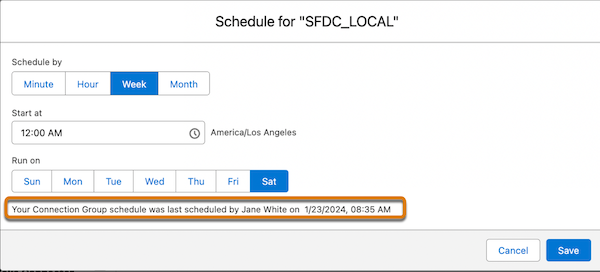
Select the time to run the recipe. You can schedule it to run by minute, hour, week, or
month. CRM Analytics runs the data sync according to the time zone of the
user who set the schedule.
If you schedule the recipe to run by minute or hour, select Stop schedule at
a specific time to stop the recipe from running after a certain time. For
example, to restrict runs to office hours, set a job to start at 8:00 AM, run every hour,
and stop at 6:00 PM.
Note If you don’t select a time, the schedule
stops adding data sync runs to the queue at 11:59 PM.
Click Save. Schedule information for the connection displays in
the connection header.
Set the sync type for each object in the connection.
Click to the
right of the object that you want to set the sync type for, and select Edit
Connection Mode.
Choose from the following:
Incremental Sync updates only rows that changed since the
last sync. It’s the fastest option.
Periodic Full Sync updates rows incrementally and
periodically overwrites all rows with records in the Salesforce object.
Full Sync updates all rows with records in the Salesforce object.
Note
The API Type for the connector must be BULKV2 for
incremental and periodic full sync.
Click Save.
Note When reviewing the results of an incremental sync job
in Job Manager, the Rows in and Rows out values represent the total number of rows across
all syncs.
Schedules for data sync, dataflow, and recipes are removed 30
days after the last save in Sandbox and Developer edition orgs, and 10 days after the last
save in Trial orgs. Users subscribed to notifications receive an email when a schedule is
removed. Set the schedule again at any time.
The scheduler provides details on who created or modified the schedule and when the
schedule was created or last modified.
When you deactivate a user who scheduled a data sync, the schedule is deleted and the data
sync is unscheduled.
Tip If you have a CRM Analytics Plus license,
you can set the schedule to run every 5, 15, 20, or 30 minutes. This feature isn’t
available in sandbox orgs.
We use three kinds of cookies on our websites: required, functional, and advertising. You can choose whether functional and advertising cookies apply. Click on the different cookie categories to find out more about each category and to change the default settings.
Privacy Statement
Required Cookies
Always Active
Required cookies are necessary for basic website functionality. Some examples include: session cookies needed to transmit the website, authentication cookies, and security cookies.
Functional Cookies
Functional cookies enhance functions, performance, and services on the website. Some examples include: cookies used to analyze site traffic, cookies used for market research, and cookies used to display advertising that is not directed to a particular individual.
Advertising Cookies
Advertising cookies track activity across websites in order to understand a viewer’s interests, and direct them specific marketing. Some examples include: cookies used for remarketing, or interest-based advertising.