You are here:
Show Subtotals on First-Level Groups in Lightning Tables
Lightning tables are a powerful tool for summarizing data on a dashboard. Second-level groups automatically show subtotals for each measure column. Show subtotals to add subtotals for each measure column to first-level groups.
Required Editions
| Available in: Lightning Experience |
| Available in: Essentials, Professional, Enterprise, Performance, Unlimited, and Developer Editions |
| User Permissions Needed | |
|---|---|
| To create dashboards: | Run Reports AND Create and Customize Dashboards |
| To edit and delete dashboards that you created: | Run Reports AND Create and Customize Dashboards |
| To edit and delete dashboards that you created in public folders: | Edit My Dashboards |
| To edit and delete dashboards that you didn’t create in public folders: | Manage Dashboards in Public Folders |
| To create, edit, and delete dynamic dashboards: | Manage Dynamic Dashboards |
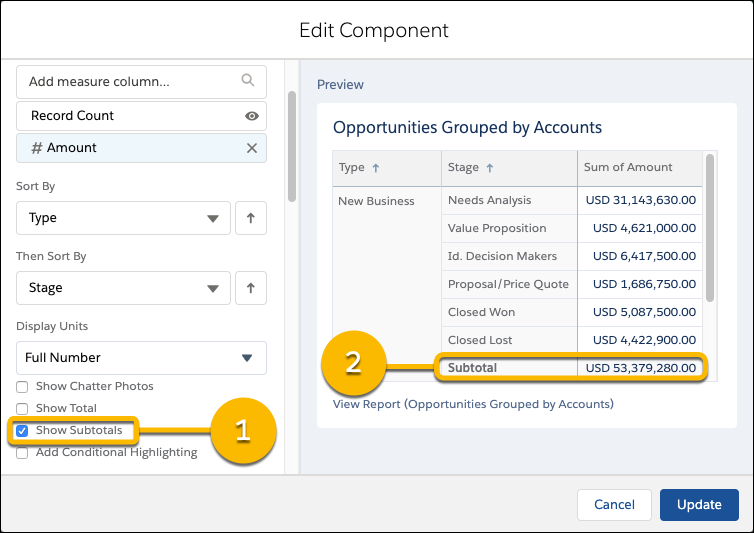
To show subtotals on a Lightning table, edit the widget.
- If necessary, group data and add measure columns. To show subtotals, the table requires at least two groups.
-
Select Show Subtotals (1).
 Note Subtotals always match the summary type of their associated metric column. If the metric column is sum of amount, the subtotal is a sum (2).
 - Click Update.
- Click Save.
The table now features subtotals for the first-level group.
Depending on how summary formulas are applied to source report data, you can show subtotals for summary formulas that appear on Lightning table as metric columns. Here are the conditions.
- If a summary formula is applied at all levels, then subtotals can be applied.
- If a summary formula is applied to a specific group, then subtotals can be applied if
the table also has the specific group. If the specific group is a second-level group,
then the table must match both the source report's first-level and second-level groups.
Because Lightning tables support up to two groups, summary formulas applied to third and
fourth-level groups can’t be subtotaled.
For example, say that a source report is grouped first by Type and then by Stage. It has a summary formula applied to Stage. The summary formula is able to be subtotaled only on Lightning tables grouped first by Type and then by Stage. If you reverse the group order in the Lightning table - grouping first by Stage and then by Type, the subtotal is "Incalculable" because the group order prevents the summary formula from running.
- If a summary formula is applied only to the grand total, then subtotals can’t be applied.
