Loading
Feature Degradation | Agentforce Voice Read More
Analyze Your Data
Table of Contents
Select Filters

          No results
          No results
          Here are some search tips

          Check the spelling of your keywords.
          Use more general search terms.
          Select fewer filters to broaden your search.

          Search all of Salesforce Help
          Report on Chatter Top 100 Feed Item Views with Interaction Count Report

          Report on Chatter Top 100 Feed Item Views with Interaction Count Report

          Get a report on the top 100 feed item views in your organization or community with the primary object Interaction Count Report. Knowing the posts that people are looking at most is a great way to get insight into current Chatter trends. Actions counted as views include liking, commenting, and viewing a feed item detail. View counts aren’t unique. For example, a user can add three comments to a post, and that is counted as three views. After you set up the report, it’s run weekly.
          Required Editions

          Available in: Salesforce Classic and Lightning Experience
          Available in: Essentials, Group, Professional, Enterprise, Performance, Unlimited, and Developer Editions
          User Permissions Needed
          To create or update custom report types: “Manage Custom Report Types”
          To create a public reports folder: “Manage Public Reports”

          Custom report types are the only way to make reports about the 100 top feed item views. Salesforce doesn’t provide sample top view activity reports or a standard report folder.

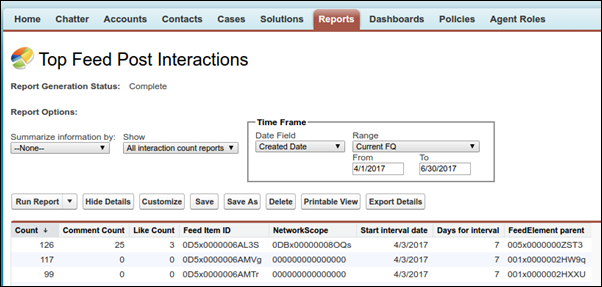
          Sample interaction count report in Salesforce Classic

          Note
          Note Reports on feed activities don’t include information about system-generated posts, such as feed tracked changes.

          Primary Object for Interaction Count Report

          When you create a custom report type, select Interaction Count Reports for the Primary Object.

          Available Interaction Count Report Fields

          The following table lists the available fields for Interaction Count reports.

          Field Description
          Comment Count The number of comments on a post
          Count The number of views on a post
          Days for interval How often the report is run—currently 7, for every seven days (fixed value)
          FeedElement parent The ID of the group, profile, record, or other entity that is the parent to the feed where the content is posted
          Feed Item ID The ID of the post
          Like Count The number of likes on the post
          NetworkScope

          The scope of the network where this feed item is available.

          This field always has a value. For the default network, it’s 00000000000000. If it’s posted in a community, it has the ID of the community (also known as the NetworkId). If the value contains an "I," the post is parented by a record, like an account, an opportunity, or some other record type.

          Start interval Date The date that marks the start of the seven-day run interval
           
          Loading
          Salesforce Help | Article
