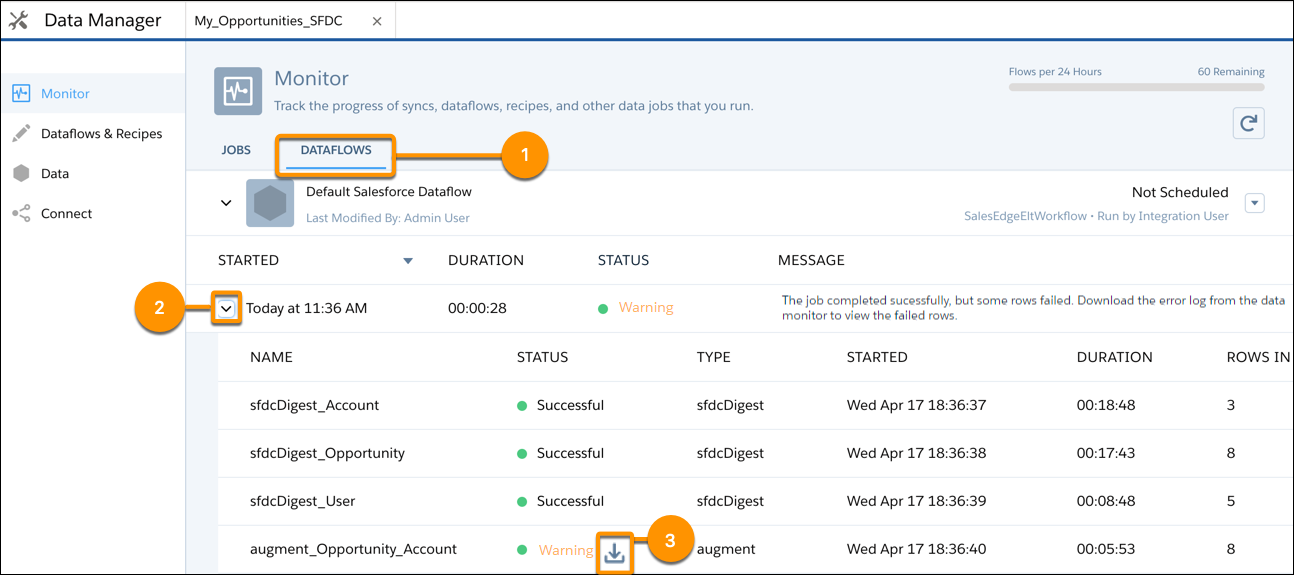
In Data Manager, the Monitor's Dataflows tab shows status, start time, and duration of
the last 10 dataflow jobs. It retains the last 7 days of job history. You can view error
messages about each job, view the run-time details about every transformation that is processed,
monitor the number of jobs remaining from your org’s 24-hour limit, and download error
logs.
Required Editions
Available in Salesforce Classic and Lightning Experience.
Available with CRM Analytics, which is available for an extra cost in
Enterprise, Performance, and Unlimited Editions. Also available in
Developer Edition.
User Permissions
Needed
To access the monitor:
Edit CRM Analytics Dataflows, Upload External Data to CRM Analytics, or Manage
CRM Analytics
To download an error log:
Edit CRM Analytics Dataflows and View All Data
Note The View All Data
permission is required to download an error log run by another user. The user who
ran the dataflow or uploaded a CSV is able to download the error log without the
View All Data permission.
On the Monitor tab of Data Manager, click Dataflows (1).
Note Duration is calculated as the sum of the job queue time and job run time.
Monitor the flow indicator to see how many dataflow and recipe jobs can be run in a
rolling 24-hour period.
Note Runs less than 2 minutes in duration, and data sync, don’t count toward this limit.
To request a higher 24-hour limit, contact Salesforce Support.
Click to see the latest status of a job.
Each job can have one of these statuses.
Status
Description
Running
The job is running.
Failed
The job failed.
Successful
The job completed successfully.
Warning
The job completed successfully, but some rows failed.
If the dataflow job fails, expand the job node (2) to view the run-time details for
every transformation that was processed.
If an error log is available for a node, click the download log button (3) to download
a CSV file containing the failed rows.
Note Error logs display the data from rows that have failed to load. To maintain data
security and prevent unauthorized access to this data, only the dataflow owner or users
with the View All Data permission can download an error log.
If there’s a problem with the dataflow logic, edit the dataflow and then run it
again.
We use three kinds of cookies on our websites: required, functional, and advertising. You can choose whether functional and advertising cookies apply. Click on the different cookie categories to find out more about each category and to change the default settings.
Privacy Statement
Required Cookies
Always Active
Required cookies are necessary for basic website functionality. Some examples include: session cookies needed to transmit the website, authentication cookies, and security cookies.
Functional Cookies
Functional cookies enhance functions, performance, and services on the website. Some examples include: cookies used to analyze site traffic, cookies used for market research, and cookies used to display advertising that is not directed to a particular individual.
Advertising Cookies
Advertising cookies track activity across websites in order to understand a viewer’s interests, and direct them specific marketing. Some examples include: cookies used for remarketing, or interest-based advertising.