You are here:
Set Up Debug Logging
To activate debug logging for users, Apex classes, and Apex triggers, configure trace flags and debug levels in the Developer Console or in Setup. Each trace flag includes a debug level, start time, end time, and log type. The trace flag’s log type specifies the entity you’re tracing.
Required Editions
| User Permissions Needed | |
|---|---|
| To view, retain, and delete debug logs: | View All Data |
To configure trace flags and debug levels from the Developer Console, click Debug | Change Log Levels. Then complete these actions.
- To create a trace flag, click Add.
- To edit an existing trace flag’s duration, double-click its start or end time.
- To change a trace flag’s debug level, click Add/Change in the Debug Level Action column. You can then edit your existing debug levels, create or delete a debug level, and assign a debug level to your trace flag. Deleting a debug level deletes all trace flags that use it.
Create Trace Flags in Setup
- From Setup, use the Quick Find box to find and select Debug Logs.
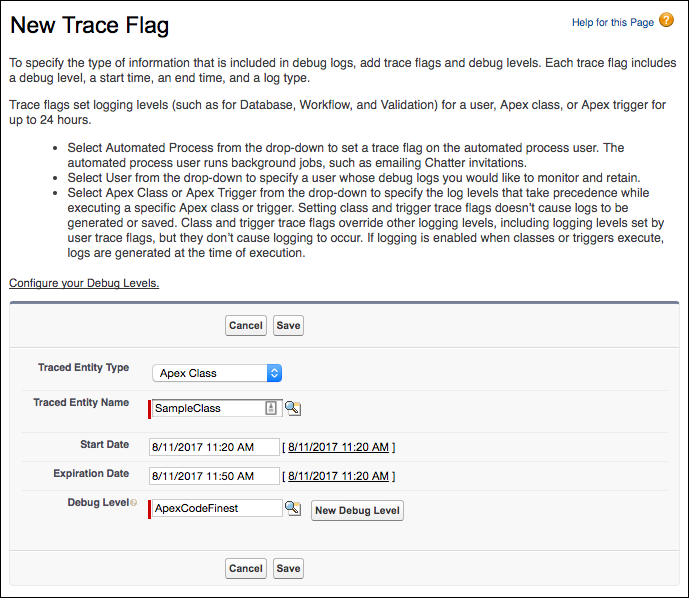
- Click New.
-
Select the entity to trace, the time period during which you want to
collect logs, and a debug level.
A debug level is a set of log levels for debug log categories: Database, Workflow, Validation, and so on. You can reuse debug levels across your trace flags.
View, Edit, or Delete Trace Flags in Setup
-
Navigate to the appropriate Setup page.
- For user-based trace flags, use the Quick Find box to find and select Debug Logs.
- For class-based trace flags, use the Quick Find box to find and select Apex Classes. Click the name of a class, then click Trace Flags.
- For trigger-based trace flags, use the Quick Find box to find and select Apex Triggers. Click the name of a trigger, then click Trace Flags.
-
From the Setup page, click an option in the Action column.
- To delete a trace flag, click Delete.
- To modify a trace flag, click Edit.
- To modify a trace flag’s debug level, click Filters.
- To create a debug level, click Edit, and then click New Debug Level.
Configure Debug Levels in Setup

Important The Debug Levels page is only available in Salesforce Classic. As an
alternative, you can modify debug levels from the Developer Console or query the DebugLevel object using Tooling API.
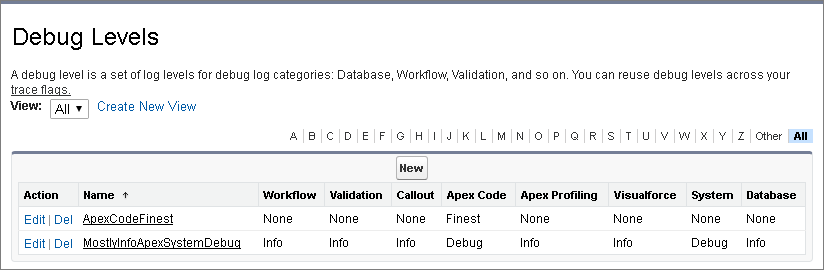
- To manage your debug levels From Setup, use the Quick Find box to find and select Debug Levels.
-
To edit or delete a debug level, click an option in the Action column. To create a
debug level, click New.
Did this article solve your issue?
Let us know so we can improve!
