
You are here:
Debug Log Filtering for Apex Classes and Apex Triggers
Debug log filtering provides a mechanism for fine-tuning the log verbosity at the trigger and class level.
Required Editions
| Available in: Salesforce Classic (not available in all orgs) and Lightning Experience |
| Available in: Enterprise, Performance, Unlimited, Developer, and Database.com Editions |
To debug complex Apex logic, you can set Apex class and trigger trace flags, also known as
debug log filters. For example, you can raise the log verbosity for a given class while
turning off logging for other classes or triggers. These trace flags have the debug log type
CLASS_TRACING and override the debug log levels of the
USER_DEBUG and DEVELOPER_LOG trace flags.
When you override the debug log levels for a class or trigger, these debug log levels also apply to the class methods that your class or trigger calls and the triggers that get executed as a result. All class methods and triggers in the execution path inherit the debug log settings from their caller, unless they have their own trace flags that override these settings.

USER_DEBUG or the
DEVELOPER_LOG trace flag is active for the user running the code.For concrete instructions about how to configure debug log filters, see Set Up Apex Class and Trigger Trace Flags.
Example of Fine-Tuned Debug Logging
Let’s explore how Apex class and trigger trace flags override the debug log levels of other trace flags.
First, define these example classes and triggers: Class1,
Class2, Class3, UtilityClass,
Trigger1, and
Trigger2.
public with sharing class Class1 {
    public static void class1Method() {
        System.debug('Class1.class1Method() was called');
        Class3.class3Method();
    }
}
public with sharing class Class2 {
public static void class2Method() {
// Code that invokes Trigger2
System.debug('Class2.class2Method() was called');
Contact newContact = new Contact(FirstName='FirstName', LastName='LastName');
insert newContact;
}
}public with sharing class Class3 {
public static void class3Method() {
System.debug('Class3.class3Method() was called');
UtilityClass.utilityMethod();
}
}public with sharing class UtilityClass {
public static void utilityMethod() {
System.debug('UtilityClass.utilityMethod() was called');
}
}trigger Trigger1 on Account (before insert) {
System.debug('Trigger1 invoked');
Class1.class1Method();
Class2.class2Method();
}trigger Trigger2 on Contact (before insert) {
System.debug('Trigger2 invoked');
}Here’s a summary of how this code runs.
Trigger1fires before a new account is inserted.Trigger1callsClass1.class1Method()andClass2.class2Method().- The
Class1.class1Method()callsClass3.class3Method(), which in turn calls theUtilityClass.utilityMethod()method. - The
Class2.class2Method()inserts a new contact, which invokesTrigger2
Now, let’s first examine a debug log for this code without any class or trigger trace
flag overrides. To invoke Trigger1, in an Anonymous Apex code block, create
and insert a new
account.
Account newAccount = new Account(Name='Test Account 1234');
insert newAccount;
If you execute an Anonymous Apex code block in the
Developer Console, the DEVELOPER_LOG trace flag is active, and the
SFDC_DevConsole debug log level profile is applied by default. The
SFDC_DevConsole debug log level profile has these debug log levels
set.
- Apex Code—Finest
- Apex Profiling—Info
- Callouts—Info
- Data Access—Info
- Database—Info
- NBA—Info
- System—Debug
- Validation—Info
- Visualforce—Finer
- Wave—Info
- Workflow—Info
Here’s a snippet of the debug log in the Developer Console. The Debug Only filter is
applied, so only USER_DEBUG events are
shown.
13:40:23.49 (477255762)|USER_DEBUG|[2]|DEBUG|Trigger1 invoked
13:40:23.49 (490847713)|USER_DEBUG|[3]|DEBUG|Class1.class1Method() was called
13:40:23.49 (501554543)|USER_DEBUG|[3]|DEBUG|Class3.class3Method() was called
13:40:23.49 (513291355)|USER_DEBUG|[3]|DEBUG|UtilityClass.utilityMethod() was called
13:40:23.49 (527535070)|USER_DEBUG|[4]|DEBUG|Class2.class2Method() was called
13:40:23.49 (570470421)|USER_DEBUG|[2]|DEBUG|Trigger2 invoked
Because the
Apex Code debug log level is FINEST, all System.debug()
statements invoked from Apex classes or triggers are written to the debug log.
Now, to demonstrate class and trigger trace flag overrides, let’s change the debug log levels according to this scenario.
- Suppose
Class1is causing some issues that you want to examine closely. You create aClass1trace flag that raises the debug log levels ofClass1to the finest granularity. - Because
Class1callsClass3,Class3inherits the granular log filters ofClass1.Class3callsUtilityClass, but suppose you’ve already testedUtilityClassand confirmed that it works properly. Therefore, you create aUtilityClasstrace flag where all the log filters are turned off. - Similarly,
Class2isn’t in the code path that causes a problem, so you create aClass2trace flag where logging is minimized to log only errors for the Apex Code category. BecauseClass2invokesTrigger2,Trigger2inherits the log level settings ofClass2.
This diagram illustrates the new debug log levels in this scenario.
Fine-tuning debug logging for classes and triggers
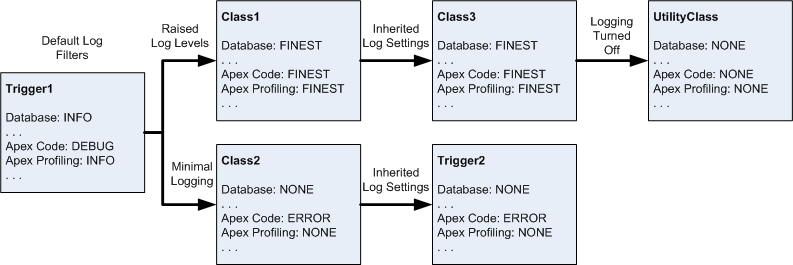

In the diagram, Trigger1 shows the default log levels without any active trace flags.
When working in the Developer Console, the DEVELOPER_LOG trace flag is
active by default, so the debug logs in this example reflect the
SFDC_DevConsole debug log level profile instead.
Here’s how the Developer Console appears after you create debug log level profiles and assign them to class or trigger trace flags.
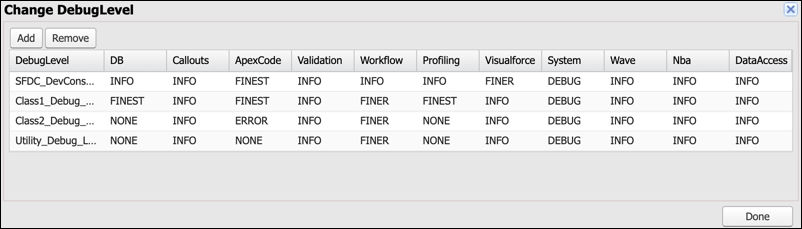
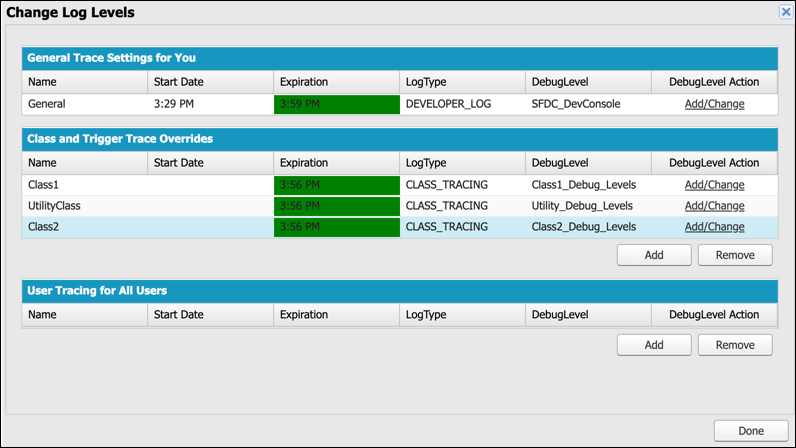
Now, execute the Anonymous Apex code block again.
If you open the debug log and filter by Debug Only, you can see that the class and trigger trace flag overrides are applied.
15:29:49.42 (65879589)|USER_DEBUG|[2]|DEBUG|Trigger1 invoked
15:29:49.42 (68318473)|USER_DEBUG|[3]|DEBUG|Class1.class1Method() was called
15:29:49.42 (69855182)|USER_DEBUG|[3]|DEBUG|Class3.class3Method() was called
Trigger1
retains the default SFDC_DevConsole debug log level profile because it
doesn’t have an active trigger trace flag override. Therefore, its
System.debug() message still appears in the debug log.
The debug
log level of Class1 and Class3 for the Apex Code category
is set to FINEST, so the System.debug() statements in the
called methods of these classes are shown.
The debug log level of
Class2 and Trigger2 for the Apex Code category is set to
ERROR, which means that only errors and exceptions are logged. If the
System.debug()
LoggingLevel enum is set to
ERROR, then System.debug() messages in these classes are
also logged. However, in this case, the System.debug() logging level
remains at the default DEBUG level. Therefore, the
System.debug() method in the called methods of these classes aren’t
logged.
Finally, the debug log level of UtilityClass for the Apex
Code category is set to NONE, which means that no debug logs are generated
when methods from this class are called.
