
You are here:
Publisher Actions and Layouts
Actions add functionality to the Chatter Publisher in Salesforce Classic. Actions let your users do more in Salesforce across all devices.
Required Editions
| Available in: Essentials, Group, Professional, Enterprise, Performance, Unlimited, Contact Manager, Developer, and Database.com Editions |
Actions are all about productivity. Actions let users accomplish things with fewer clicks, fewer fields, and ultimately less time spent. Actions are especially useful in the Salesforce app, because it makes it easy to create and edit records with a simple, mobile-optimized interface. By default, the Chatter publisher includes the standard actions Post, File, Link, Poll, and Question.
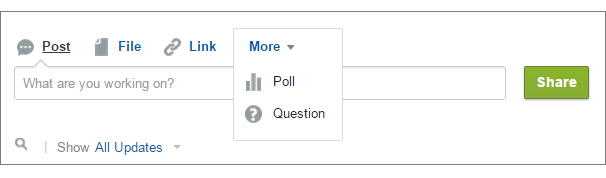
Actions appear in the action bar, its associated action menu, and as list-item actions.
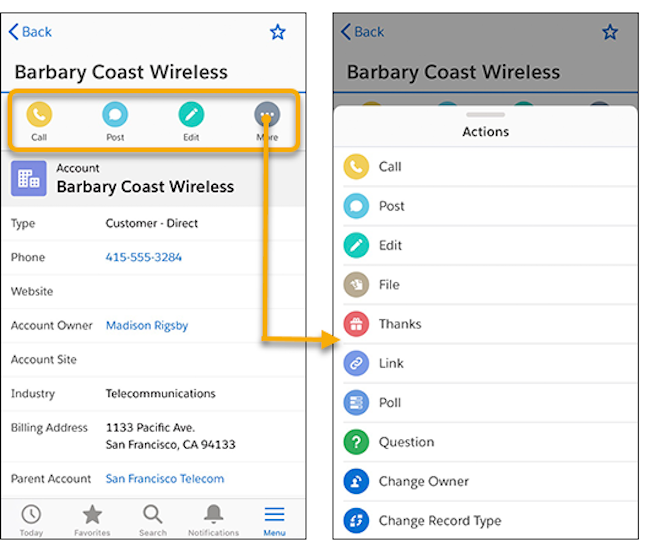
There are several categories of actions, like standard actions, nonstandard actions, default actions, mobile smart actions, custom actions, and productivity actions.
- Standard actions: Standard actions are actions that are automatically added to the publisher when Chatter is enabled—such as Post, File, Link, and Poll. You can customize the order in which these actions appear in the publisher, but you can’t edit their properties.
- Nonstandard actions: Nonstandard actions are actions that you create and customize yourself.
- Default actions: Default actions are predefined actions provided by Salesforce. To make them available to your users, add them to the Chatter publisher layout.
- Mobile smart actions: Mobile smart actions are a set of preconfigured actions, just like default actions. Mobile smart actions let users create records directly in the feed.
- Custom actions: Custom actions are Visualforce pages or canvas apps with functionality that you define. For example, you can create a custom action so that users can write comments that are longer than 5000 characters.
- Productivity actions: Salesforce predefines productivity actions. They are attached to account, contact, event, lead, user, and user profile objects. You can’t edit or delete productivity actions.
To customize the publisher with actions or change the order of actions, first enable actions in the publisher. Enable actions in Setup on the Chatter Settings page.
