You are here:
Feed Tracking
Feed tracking detects changes to tracked record fields and posts them as updates in the What I Follow feed. Users who follow a record see those updates in their view of What I Follow, with one exception: Updates that users make themselves aren’t posted to What I Follow. Users can see those updates in their profile feeds.
Required Editions
| Available in: both Salesforce Classic and Lightning Experience |
Available in: Essentials, Group, Professional, Enterprise, Performance, Unlimited, Contact Manager, Developer, and Database.com Editions The Account, Case, Contact, Lead, Opportunity, and User objects aren’t available in Database.com. Salesforce Connect external objects are available in Developer Edition and, for an extra cost, in Enterprise, Performance, and Unlimited Editions. |
| User Permissions Needed | |
|---|---|
| To select the fields to track: | “Customize Application” |
| To view the field tracking setup page: | “View Setup and Configuration” |
Feed tracking is available for record fields. You can configure feed tracking for users, Chatter groups, topics, custom objects, external objects, and the following standard objects: accounts, knowledge articles, assets, campaigns, cases, contacts, contracts, dashboards, events, leads, opportunities, products, reports, solutions, and tasks.

Sharing rules and field-level security determine the visibility of record changes in Chatter feeds. To see changes to a record in their feeds, users must have access to the record.
These objects and fields are tracked by default.
- Account: Account Name, Account Owner
- Case: Case Owner, Priority, Status
- Chatter Group: Allow Customers, Description, Group Access, Information Body, Information Title, Name, Owner Name
- Contact: Account Name, Contact Owner, Name
- Lead: Lead Owner, Lead Status, Name
- Opportunity: Amount, Close Date, Opportunity Name, Opportunity Owner, Stage
- Topic: Description
- User: About Me, Address, Email, Manager, Phone, Title
Salesforce deletes up to 20,000 tracked feed updates per week, as long as the updates are older than 45 days and have no likes or comments. Tracked feed updates for Case records aren’t removed. Updates to Case records are retained for audit and compliance purposes. If auditing is enabled for a tracked field, the tracking field audit history is still available.
Reports on feed activities don’t include information about system-generated posts.
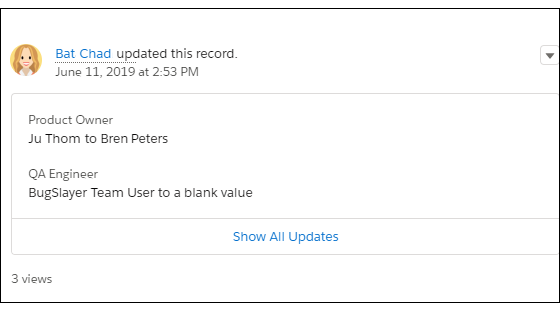
Tracked changes in a feed can be bundled together for quick and easy reading. This image shows two change notifications bundled together. On this record, Bat Chad changed the values for the Product Owner and QA Engineer fields.
- Customize Chatter Feed Tracking
When you enable feed tracking for objects and records, users see updates for the objects and records that they follow in their What I Follow feed. Many objects and fields are tracked by default, but you can further customize feed tracking to include or exclude specific objects and fields. - Enable Feed Updates for Related Records
Show feed updates on a record’s detail page whenever someone creates related records. Feed updates for related records let you track the creation of related records from the parent record. - Feed Tracking Limitations
Here are some limitations on tracking objects, fields, and topics. - Feed Tracked Change Bundles
We save you time and space in your feeds by bundling multiple feed tracked change updates into a quick-reference list. Bundles are collections of feed tracked change items that you see in feeds. You can see bundles in your browser. In Salesforce for Android and Salesforce for iOS, bundles appear only in record feeds.
