You are here:
Control Chatter Access Through Permission Sets
Manage Chatter access by modifying existing permission sets or setting up new ones.
Required Editions
| Available in: both Salesforce Classic and Lightning Experience |
| Available in: Enterprise, Performance, and Unlimited Editions |
| User Permissions Needed | |
|---|---|
| To enable Chatter: | Customize Application |
When you enable or disable Chatter through permission sets, consider that:
- When you enable Chatter in a permission set, the permission set takes precedence over user profile settings. All users with a Chatter-enabled permission set have access to Chatter, even if Chatter isn't enabled in their user profile.
- When you disable Chatter in a permission set, the permission set doesn't take precedence over user profile settings. All users with a Chatter-enabled user profile have access to Chatter, even if Chatter is disabled in their permission set. To prevent that person from accessing Chatter, disable Chatter in both the person's user profile and permission set.
- When Chatter profile-based rollout is enabled for an org, Chatter is automatically enabled when some user-level permissions are already enabled. And some Chatter settings are disabled. For more information, see Profile-Based Rollout Considerations.
Verify that existing permission sets include the correct and required Chatter permissions for the desired subset of users.
- In Setup, navigate to Permission Sets.
-
For each existing user-level permission set:
- In the System section, click System Permissions.
-
Click Edit, and select
Enable Chatter. The Enable
Chatter permission is available in a permission
set only after Chatter profile-based rollout is
enabled for your org.
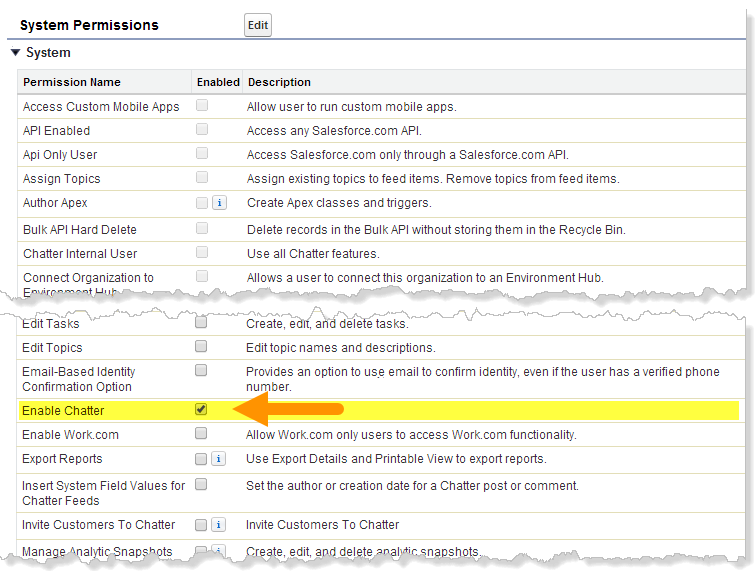
- Save your changes.
-
If applicable, create permission sets with the desired
permissions and assign them to users. By default, all
permissions in a new permission set are disabled. Enable the
appropriate permissions in the new permission set to give
users access to Chatter plus extra levels of management
authority.
- Create and Own New Chatter Groups (ChatterOwnGroups)—Users with this permission can create groups in Chatter.
- Create and Share Content Deliveries for Chatter Files (ChatterFileLink)—Users with this permission can use files with Chatter, like uploading, attaching, and sharing, and create public links.
- Invite Customers To Chatter (ChatterInviteExternalUsers)—Users with this permission can invite users who don’t have a Salesforce license to Chatter.
- Manage Chatter Messages and Direct Messages (ManageChatterMessages)—Users with this permission have management access to Chatter Messages and Direct Messages (Experience Builder sites).
- Moderate Chatter (ModerateChatter)—Users with this permission can moderate Chatter feeds.
- Moderate Chatter Feeds (ModerateNetworkFeeds)—Users with this permission can moderate feeds in sites.
- Use Case Feed (ViewCaseInteraction)—Users with this permission can access Case feeds.
- View All Data (ViewAllData)—Users with this permission can view all data, regardless of their membership status in a feed or ownership of a record.

Note Selecting the Enable Chatter permission in a person's permission set
doesn't automatically turn on Chatter for that person. People can't
use Chatter until you turn on Chatter for your
organization.
Did this article solve your issue?
Let us know so we can improve!
