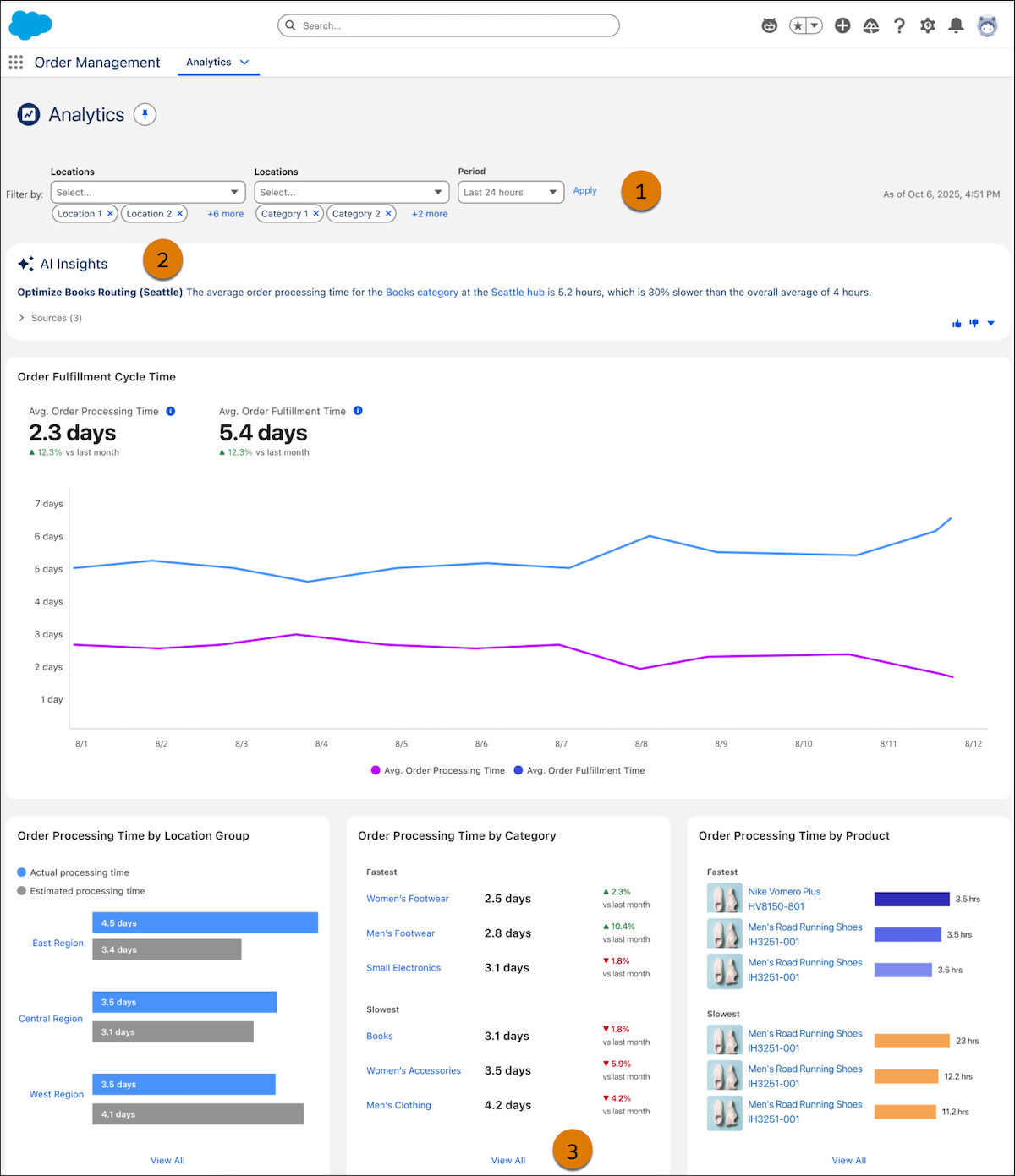
The Order Management Analytics dashboard provides key metrics across the order
fulfillment lifecycle. Use AI-generated insights to enhance decision making for your order
management operations with real-time, unified data. Create data streams to bring Order
Management data into Data 360. Then connect your Data 360 license to Order Management to create
calculated insights for order fulfillment performance.
The Order Management Analytics dashboard and calculated insights are available if you have
Data 360 provisioned with an OM Growth license. Data 360 and Einstein Generative AI power
calculated insights.
To get AI-powered calculated insights, set up a data stream between Order Management and Data
360 by using convenient data kits. See Share Data Using Order Management File-Based Data
Kits. Then you can turn on the connection between Data 360 and Order Management to
access the dashboard and calculated insights. See Enable Order Management
Analytics. To refresh the data on your dashboard, visit calculated insights in Data
360 and republish.
On the dashboard, use filters (1) to update visualizations based on specific locations and
time periods. The filters don’t affect the calculated insights. View AI-powered calculated
insights (2) and pinpoint locations that require operational review to enhance efficiency and
order fulfillment performance. View the three fastest and slowest order processing times for
location or category. Open an expanded view (3) to see all times across each metric.
Important If daily insights fail to generate, the system defaults to the most
recent generated insight. This behavior can lead to discrepancies between AI Insights and the
dashboard data.
Enable Order Management Analytics Connect your org’s Data 360 license to Order Management to access the Analytics dashboard and create and view calculated insights.
Did this article solve your issue?
Let us know so we can improve!
Loading
Salesforce Help | Article
Cookie Consent Manager
General Information
Required Cookies
Functional Cookies
Advertising Cookies
General Information
We use three kinds of cookies on our websites: required, functional, and advertising. You can choose whether functional and advertising cookies apply. Click on the different cookie categories to find out more about each category and to change the default settings.
Privacy Statement
Required Cookies
Always Active
Required cookies are necessary for basic website functionality. Some examples include: session cookies needed to transmit the website, authentication cookies, and security cookies.
Functional Cookies
Functional cookies enhance functions, performance, and services on the website. Some examples include: cookies used to analyze site traffic, cookies used for market research, and cookies used to display advertising that is not directed to a particular individual.
Advertising Cookies
Advertising cookies track activity across websites in order to understand a viewer’s interests, and direct them specific marketing. Some examples include: cookies used for remarketing, or interest-based advertising.