
You are here:
Considerations for Using Joins
Unlike a lookup, a join creates a separate record for each match in the output data when multiple rows match. Before using a join, ensure that you understand the implications of duplicate rows.
Don’t double count measures when aggregating records from a join
In this example, both input data source objects have duplicate key values.
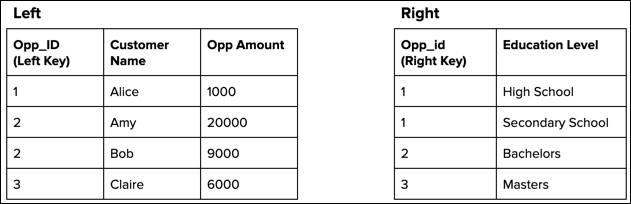
A left join duplicates the Opp_ID 1 record in the left
object because it has multiple matches in the right object.
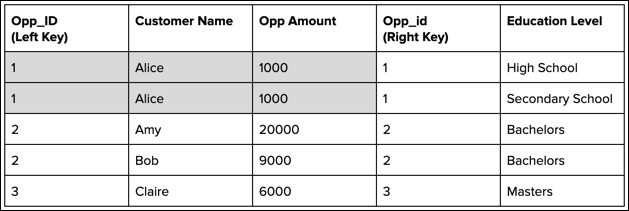
Notice that the duplicated records repeat the opportunity amount for Alice. If you added all opportunity amounts to get the total, you’d double count the amount for Alice. To prevent duplicate records, use a lookup instead of a join.
Refrain from using joins when the join keys have a many-to-many relationship.
When the join keys have a many-to-many relationship, the output data can become significantly larger than the input data sources. For instance, if four records on the left and five records on the right have the same key value, the join adds 20 (4*5) records to the output. In a more extreme case, if 10,000 records on the left and 5,000 on the right share the same key value, the join creates 50 million records in the output.
To illustrate why this occurs, consider these input data sources that have duplicate key values.
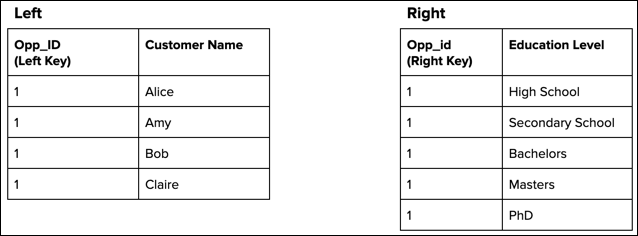
A left join duplicates each record in the left object five times because it has five matches in the right object.
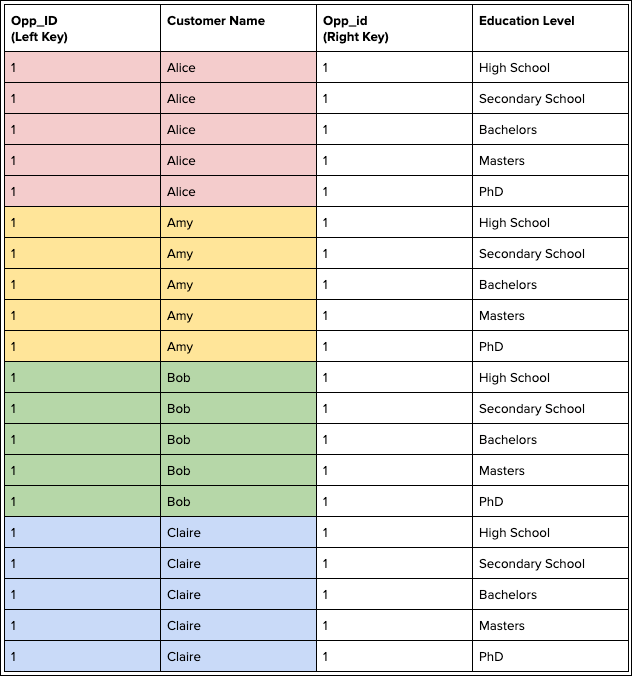
To prevent duplicate records, use a lookup instead of a join. If you must use a join, try adding more key fields to make the keys have more unique values.
To create a fully qualified key (FQK), always add a key qualifier field to a join. And replace any null values in a key qualifier field. See Join Objects in a Batch Data Transform.
