
You are here:
Left Join
Like a lookup, a left join includes all rows from the left input data source object and only matching rows from the right object. Unlike a lookup, a join includes all matched rows in the output data when multiple rows match.

Our company's marketing team captures demographic data in an external data source for opportunities stored in Salesforce. To help create more targeted campaigns, the team is segmenting our current opportunities by the Education Level demographic. Let’s use a left join to add demographic data to the opportunity data.
To illustrate how this batch data transform handles unmatched rows and duplicate keys, we included them in both input data sources.
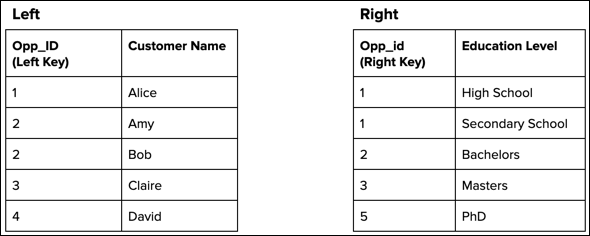
After performing the left join based on the matching keys, the batch data transform produces the following output data.
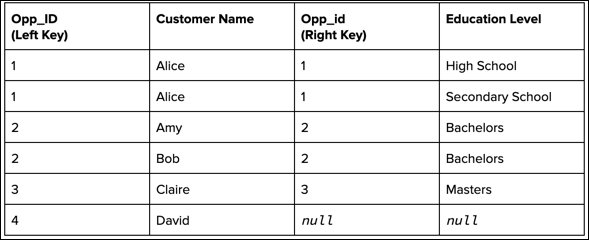
All rows from the left, including those without a match and those with multiple matches, are
included in output. Because Opp_ID 1 has two matches on the
right (High School and Secondary School), the output contains a separate record for each
education level. Also, because Opp_ID 4 doesn’t have a
match, the Opp_id and Education
Level fields are null for that record.
