
You are here:
Run a Batch Data Transform
Run a batch data transform for the first time to create the data. Run it again to update it with the latest data.
- Click the Data Transforms tab. If the Data Transforms tab isn’t visible, click the More tab and select Data Transforms.
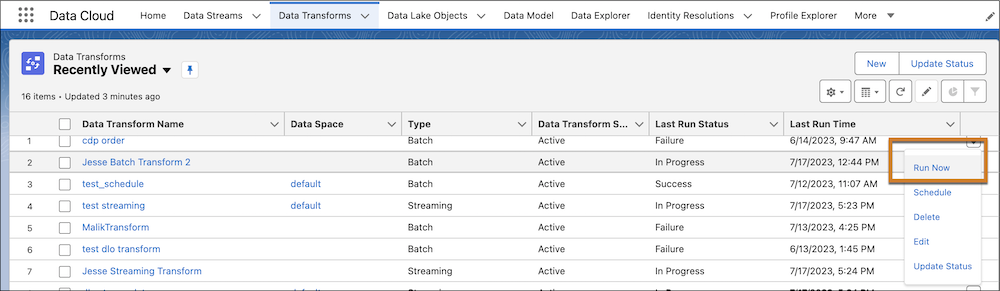
- On the Recently Viewed screen, click the triangle to the right of the batch data transform
name you want to run, and select Run Now.
- Schedule a Batch Data Transform
To ensure that the most up-to-date data is available by a particular time or to run a job during non-business hours, schedule a batch data transform. - Batch Data Transform Run Types
A batch data transform runs in either incremental or full mode. During an incremental run, the transform applies only to input data that has been added, updated, or deleted. These changes can occur through a data stream or from the target of another batch data transform that runs incrementally. A full run processes both new and existing data. You can’t configure the run type. The batch data transform selects the run type based on specific criteria.
Did this article solve your issue?
Let us know so we can improve!
