
You are here:
Data Interpretation with Fully Qualified Keys
Fully qualified keys help to accurately interpret data ingested from different sources. Each data stream is ingested into Data 360 with its specific keys and attributes. When multiple data streams are harmonized into a single data model object (DMO), the various keys can conflict and records can have same key values. Fully qualified keys avoid conflicts by adding key qualifier fields and interpreting the data accurately.
A fully qualified key consists of a source key, such as a contact ID from CRM or a subscriber key from Marketing Cloud Engagement, and a key qualifier.

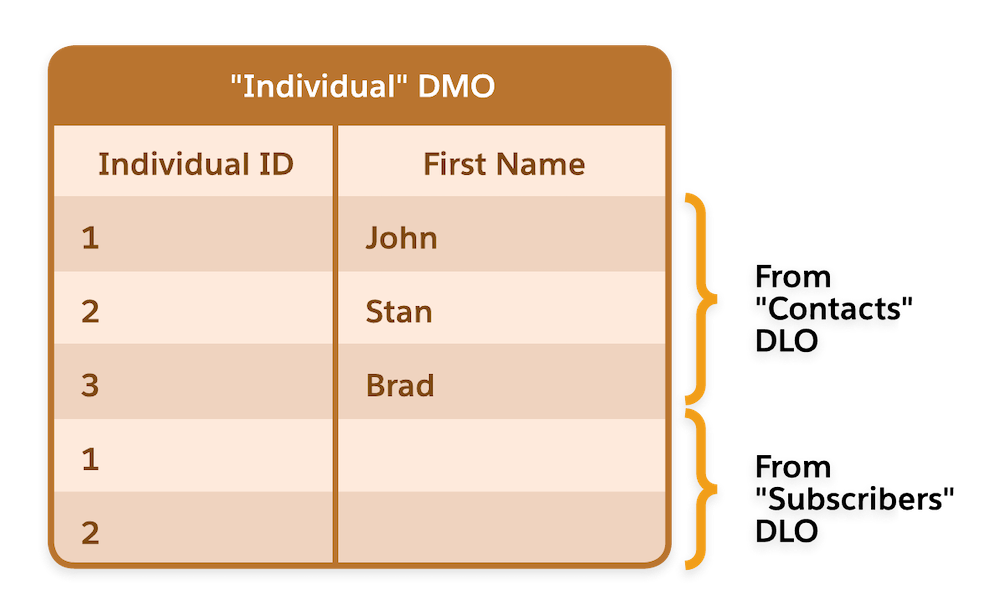
For example, let’s say you have two data streams with related data lake objects (DLO) for profile data: Contacts DLO from Salesforce CRM and Subscribers DLO from Engagement. The records for these DLOs are mapped to the Individual DMO. Now, you want to join the Individual DMO to the Engagement DMO to identify individuals with a minimum of two clicks. Here’s how using fully qualified keys can accurately interpret data ingested from two different sources.
The two data streams are mapped to the Individual DMO in Data 360. The Contacts DLO has three records, and the Subscribers DLO has two records. So the Individual DMO, which contains all the records from all the mapped data streams, has five records.
Engagement is using the Contact ID from the CRM org as the primary key (Subscriber Key). So, there are multiple records in the Individual DMO with the same value for Individual ID which is the primary key field.
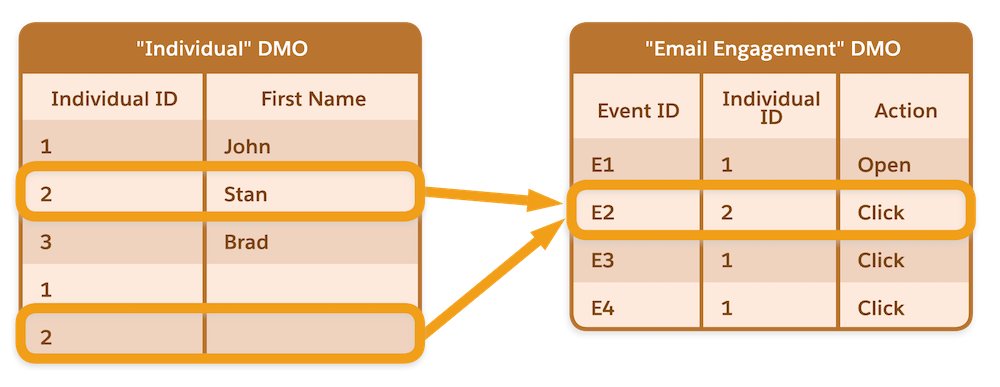
Next, let’s consider the Email Engagement DMO, which contains email engagement data that was ingested from Engagement. The Individual DMO and Email Engagement DMO have a 1:N relationship through the Individual ID.
When you join the Individual DMO and the Email Engagement DMO, Data 360 interprets the combined data set as the first row of Individual 2 having one click and the second row of Individual 2 having one click. In other words, Individual 2 is assumed to have two email clicks. But in actuality, Individual 2 has only one click action, although Data Cloud interprets it as two click actions.
This misinterpretation can create an issue when this data is queried, including segmentation, calculated insights, and query API. If you run a query and ask for individuals who have a minimum of two click actions, Individual 2 is returned in the response. This issue occurs even when profile unification is deployed, because engagement data is always joined to the Individual DMO.
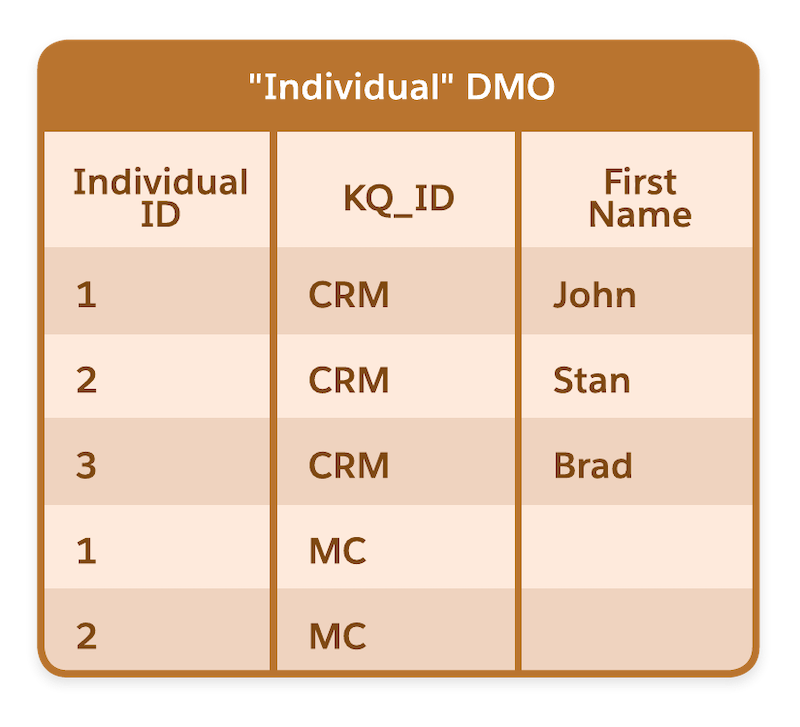
You can avoid this issue by using fully qualified keys. When you add key qualifier fields to all your DLO fields that contain a key value, either a primary key or a foreign key, Data 360 interprets the data ingested from different data sources correctly. In this example, key qualifiers are added to the DLOs from Salesforce CRM and Engagement. The Individual DMO includes the key qualifier field indicating where the record was sourced from.
When the Individual DMO and Email Engagement DMO are joined, the table join uses both the foreign key field (Individual ID) and the key qualifier field (KQ_ID), which enables Data 360 to interpret the data accurately.
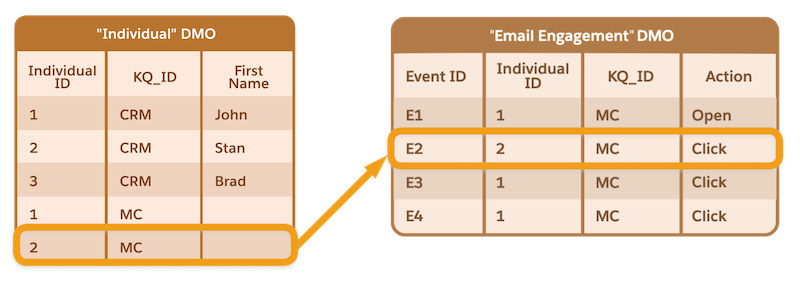
When you run the same query for Individuals who have a minimum of two click actions, data for Individual 2 doesn’t meet the query criteria, and it isn’t returned in the query response.
