
You are here:
Hybrid Search
To provide relevant information to an LLM with gen AI applications and generate the correct response, requires both vector search and keyword search. Vector search understands semantic similarities and context, but lacks specific domain vocabulary. Keyword search excels at lexical similarity but not at semantic similarity. In Data 360, hybrid search combines the strengths of semantically aware vector search with the precision and speed of keyword search.
Required Editions
| Available in: All Editions supported by Data 360. See Data 360 edition availability. |
For example, vector search understands that “How to log in to my account?” and “How can I sign on?” are similar queries. But vector search can fail to understand that a search on “LaserPrinter TX 400” and “LaserPrinter TX 440” are also similar because it doesn’t match numbers well or specific domain terms such as a LaserPrinter, which keyword search can.
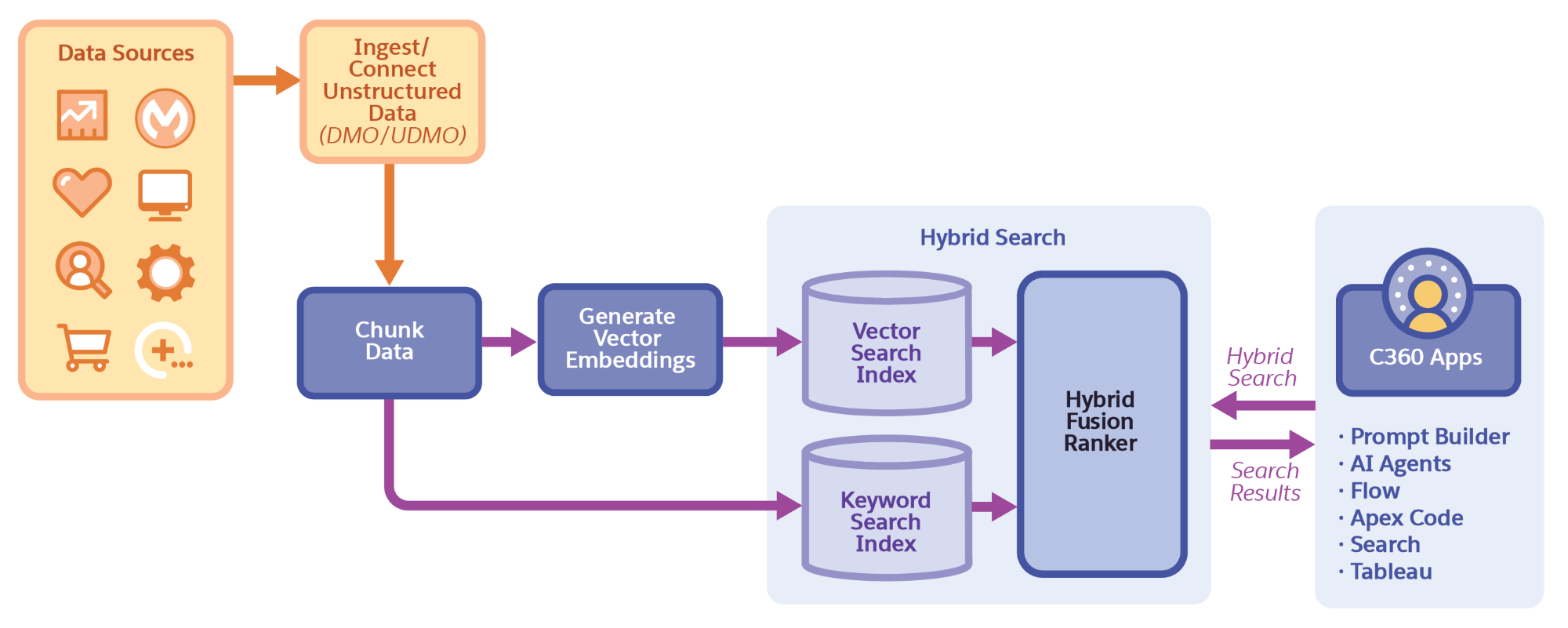
Hybrid search indexes the information in the DMO or UDMO to retrieve relevant results. Before you create a hybrid search index, unstructured data stored in DMOs and UDMOs are chunked. Chunking breaks the DMOs and UDMOs into manageable, semantically meaningful units.
Next, data indexing generates vector embeddings for a vector search index and a keyword search index for the DMOs and UDMOs. You manage the search index creation, deletion, and hydration using the Data 360 search index UI interface and APIs.
With hybrid search, the vector search index is queried to retrieve information based on semantic similarity and the keyword search index is queried to retrieve information based on lexical similarity. Hybrid search then merges and ranks the results provided by both types of searches to generate the best response. You can also configure additional ranking factors, such as recency or popularity of records, to influence the search results returned.
After you create a search index in Data 360, you can perform searches on that data from apps such as Prompt Builder, AI agents, or Tableau.
- Create a Hybrid Search Index with Advanced Setup
Configure a hybrid search index for a data model object (DMO) or an unstructured data model object (UDMO) to provide relevant information to generative AI applications. Data 360 breaks up the referenced data into semantically related chunks and generates searchable vectors, and then generates a vector index and a keyword index. - Run Hybrid Search Queries with Query API
Use Query API to run hybrid searches in Data 360. Use these examples as starting points. - Hybrid Search Query Expressions
Enhance your hybrid search queries with pre-filtering fields and join expressions to access fields. - Hybrid Search Fusion Ranking
Ranking reorders the search results so that the most relevant results to a user query are at the top. Data 360 Hybrid search retrieves results from two indexes—keyword and vector— based on the similarity with the query and then merges (fuses) the results. The ranking model then reranks the merged results. - Influence Hybrid Search Relevance Ranking
Increase the accuracy of search index query results and improve the quality of RAG applications by sending relevance-specific parameters. Using SQL, you can send relevance configuration settings for supported fusion ranker models and improve the result relevance for your specific use case. - Hybrid Search Autodrop Results
Dynamically filter out results that show a sharp decrease in relevance scores to increase the precision of search results for your prompts and RAG use cases. Data 360 hybrid search autodrop is a method by which you can filter out irrelevant search results that can mislead upstream applications like prompt builder using those results. - Hybrid Search Best Practices
Enhance your hybrid search retrieval and search relevance by chunking the correct fields, selecting pre-filter fields, and adding ranking factors. - Hybrid Search Autodrop Best Practices
Use these best practices to configure autodrop for Data 360hybrid search results.
