
You are here:
Best Practices for Fully Qualified Keys
Use fully qualified keys (FQKs) to help Data 360 accurately interpret data ingested from different data sources.
When using FQKs, follow these best practices.
- Configure key qualifier fields:
- Configure key qualifier fields for all Data Lake Object (DLO) fields containing a key value (primary or foreign).
- For fields from multiple DLOs mapping to the same Data Model Object (DMO) field, all DLO fields should have key qualifier fields.
- Use null-safe joins:
- In Data Cloud Query SQL, use
COALESCE()on key qualifier fields in all table joins to handle null values and prevent data loss. - In Tableau, use
IFNULL()on key qualifier fields in table joins and for adhoc table joins.
- In Data Cloud Query SQL, use
- When you enable FQKs in an existing org, update your existing calculated insights to add key qualifier fields to table joins and dimensions.
- When you create a calculated insight, use key qualifier fields in table joins and dimensions to ensure data accuracy. With key qualifier fields, Data 360 interprets your insight correctly when it’s combined with other DMOs in segments and activations.
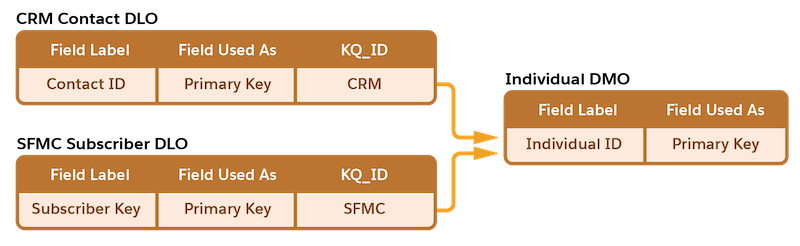
In this example, the primary key fields from the contact and SFMC subscriber DLOs are mapped to the same DMO field, Individual.Id. So both DLO fields must have a key qualifier field configured.
Did this article solve your issue?
Let us know so we can improve!
