
You are here:
Design Considerations
Keep these design considerations in mind when you welcome new loyalty members to your program.
Configuring Marketing Cloud Connect
- Marketing Cloud Connect requires using the Contact Record ID from Sales Cloud or Service Cloud as the subscriber key in Marketing Cloud Engagement to return email tracking data to Salesforce CRM.
Supporting Multiple Brands
- If you have one Loyalty Management org and multiple Marketing Cloud Engagement business units, query the synchronized data extensions and save your results to shared Salesforce data extensions so that the child business units can access them. In this case, Loyalty Management Content blocks don’t work because they rely on standard synchronized data extension naming (for example, Contact_Salesforce).
- If you have multiple Salesforce orgs that use multi-org Marketing Cloud Connect, synchronized data extensions at the child business unit level are named differently (for example, Contact_Salesforce1). In this situation, Loyalty Management content blocks don’t work because they rely on standard synchronized data extension naming (for example, Contact_Salesforce).
Displaying Loyalty Management Information in Emails
Set up one or more saved content blocks for reuse in emails to display personalized loyalty program information.
The Loyalty Management Content Blocks managed package addresses these use cases for displaying loyalty program information.
- Loyalty Campaign Promotion—You choose a specific campaign and promotion to inform members about the promotion details. This content block uses the Campaign ID to associate the specific promotion.
- Loyalty Tier Upgrade—You choose a specific loyalty program, tier group, and tier. This content block uses the Contact ID to look up tier information.
- Loyalty Accrual Transaction—Use this content block to inform members about the points they’ve earned for an activity. It uses the Transaction Journal ID to associate the specific transaction.
- Loyalty Redemption Transaction—Use this content block to inform members about the points they’ve redeemed for an activity. It uses the Transaction Journal ID to associate the specific transaction.
Custom Content Blocks Example
You can also create custom content blocks to look up information from synchronized data extensions. For example, Sunnie Foods uses a custom content block to display a customer’s loyalty tier, membership number, and points balance in the email banner.
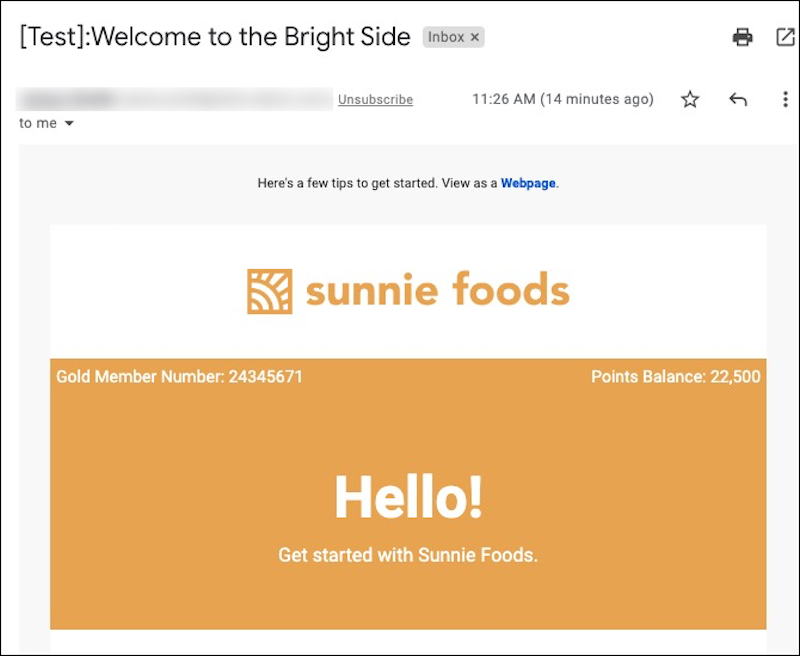
Sunnie Foods uses this code to create the custom content block.
%%[ set @ContactId = ContactID set @LoyaltyProgramMemberId = Lookup("LoyaltyProgramMember_Salesforce", "Id", "ContactId", @ContactId) set @LoyaltyMemberTier_Name = Lookup("LoyaltyMemberTier_Salesforce","Name","LoyaltyMemberId",@LoyaltyProgramMemberId) set @LoyaltyProgramMember_MembershipNumber = Lookup("LoyaltyProgramMember_Salesforce","MembershipNumber","ContactId",@ContactId) set @LoyaltyMemberCurrency_PointsBalance = Lookup("LoyaltyMemberCurrency_Salesforce","PointsBalance","LoyaltyMemberId",@LoyaltyProgramMemberId) ]%%<table align="center" border="0" cellpadding="0" cellspacing="0" class="db-container brand-bg" width="600">

  <tr>
   <td align="left" class="text-brand-color font14 p5left p5right p5top p5bottom text-align-left" valign="top" width="50%">
    %%=v(@LoyaltyMemberTier_Name)=%% Member Number: %%=v(@LoyaltyProgramMember_MembershipNumber)=%%</td><td align="right" class="text-brand-color font14 p5left p5right p5top p5bottom text-align-right" valign="top" width="50%">
Points Balance: %%=FormatNumber(@LoyaltyMemberCurrency_PointsBalance,"N0","en-US")=%%</td></tr></table>Did this article solve your issue?
Let us know so we can improve!
