
You are here:
Compose the Email in Content Builder
Let’s walk through the steps to create the first welcome email in this campaign.
- In Marketing Cloud Engagement, go to Content Builder.
- To create your email message, click + Create and Email Message.
- Select Template for the email creation method.Emails can be created in many ways in Content Builder including from a template or HTML. In this example, we explain how to create an email from a template.
- Choose the desired template and click Select.
- Define email properties including an email name and description and click Next
- To use the personalization in the Data 360 data extension, drag a
Code Snippet Block to the email canvas.
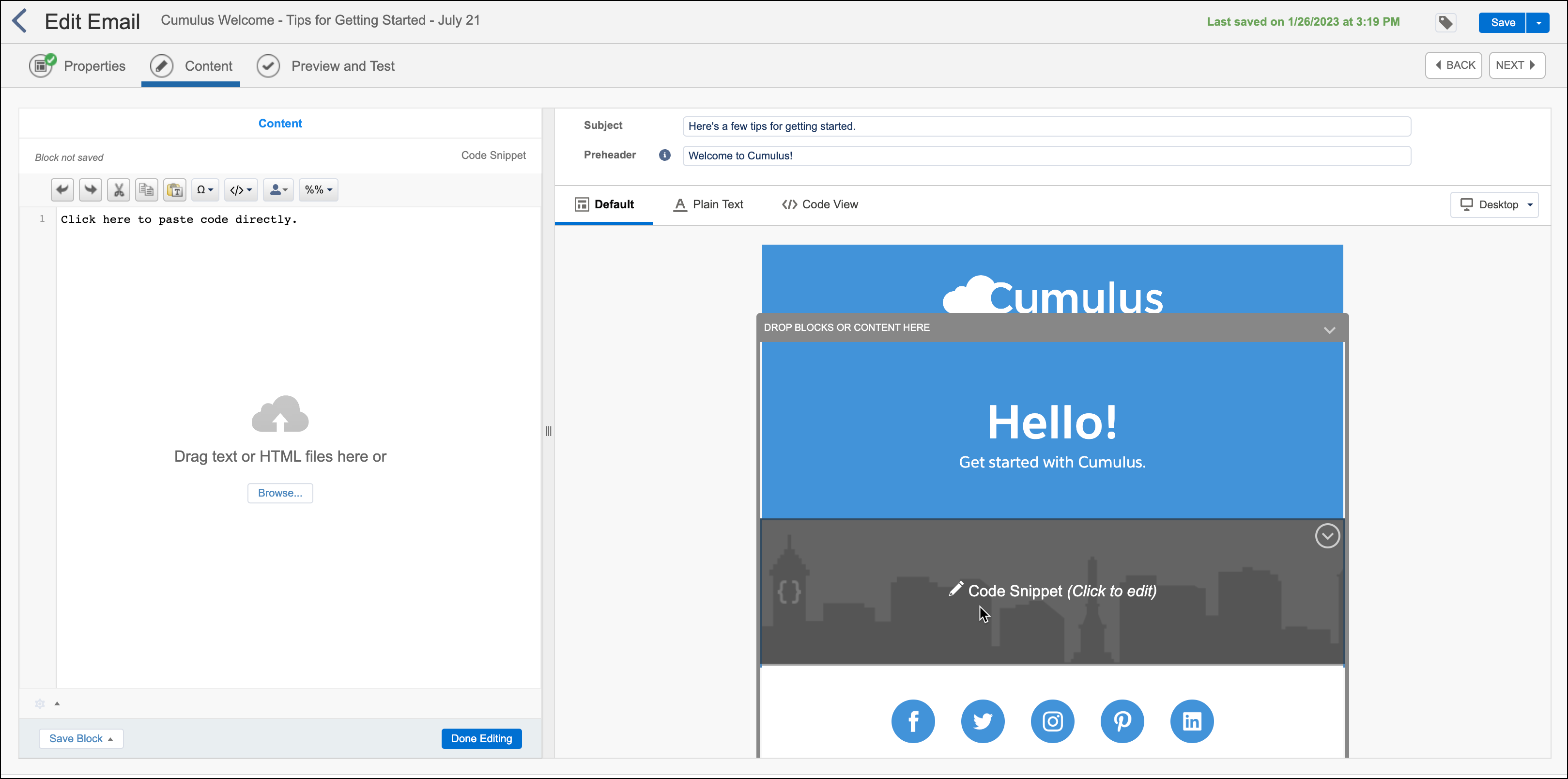
- In this use case, the personalized elements include the customer’s first name, insurance policy number, policy type, and policy start date. Code the content using GTL, SSJS, or AMPscript to use the JSON formatted content in the data extension.
- Click Preview and Test and select the data extension from Data 360.
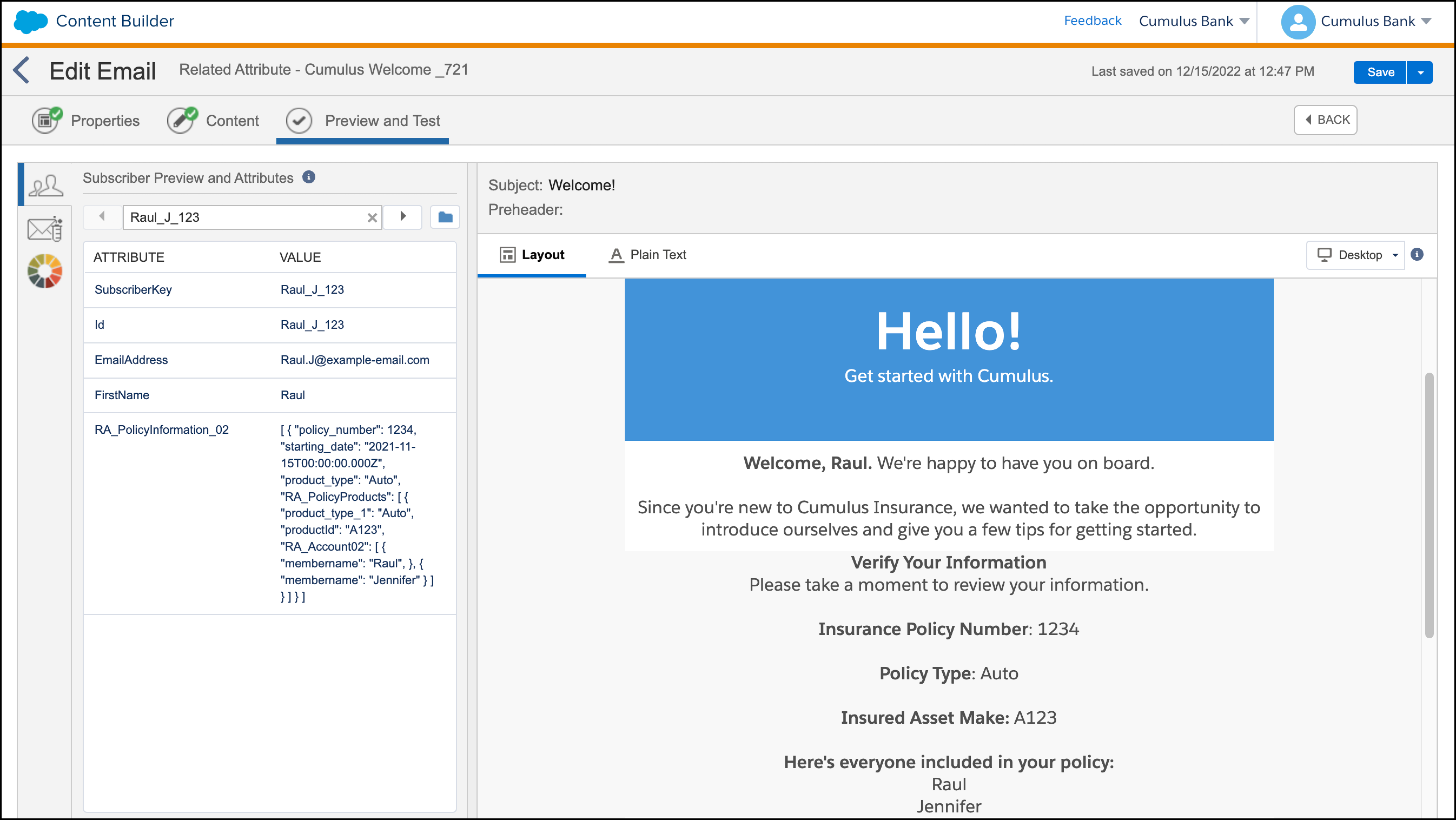
- After testing, click Save and Exit.
- Complete these steps for the remaining two email messages.
You can parse this data with either GTL, SSJS, or AMPscript.

Example Sample GTL
parsing
%%[ set @JSONData = [RA_PolicyInformation_02] ]%%
{{.datasource RA_PolicyInformation_02 type=variable}}
{{.data}}
{ "target" : "@JSONData"}
{{/data}}
<b>Verify Your Information</b><br />
Please take a moment to review your information.<br />
<br />
<b>Insurance Policy Number</b>: {{RA_PolicyInformation_02.policy_number}}<br />
<br />
<b>Policy Type</b>: {{RA_PolicyInformation_02.product_type}}<br />
<br />
{{.datasource RA_PolicyProducts type=nested}}
{{.data}}
{ "target" : "RA_PolicyInformation_02.RA_PolicyProducts" }
{{/data}}
<b>Insured Asset Make:</b> {{RA_PolicyProducts.productId}}<br />
<br />
<b>Here's everyone included in your policy:</b><br />
{{.datasource RA_Account type=nested}}
{{.data}}
{ "target" : "RA_PolicyProducts.RA_Account02" }
{{/data}}
{{RA_Account.membername}}<br />
{{/datasource}}
{{/datasource}}
{{/datasource}}
<script runat="server">
    Platform.Load("core","1");

    var JSONblock = Platform.Recipient.GetAttributeValue("RA_PolicyInformation");
    var JsonData = Platform.Function.ParseJSON(JSONblock);

    for (var i=0; i<JsonData.length; ++i) {
        var RA_PolicyInformation_02 = JsonData[i];

        Platform.Response.Write('<b>Verify Your Information</b><br />');
        Platform.Response.Write('Please take a moment to review your information.<br />');
        Platform.Response.Write('<br />');
        Platform.Response.Write('<b>Insurance Policy Number</b>: ' + RA_PolicyInformation_02['policy_number'] + '<br />');
        Platform.Response.Write('<br />');
        Platform.Response.Write('<b>Policy Type</b>: ' + RA_PolicyInformation_02['product_type'] + '<br />');
        Platform.Response.Write('<br />');

        var RA_PolicyProducts = RA_PolicyInformation_02['RA_PolicyProducts'];
        for (var j=0; j<RA_PolicyProducts.length; ++j) {
            RA_PolicyProduct = RA_PolicyProducts[j];

            Platform.Response.Write('<b>Insured Asset Make:</b> ' + RA_PolicyProduct['productId'] + '<br />');
            Platform.Response.Write('<br />');
            Platform.Response.Write('<b>Here\'s everyone included in your policy:</b><br />');

            var RA_Account02 = RA_PolicyProduct['RA_Account02'];
            for (var k=0; k<RA_Account02.length; ++k) {
                RA_Account = RA_Account02[k];

                Platform.Response.Write(RA_Account['membername'] + '<br />');
            }
        }
    }
</script>
%%[
var @i, @j, @k, @PolicyRowset, @PolicyCount, @PolicyRow, @PolicyNumber, @ProductType, @PolicyProductsRowset, @PolicyProductCount, @PolicyProductRow, @PolicyProductId, @MemberRowset, @MemberCount, @MemberRow, @MemberName

set @PolicyRowset=BuildRowsetFromJson(RA_PolicyInformation,"$.[*]", false)

set @PolicyCount=rowcount(@PolicyRowset)

for @i = 1 to @PolicyCount do
    set @PolicyRow=row(@PolicyRowset, @i)
    set @PolicyNumber=field(@PolicyRow, "policy_number")
    set @ProductType=field(@PolicyRow, "product_type")

    OutputLine(V("<b>Verify Your Information</b><br />"))
    OutputLine(V("Please take a moment to review your information.<br />"))
    OutputLine(V("<br />"))
    OutputLine(concat("<b>Insurance Policy Number</b>: ", @PolicyNumber, "<br />"));
    OutputLine(V("<br />"));
    OutputLine(concat("<b>Policy Type</b>: ", @ProductType, "<br />"));
    OutputLine(V("<br />"));

    set @PolicyProductsRowset = BuildRowsetFromJson(RA_PolicyInformation, concat("$.[", Subtract(@i, 1), "].RA_PolicyProducts[*]"), false)
    set @PolicyProductCount = rowcount(@PolicyProductsRowset)

    for @j = 1 to @PolicyProductCount do
        set @PolicyProductRow=row(@PolicyProductsRowset, @j)
        set @PolicyProductId=field(@PolicyProductRow, "productId")

        OutputLine(concat("<b>Insured Asset Make:</b>", @PolicyProductId, "<br />"));
        OutputLine(V("<br />"));
        OutputLine(V("<b>Here's everyone included in your policy:</b><br />"));

        set @MemberRowset = BuildRowsetFromJson(RA_PolicyInformation, concat("$.[", Subtract(@i, 1), "].RA_PolicyProducts[", Subtract(@j, 1), "].RA_Account02[*]"), false)
        set @MemberCount = rowcount(@MemberRowset)

        for @k = 1 to @MemberCount do
            set @MemberRow=row(@MemberRowset, @k)
            set @MemberName=field(@MemberRow, "membername")

            OutputLine(concat(@MemberName, "<br />"));

            next @k

        next @j

    next @i
]%%
Did this article solve your issue?
Let us know so we can improve!
