Loading
Feature Disruption - Service Cloud VoiceRead More
Feature degradation | Gmail Email delivery failureRead More
About Salesforce Data 360
Table of Contents
Select Filters

          No results
          No results
          Here are some search tips

          Check the spelling of your keywords.
          Use more general search terms.
          Select fewer filters to broaden your search.

          Search all of Salesforce Help
          Remove or Delete a Key Qualifier

          Remove or Delete a Key Qualifier

          To reduce clutter and avoid reaching your org's limit for key qualifiers, remove and delete unnecessary key qualifiers from the system. To delete a key qualifier, you must first remove it from all the data lake object (DLO) fields that it’s associated with and then delete it. You can also just remove a key qualifier from a DLO field but not delete it from the system. Removing a key qualifier from a DLO field can potentially affect the accuracy of calculated insights, segments, activations, and API queries.

          Required Editions

          Note
          Note To remove key qualifiers from a companion org, remove them from the home org and wait at least 10 minutes for the companion org to sync with the home org.
          Available in: All Editions supported by Data 360. See Data 360 edition availability.
          User Permissions Needed
          To remove and delete key qualifiers:

          Permission set:

          • Data Cloud Architect
          1. Identify the DLO fields associated with a key qualifier.
            Before you remove or delete a key qualifier, you must remove it from its associated DLO fields. Identify all the DLO fields that share the key qualifier.
            1. In Data Cloud, go to the Data Lake Objects tab.
            2. Click the name of a DLO.
            3. Click the dropdown next to any DLO field and select View Key Qualifiers.
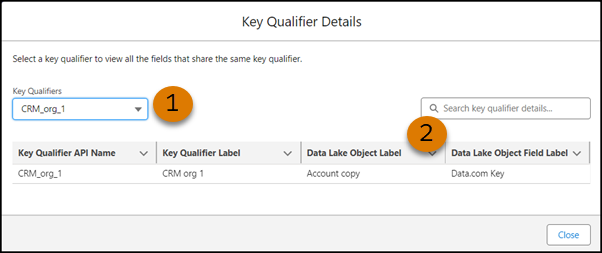
            4. In the Key Qualifier Details window, select the key qualifier that you want to delete (1) and note the DLO and DLO fields that are associated with it (2).
              The Key Qualifier Details window with a key qualifier selected and showing the DLO and DLO field name.
          2. Remove the key qualifier from the DLO fields.
            Before you can delete a key qualifier, you must remove it. You can also just remove it without deleting it.
            1. On the Data Lake Objects tab, click the DLO that contains the field that you want to remove the key qualifier from.
            2. Next to the DLO field that you want to remove the key qualifier from, click the dropdown, and select Remove Key Qualifier.
            3. After you confirm the removal, the key qualifier is no longer associated with the DLO field.
            If you’re only removing a key qualifier and not deleting it, you’re done.
          3. Delete the key qualifier.
            1. On the Data Lake Objects tab, click a DLO.
            2. Click the dropdown next to any DLO field, and select Add Key Qualifier.
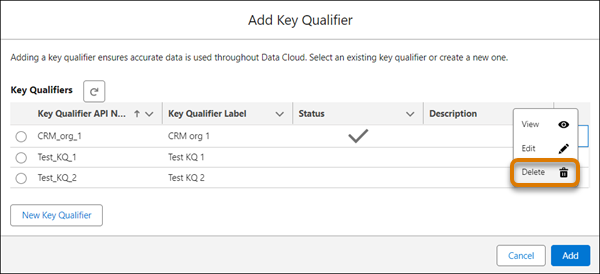
            3. In the Add Key Qualifier window, select the key qualifier that you want to delete, click the dropdown next to it, and select Delete.
              The Add Key Qualifier window highlighting the Delete option in a dropdown for a key qualifier.
            1. When prompted, confirm that you want to delete the key qualifier.
           
          Loading
          Salesforce Help | Article