
You are here:
Enhancing Data Analysis with Vector Search in Tableau
Find and analyze data based on meanings, not just keywords, by using vector search in a Tableau query. Vector search broadens the scope of data exploration as well as enhances the accuracy and relevance of the insights by identifying semantic similarities rather than relying solely on exact keyword matches.
For example, a business analyst creates a Voice of the Customer analysis dashboard. The analyst
sourced the data from a file in an Amazon S3 bucket, created a Data 360 data stream from that
content, and mapped the custom fields to a custom DMO they named dc_voc. The analyst then created a search index configuration from the dc_voc object and chunked and vectorized the Description field from
the object. The analyst can now use a search filter in Tableau specifically tailored for Voice of
the Customer descriptions.
The Tableau dashboard displays both structured and unstructured data analytics. The left side uses a category filter, and the right side uses semantic search to enhance data exploration.
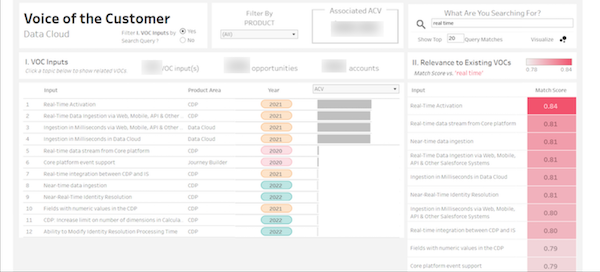
For instance, when you enter the term “real time” into the semantic search on the right side, the records show entries that include related terms, such as real-time activation, near-time data ingestion, and real-time data stream.
The matching score ranks results based on the similarity of their descriptions to the search term. This scoring system highlights the advantage of semantic search, because it captures varied expressions of similar concepts, providing richer insights than a simple keyword search.
To implement this functionality, the analyst created a custom SQL query in Tableau that uses
the vector_search( ) function. (Note that the query contains
non-standard or custom objects that are examples and may not correspond to objects in customer
orgs.)
SELECT distinct "dc_voc__dlm"."Accounts_Impacted__c" AS "# Accounts Impacted",
  "dc_voc__dlm"."Opportunities_Impacted__c" AS "# Opportunities Impacted",
  "dc_voc__dlm"."Created_By_Role_Name__c" AS "Created By: Role: Name",
  "dc_voc__dlm"."Created_Date__c" AS "Created Date",
  "dc_voc__dlm"."Description__c" AS "Description",
  "dc_voc__dlm"."Input_Name__c" AS "Input Name",
  "dc_voc__dlm"."Product_Area__c" AS "Product Area",
  "dc_voc__dlm"."Total_ACV_Impacted_converted__c" AS "Total ACV Impacted (converted)",
  "dc_voc__dlm"."Total_AOV_Impacted__c" AS "Total AOV Impacted",
  "Chunk__c", "score__c" FROM vector_search(table("dc_voc_str_id_vector__dlm"), <Parameters.Query String>, '', 500) vs
INNER JOIN "dc_voc_str_id_chunk__dlm" USING ("RecordId__c")
INNER JOIN "dc_voc__dlm" USING("Str_id__c")
ORDER BY "score__c" DESC
LIMIT <Parameters.Limit VOC Matches>
Notice two specific parameters:
Query Stringfor entering search terms.Limit VOC Matchescontrols the number of VOC records displayed.
This integration of vector search within Tableau not only broadens the scope of data exploration but also enhances the accuracy and relevance of the insights derived from customer feedback by identifying semantic similarities rather than relying solely on exact keyword matches.
