
You are here:
Create a Metric for a Semantic Model
Create a metric to standardize how your organization measures performance.
Required Editions
| Available in: All Editions supported by Data 360. See Data 360 edition availability. |
| User Permissions Needed | |
|---|---|
| To create a metric: | Permission set:
AND Semantic Models object |
- In Data Cloud, on the Semantic Layer tab, go to the Metrics tab.
- Click New Metric, and select the semantic model that you want to use.
- Name the metric, enter an optional description, and click Next.
-
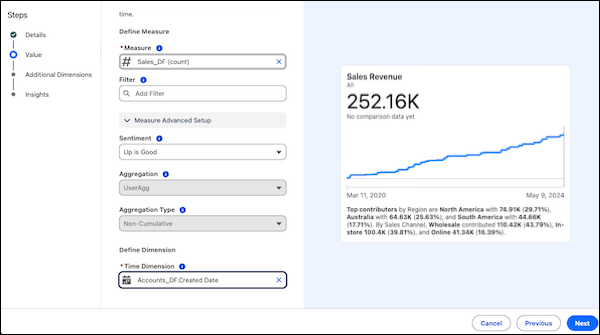
Define the measure and time dimension fields to track the Metric over time, and then
click Next.
- To create a new measure or dimension, click + Add New from the dropdown.
-
If you want to group and filter the metric for more detailed insights, add dimensions,
and then click Next.
- To create a new dimension, click + Add New from the dropdown.
-
(Tableau Next only) On the Insights step, configure automated
analysis and drill-down options.
-
Record-Level Details: Enable drill-down functionality to
row-level data.
 Note Enter the information for Record ID and Fields before turning on Records Level Data. The record-level table appears on the Metric detail page after you configure all three items.
-
Record-Level Details: Enable drill-down functionality to
row-level data.
- Click Save.
Did this article solve your issue?
Let us know so we can improve!
