
Loading
About Salesforce Data 360
Table of Contents
Select Filters

          No results
          No results
          Here are some search tips

          Check the spelling of your keywords.
          Use more general search terms.
          Select fewer filters to broaden your search.

          Search all of Salesforce Help
          Delete an Object from a Union

          Delete an Object from a Union

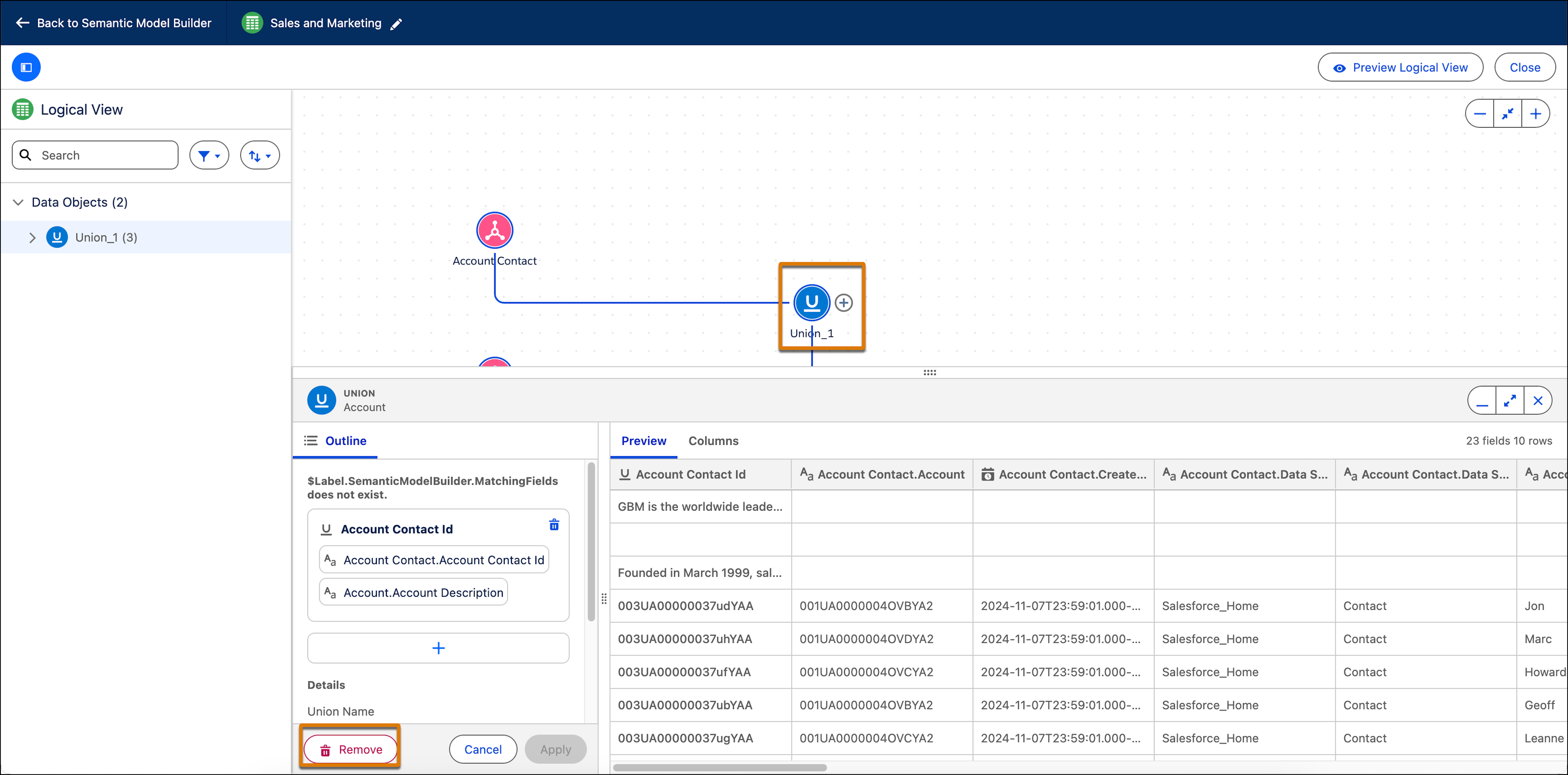
          You can remove an object from the unified table if it is not connected to another object or if it is not being used by another semantic definition. For example, if the object is being used in a calculated field, you cannot remove it from a union. You can also delete the entire union. Removing an object affects the selected matching fields. If only two matching fields exist, removing the DMO eliminates the match entirely, because a single field cannot remain matched.
          Required Editions

          Available in: All Editions supported by Data 360. See Data 360 edition availability.
          User Permissions Needed
          To delete an object from a union:

          Permission set:

          • Data Cloud Architect

          AND

          Semantic Models object

          1. In Data Cloud, on the Semantic Layer tab, select a data model.
          2. Edit a logical view that has a union.
          3. Click on the object you want to remove and from the bottom pane, click Remove Object.
          4. To remove a union, click on the union and then click Remove.

            Delete union

           
          Loading
          Salesforce Help | Article