You are here:
Use Value Suggestions in Segmentation
You can enable value suggestions for data model object (DMO) fields if the data type is Text. Enable or deactivate the feature in the DMO record home. You can enable value suggestions for up to 500 attributes for your entire org. It can take up to 24 hours for suggested values to appear.
- In Data 360, click the Segments tab.
- Select a segment.
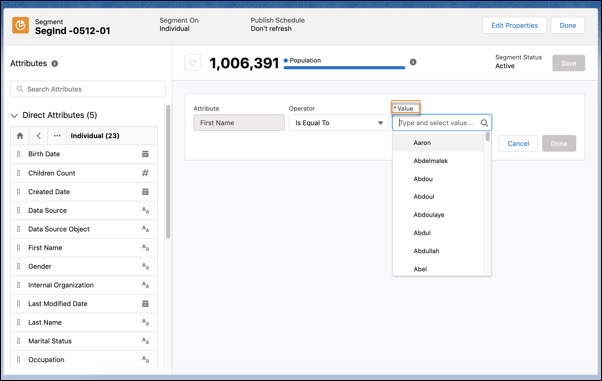
- To use value suggestion when creating segment filters, drag the attribute onto the canvas.
-
Start typing in the Value field for an attribute.
If you don’t see the values in your list yet, start typing the values you’ve already ingested or type values exactly as they appear in your dataset.
Suggested values are retained for 30 days in the suggested values dataset. For attributes with more than 1,000 values, the most frequently occurring 1,000 values in the dataset are displayed alphabetically. This includes both new and old suggested values. Some operators allow you to select multiple values for an attribute. Values with more than 255 characters aren’t available as suggested values, but you can still type them in to filter on them.
 Note When suggested values are enabled on fields mapped to external objects (See BYOL), charges apply per field every 24 hours.Note
- When the DMO's category is Other, value suggestion is available when the relationships from the Segment On entity to the DMO are one-to-one (1:1) and many-to-one (N:1). Value suggestions aren’t available when the relationships are one-to-many (1:N). The DMO category and relationships are determined while ingesting and mapping your data.
- Use data newer than 30 days. If the data has been inactive for 30 days, the values don’t appear.