Use Experience Builder to Configure Micro-Batching for High-Volume Sites
Use the Create Record Form, Contact Support Form, or Lead Form (LWC) components to
create cases, leads, and custom objects more efficiently. When records are collected into batches
and processed asynchronously, your site can process more records at a time. Batch processing
improves performance and keeps your site moving during traffic spikes.
Required Editions
Available in: Salesforce Classic and
Lightning Experience
Available in: Enterprise, Developer, Performance, and
Unlimited Editions
User Permissions Needed
To configure record and case creation in batches:
Use Micro-Batching to Create Records
To publish an Experience Cloud site:
Be a member of the site AND Create and Set Up Experiences
OR
Be a member of the site AND an experience admin, publisher, or builder in that
site
To enable users to configure micro-batching, select the Use Micro-Batching to
Create Records permission on the user’s profile.
The following applies to authenticated users who create records in batches using
micro-batching:
They can click Upload File on a component to attach files to cases
submitted in batches.
They own all records that they create via micro-batching.
Field-level security and record type access are bypassed when creating the records. They
apply after the record is created.
Records created via micro-batching use the default record type for the org when created via
micro-batching.
When creating a child record, only Read access on the parent record is required.
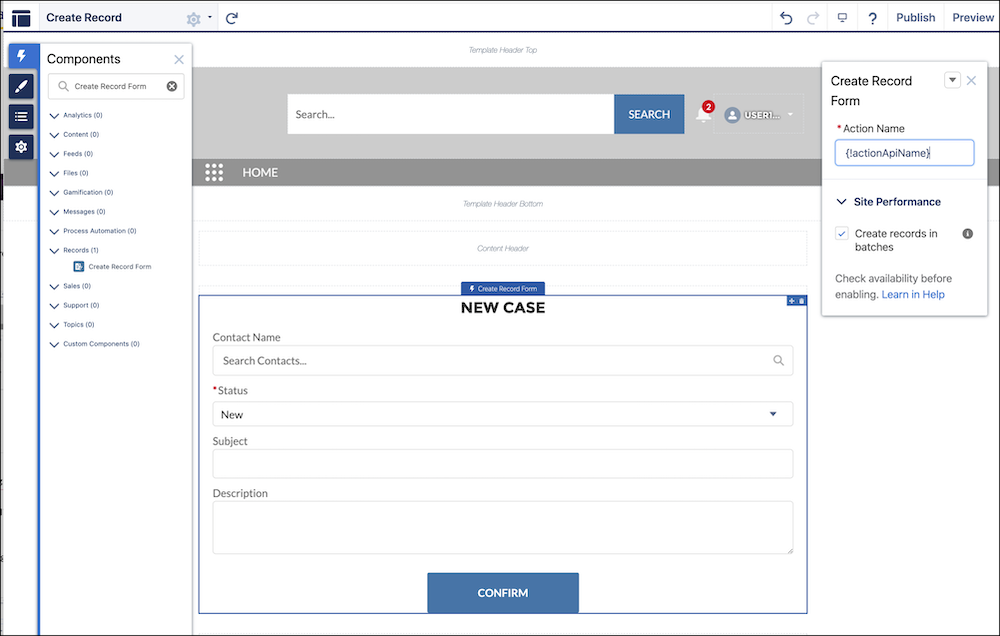
To configure record creation for micro-batching, click the Create Record
Form component.
In the Site Performance section of the component settings, select Create records
in batches.
The Create Record Form can be used to create any object. Cases, leads, and custom objects
can be created in batches. Other records are still created one at a time.
The Contact Support Form component can be used to create cases in batches.
To configure the Contact Support Form for micro-batching, click the Contact
Support Form component.
In the Site Performance section of the component settings, select Create cases
in batches.
To apply your changes, publish your site.
Note The Leads Form (LWC) also uses micro-batching to create leads in batches rather than one
at a time. The Lead Form LWC component is enabled for micro-batching by default and requires
no further configuration. For more information, see the Lightning Web Component Developer
Guide.
We use three kinds of cookies on our websites: required, functional, and advertising. You can choose whether functional and advertising cookies apply. Click on the different cookie categories to find out more about each category and to change the default settings.
Privacy Statement
Required Cookies
Always Active
Required cookies are necessary for basic website functionality. Some examples include: session cookies needed to transmit the website, authentication cookies, and security cookies.
Functional Cookies
Functional cookies enhance functions, performance, and services on the website. Some examples include: cookies used to analyze site traffic, cookies used for market research, and cookies used to display advertising that is not directed to a particular individual.
Advertising Cookies
Advertising cookies track activity across websites in order to understand a viewer’s interests, and direct them specific marketing. Some examples include: cookies used for remarketing, or interest-based advertising.