When you cache Apex methods on the Salesforce content delivery network (CDN), you
improve performance of your LWR site, and your customers benefit from faster page load
times. Only public data from Apex methods is intended to be cached, and it’s only cached for
guest users. Apex caching controls differ depending on the type of Apex methods in your
site.
Required Editions
Available in: both Salesforce Classic and Lightning
Experience
Available in: Enterprise, Performance, and
Unlimited Editions. Also available with Marketing Cloud
Account Engagement (Pardot) in Professional Edition.
For Apex methods that you own, enable caching by using caching annotation. Annotate your
Apex methods with @AuraEnabled(cacheable=true scope=’global’). And use @wire (LWC) to
invoke publicly cacheable Apex actions. To avoid caching private data, annotate only
Apex methods that return public data. Learn more about caching annotation in our
developer guides.
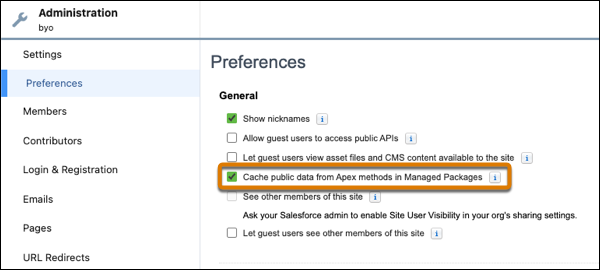
If your site uses managed packages, caching data from Apex methods in those packages is
enabled by default. To disable it, deselect Cache public data from Apex
methods in Managed Packages in Workspaces | Administration |
Preferences.
Important Only Apex methods that were annotated for caching in the managed
packages get cached. If the Apex methods in the managed packages aren’t annotated, they
don’t get cached even when the preference is enabled.
Salesforce controls caching of Apex methods used on standard pages and components, and
caches it where appropriate.
Did this article solve your issue?
Let us know so we can improve!
Loading
Salesforce Help | Article
Cookie Consent Manager
Cookie Consent Manager
General Information
Required Cookies
Functional Cookies
Advertising Cookies
General Information
We use three kinds of cookies on our websites: required, functional, and advertising. You can choose whether functional and advertising cookies apply. Click on the different cookie categories to find out more about each category and to change the default settings.
Privacy Statement
Required Cookies
Always Active
Required cookies are necessary for basic website functionality. Some examples include: session cookies needed to transmit the website, authentication cookies, and security cookies.
Functional Cookies
Functional cookies enhance functions, performance, and services on the website. Some examples include: cookies used to analyze site traffic, cookies used for market research, and cookies used to display advertising that is not directed to a particular individual.
Advertising Cookies
Advertising cookies track activity across websites in order to understand a viewer’s interests, and direct them specific marketing. Some examples include: cookies used for remarketing, or interest-based advertising.