You are here:
Criteria Types and Conditions for Audience Creation
You can use several types of criteria to define an audience and determine the conditions under which the criteria apply.
Required Editions
| Available in: Salesforce Classic and Lightning Experience |
| Available in: Enterprise, Performance, Unlimited, and Developer Editions |
| Applies to: Aura sites |
Audience Criteria Types
- Profile
- Target users who fit a particular profile that’s defined in your org—for example, Customer Community User, Partner, Marketing User.
- Location
- Target users who are in a particular geographic area, such as a state or country, as determined by their IP address.
- For limitations to keep in mind, see Location Criteria Considerations.
- Domain
- Target users based on how they enter your site, such as via coffee.awsimporters.com or tea.awsimporters.com.
- For limitations to keep in mind, see Domain Criteria Considerations.
- User Object
- Target users based on CRM fields, such as the department that they work in or their
role. You can select these types of fields on CRM objects.
- Text
- Picklist
- Multi-select picklist
- Number
- Checkbox
- Currency
- Date (but not Date/Time)
- Permission
- Target users who are assigned particular permissions in your org.
- Record-Based Criteria
- Vary what users can see based on the characteristics of the record that they’re
viewing. For example, show different record detail pages for a low-priority case and an
escalated case, or show different pages for high-value versus low-value opportunities.
You can use these objects to create record-based criteria.
- Account
- Asset
- Campaign
- Case
- Contact
- Contract
- Lead
- Opportunity
- Product2
- ProductCategory
- Quote
- Custom objects
- Any object, except Knowledge, with at least one record type (only some fields available)
- For limitations to keep in mind, see Record-Based Criteria Considerations.
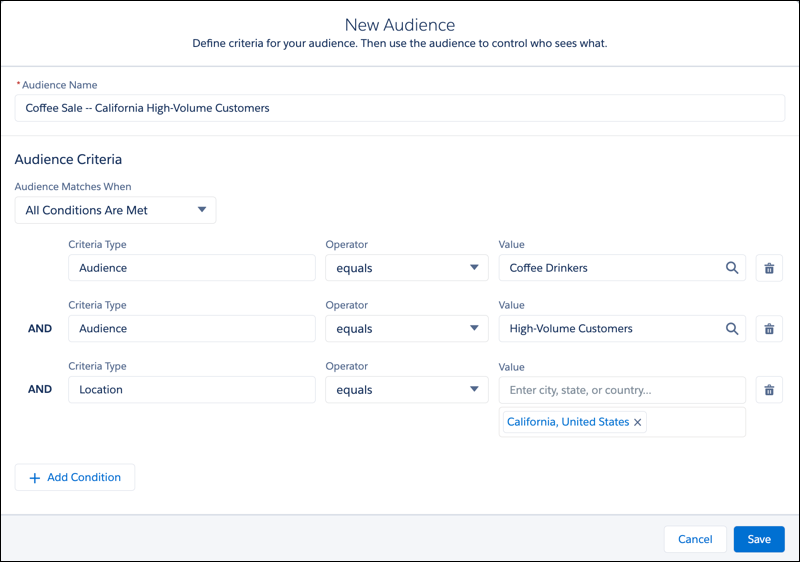
- Audience
- To avoid re-creating complex sets of criteria, you can use audiences as criteria to
create another audience. For example, you have a site that sells coffee and tea, and you
created audiences for coffee drinkers, tea drinkers, and high-volume customers. Then you
want to market a special opportunity for coffee drinkers in California who are
high-volume customers. You can create an audience just for this sale using your Coffee
Drinkers and High-Volume Customers audiences, plus a location criterion for
California.
- For limitations to keep in mind, see Audience Criteria Considerations.
Conditions for Audience Matching
In the Audience Matches When picklist, you determine the conditions under which your audience criteria apply. The criteria can apply when:
- All conditions are met
- Any condition is met
- Custom logic is met
For example, you create an audience with a Location criterion of California and a Profile criterion of Customer Community User. If the audience criteria apply when all conditions are met, only users in California with the Customer Community User profile can see your content. If the audience criteria apply when any condition is met, any user in California, and any user anywhere with the Customer Community User profile, can see your content.
To create more complex audiences, you can use custom logic. With custom logic, you use AND and OR statements to group and apply audience criteria. For example, you have an internal site, and you want to target content to marketing managers based in California and sales managers based in New York. You can use custom logic so that users who fall into either of these audiences can see that content.
