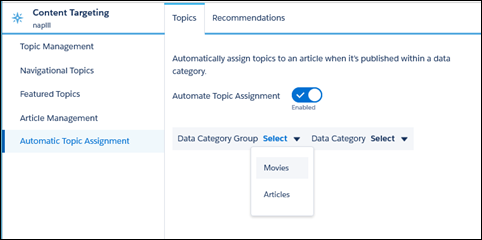
Transport all your hard work of organizing Salesforce Knowledge in your Experience
Cloud site, and boost SEO for your Knowledge articles, by mapping topics to data categories. All
articles published with a specific data category are tagged with the topics you specify.
Articles added to the data category in the future are also tagged. All articles with assigned
topics are included in search results.
Required Editions
Available in: Salesforce Classic and Lightning Experience
Available in: Essentials, Enterprise, Performance,
Unlimited, and Developer Editions
User Permissions
Needed
To access Experience Workspaces:
Manage Experiences
OR
Create and Set Up Experiences
AND
Is
a member of the site
To set up automatic topic assignments:
Edit Topics
AND
View Data Categories
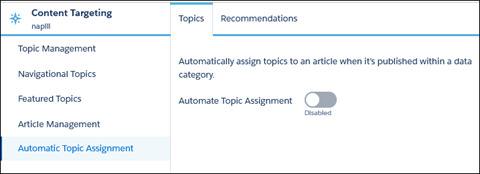
To use automatic topic assignments, enable Experience Workspaces in Digital Experience
Settings.
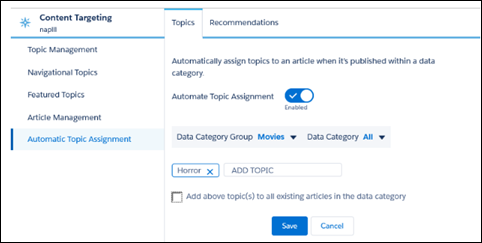
Add the topics that you want to assign to the articles under that data category.
Select the option to add the topics to existing articles in the data category. The
topics are then assigned to all articles in all data categories under the data category
group. If you don’t select this option, the topics are added only to new articles added to
the data category, and the existing articles remain unchanged.
Click Save.
Take
these items into consideration as you set up your topic assignment
rules.
Topic assignments are site-specific. If you use the same article in two different sites,
set up automatic assignments in both sites.
If a translation of a topic is available in Salesforce, the translated article is tagged
with the corresponding translated topic. If there’s no translated topic in the system,
localized articles are tagged with the base language topic.
You can’t automatically remove topics from articles. Instead, you must manually remove
topics.
If you merge two topics, you must set up new rules.
If you automatically add a topic to a data category, the topic is added to all articles
in the data categories above it in the hierarchy. Topics aren't automatically added down a
hierarchy to child data categories.
To automatically assign topics to a newly added data category, remove all existing data
categories and then publish the article. Next, add all data categories at once and
republish the article.
Did this article solve your issue?
Let us know so we can improve!

Loading
Salesforce Help | Article
Cookie Consent Manager
General Information
Required Cookies
Functional Cookies
Advertising Cookies
General Information
We use three kinds of cookies on our websites: required, functional, and advertising. You can choose whether functional and advertising cookies apply. Click on the different cookie categories to find out more about each category and to change the default settings.
Privacy Statement
Required Cookies
Always Active
Required cookies are necessary for basic website functionality. Some examples include: session cookies needed to transmit the website, authentication cookies, and security cookies.
Functional Cookies
Functional cookies enhance functions, performance, and services on the website. Some examples include: cookies used to analyze site traffic, cookies used for market research, and cookies used to display advertising that is not directed to a particular individual.
Advertising Cookies
Advertising cookies track activity across websites in order to understand a viewer’s interests, and direct them specific marketing. Some examples include: cookies used for remarketing, or interest-based advertising.