You are here:
Record Information Tabs
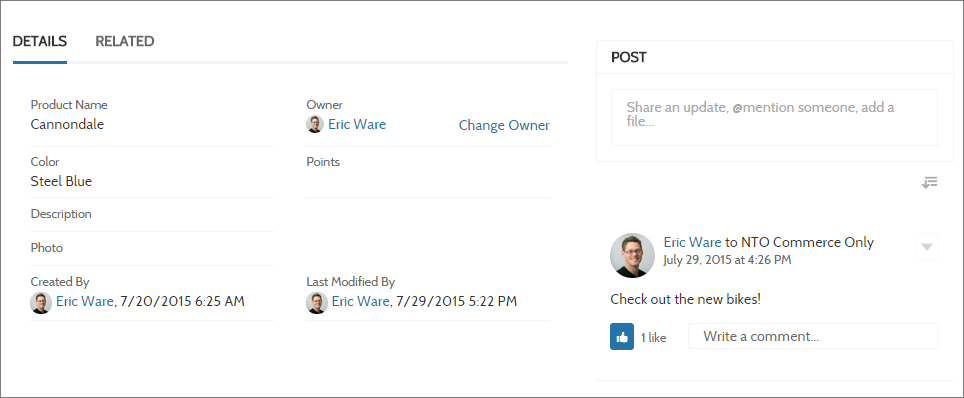
The Record Information Tabs component allows the user to display record information using tabs for Record Details, Related Records, Feed, and Activity Timeline.
- You can use the Record Information Tabs component on custom record detail pages that you create. We recommend using it with the Record Banner component.
- You can modify what fields display in the Record Information Tabs component by customizing the object’s page layout.
- Related lists in the related tab show the number of related records in each list in parentheses. For example, if there are five related contacts related to an account, the related list shows Contacts (5). If there aren’t any related records, the list title shows (0).
- Site members with permissions can create new related records and send emails
from the Related tab. They can also expand related record lists to see a longer
list. These details are displayed on the generic Record Related List page.
Related records in the related tab show the number of related records in
parentheses.
 Note Emails are supported in accounts, contacts, leads, opportunities, and campaigns.
The Customer Service template supports a record detail page that you can use out of the box with no configuration. All objects in your site without a preassigned record detail page use this generic page, called Record Detail, to display record data. For example, consider the scenario where a user lands on a case detail page. The page uses a preassigned case detail layout. The user clicks a contact in the related records. If you haven’t created a custom record detail page for contacts, the contact information is displayed using the generic Record Detail page.
- From the Pages menu in Experience Builder, select Record Detail or your custom record detail page.
- Select the Record Information Tabs component or drag the component from the Components panel to the page to add it.
-
In the property editor, configure the properties for the component.