Manage the measures for the account manager target values by configuring the Measure
field on the Account Manager Target object. Use the predefined Revenue measure or create customer
measures. Create currency type measures, such as total order amount and total sales agreement
amount. Or, create non-currency type measures, such as customer satisfaction and net promoter
score. You can also rename, reorder, and delete measures.
Required Editions
Available in: Enterprise, Unlimited, and Developer
Editions.
User Permissions Needed
To manage measures for account manager targets:
Customize Application
From the object management settings for Account Manager Targets, go to Fields &
Relationships.
Select Measure.
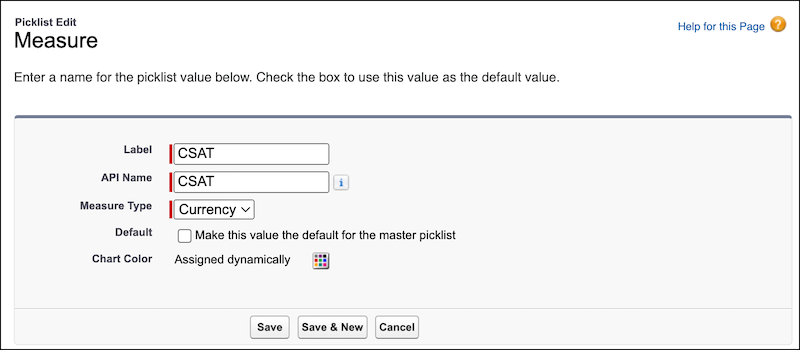
To add a new measure value, perform these steps.
In the Measure Picklist Values section, click New.
Enter a label for the measure value.
Enter an API name for the measure value.
Select a measure type.
The predefined measure type values, Currency and Non-Currency, help you maintain a
consistent classification of measure values. Select Currency for currency type of targets.
Select Other for non-currency type of targets.
Save your changes.
The new measure appears when account managers are creating targets.
To edit the label of a measure value, perform these steps.
Click Edit for the measure value.
Enter a label for the picklist value.
Save your changes.
To make a measure value the default for the measure field, perform these steps.
Click Edit for the measure value.
Select Default.
Save your changes.
To reorder measure values, perform these steps.
Click Reorder.
Reorder the picklist values by using the picklist controls.
If needed, select Display values alphabetically, not in the order
entered.
Save your changes.
To delete a measure value, click Del for the measure value.
To deactivate or activate a measure value, click Deactivate or
Activate for the measure value, respectively.
We use three kinds of cookies on our websites: required, functional, and advertising. You can choose whether functional and advertising cookies apply. Click on the different cookie categories to find out more about each category and to change the default settings.
Privacy Statement
Required Cookies
Always Active
Required cookies are necessary for basic website functionality. Some examples include: session cookies needed to transmit the website, authentication cookies, and security cookies.
Functional Cookies
Functional cookies enhance functions, performance, and services on the website. Some examples include: cookies used to analyze site traffic, cookies used for market research, and cookies used to display advertising that is not directed to a particular individual.
Advertising Cookies
Advertising cookies track activity across websites in order to understand a viewer’s interests, and direct them specific marketing. Some examples include: cookies used for remarketing, or interest-based advertising.
