
You are here:
Home Health Insights
Use the Home Health Insights dashboard to gain insights into home healthcare resources' work hours, appointments, utilization rate, and overall service efficiency. See a comprehensive view of care resources' work schedules to optimize productivity and improve patient care.
Required Editions
Available in: Lightning Experience Available in: Enterprise and Unlimited Editions of Health Cloud with the Revenue Intelligence for Health or CRM Analytics for Health Cloud add-on license |
Filter the charts in the Home Health Insights dashboard based on the care resource service region, home visit type, duration, and home visit hours. The dashboard consists of Care Resource and Patients pages.
Care Resource Page
See real-time data on key metrics, including patient count, care resource count, care resource-to-patient ratio, and care resources' work hours, including average travel and care time. Enhance resource planning and optimize care service efficiency by using these insights on scheduled home visit hours, actual working hours, and utilization rate.
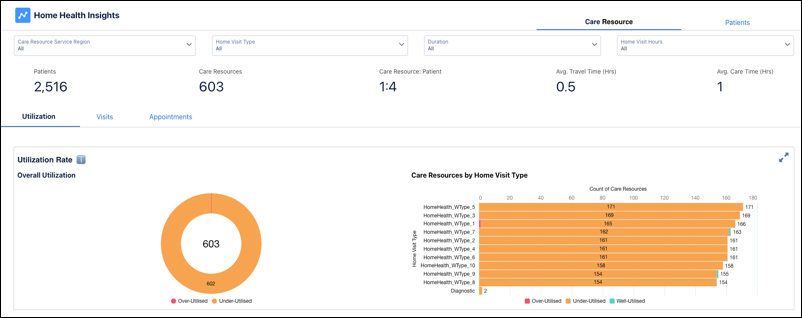
The Care Resource page includes Utilization, Visits, and Appointments tabs.
- The Utilization page provides insights into care resource efficiency by analyzing utilization levels. View the total number of care resources and see their distribution across different utilization levels—Overutilized, Well-utilized, and Underutilized.
- The Visits page analyzes the allocation and distribution of care resources based on the types of home visits that the resources handle. See the visit distribution by time (monthly, weekly, or daily) or based on visit type and home visit hours. You can also see a comparative analysis between recurring care type and Start of Care (SoC) to distinguish new patients from ongoing or follow-up care.
- The Appointments page shows an overview of all appointments, including the total count, status distribution, and appointment details associated with each care resource. Use these insights to enhance resource scheduling and optimize care management strategies.
Patients Page
Get a quick overview of patient-related data, including the total number of patients, patients under treatment (Recurring), patients who haven’t started treatment (Start of Care), available care resources, care resource-to-patient ratio, home visit type distribution, and authorization status for each care request.
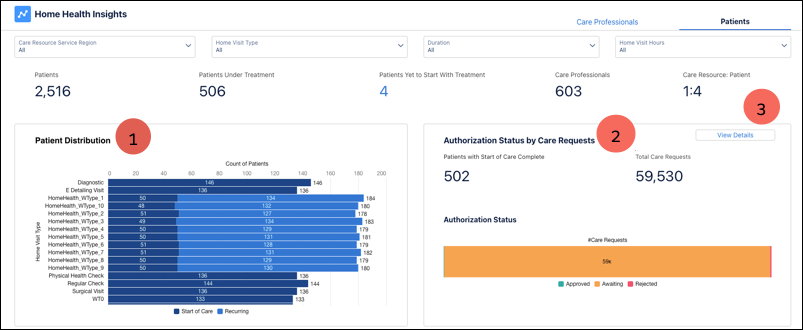
- Analyze patient distribution based on scheduled home visit types and differentiate patients by Start of Care and Recurring statuses (1). Use these insights to assess care service demand, measure patient turnover, and gauge future care demands.
- Monitor the number of care requests based on authorization status for a quick view of the pending authorizations and to prevent potential delays or disruptions in patient care due to authorization issues (2).
- Click View Details to access the Care Service Visit Plans page and get more information on each care request (3).
