
You are here:
Provider Relationship Cards
Set up provider relationship cards to quickly and efficiently show users what they need to know about providers and the facilities where they work, all in one place.
Identify the information your users look for on each Provider Relationship Card, then use the card setup wizard to connect the various objects that contain that information.
For example, you might set it up so that on the Account record page for a hospital, your call center agent sees a card for each physician working at that hospital. Or, on a Person Account record page for a doctor, the network management team can see a card for each hospital, urgent care center, or other organization where that doctor works.
A relationship card can draw its content from objects that its parent or child objects, up to three hops away. For example, this card is based on the Healthcare Practitioner Facility object, but it also uses information from objects that are related to that object through one or two intermediate objects. The fields in blue are the objects that we are pulling information from to display, in this scenario.
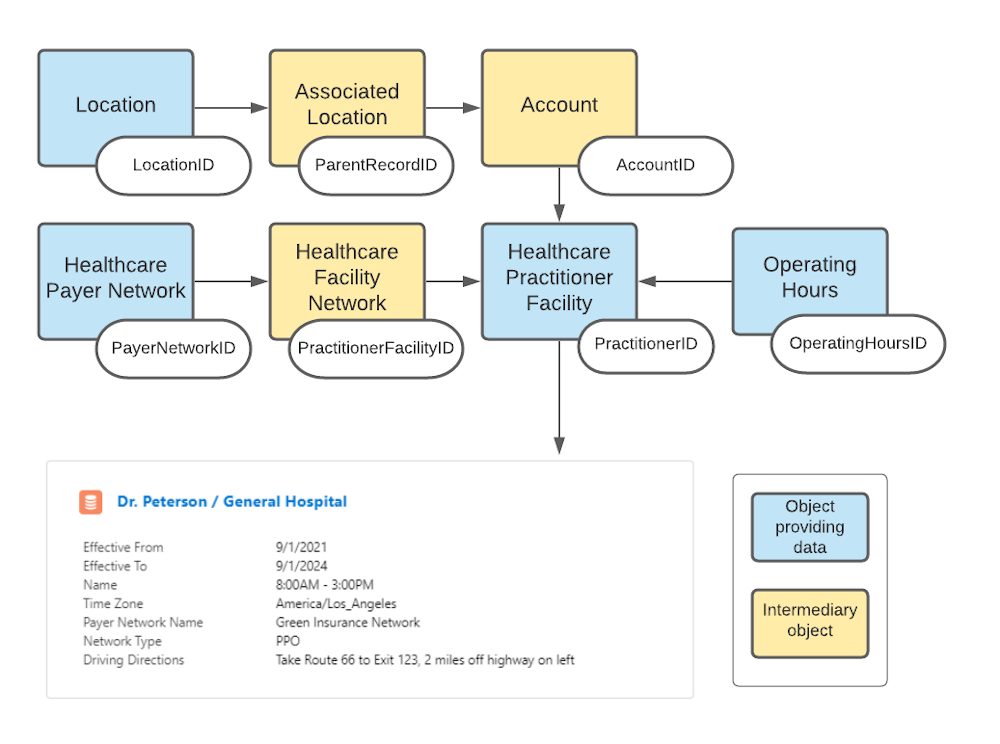
You’ll generally want a card to show each practitioner at a given practice or hospital or health center (from the Healthcare Practitioner Facility object), with their contact information, specialty information, and anything else related that your organization finds useful.
- Types of Provider Cards
Relationship cards can connect and display a lot of different types of information. Here are some common kinds of relationship information that you'd want to display on a provider relationship card, and how you'd initially set it up using out-of-the-box Health Cloud. - Set Up the Information Sources for a Relationship Card
Relationship cards show your users information about practitioners and the facilities where they work. What is shown on the card is up to you. It might include the doctor’s contact information, accounts the practitioner has a relationship with (employer, hospital affiliations, practice locations, billing company, etc.), details of the practitioner’s relationship to those accounts, and some key information about the related accounts. - Create Provider Cards for a Facility
Design cards to show your users information about providers and the facilities where they work. For example, a network specialist may need to know at a glance which facilities Dr. Carol Peterson is practicing at and when she is there. - Provider Card Fields
Use the fields provided on the card setup page to configure your provider cards the way you want them. - Import Data for Provider Cards
The data that helps users identify practitioners is stored in the provider objects. To create these records quickly, you can use Composite API requests to create and link multiple records using a single API call.
