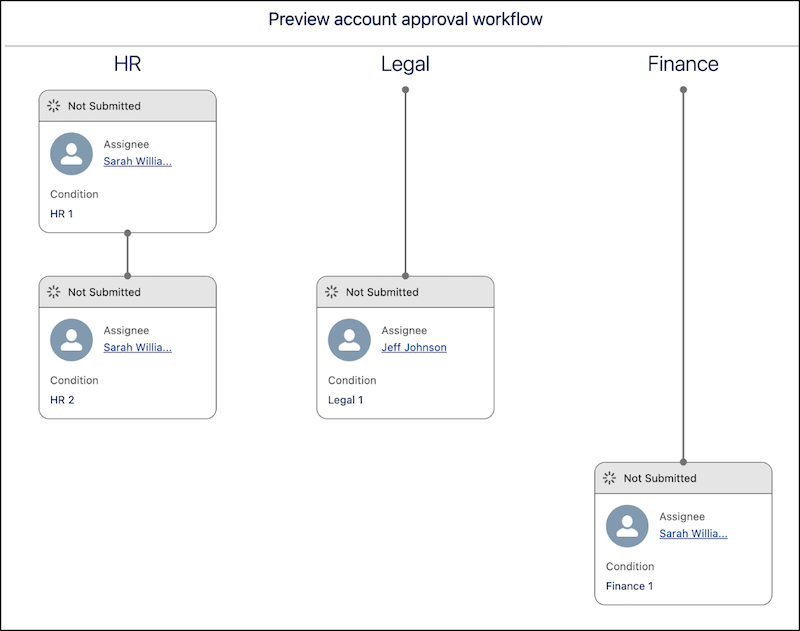
Review the steps, chains, and approvers for a record before you submit it. Preview
Approvals evaluates the record's field values and simulates the approval steps triggered. During
the preview, approval-related records aren’t created or modified.
Required Editions
Available in: Lightning Experience
Available in: Enterprise, Unlimited, and Developer Editions where
Advanced Approvals is enabled
Approval steps are shown in sequence within each chain, along with their dependencies. The
step dependencies are evaluated by using the step entry conditions configured in the
associated flow.
The preview window shows the following for each step:
Approval Chain: The chain associated with the step.
Assignee: The user, group, or queue assigned to approve the step.
Status: The status of the approval step, which is Not Submitted by default.
Approval Condition: The name of the condition that triggered the step.
Preview an Approval Workflow To visualize the approval journey of your submission, add the Approval Workflow component to your record page. The preview sorts steps by their chain name and shows them in their sequence order.
We use three kinds of cookies on our websites: required, functional, and advertising. You can choose whether functional and advertising cookies apply. Click on the different cookie categories to find out more about each category and to change the default settings.
Privacy Statement
Required Cookies
Always Active
Required cookies are necessary for basic website functionality. Some examples include: session cookies needed to transmit the website, authentication cookies, and security cookies.
Functional Cookies
Functional cookies enhance functions, performance, and services on the website. Some examples include: cookies used to analyze site traffic, cookies used for market research, and cookies used to display advertising that is not directed to a particular individual.
Advertising Cookies
Advertising cookies track activity across websites in order to understand a viewer’s interests, and direct them specific marketing. Some examples include: cookies used for remarketing, or interest-based advertising.