To use all Advanced Approvals features, you must first complete the recommended base
configuration. The Approvals settings page is the central hub for managing your organization-wide
settings. This setup is essential for your approval workflows to run effectively.
Required Editions
Available in: Lightning Experience
Available in: Enterprise, Unlimited, and Developer Editions where
Advanced Approvals is enabled
User Permissions Needed
To enable approval settings:
Approval Administrator
From Setup, find and select Approval Settings.
To automate flows, turn on these settings.
Use Flow Approval Process
Use Advanced Approvals
To manage email notifications as an administrator, turn on these settings.
Send Approval Work Item Assignment Emails to Approvers
Send Approval Submission Status Email Notifications to
Submitters
Optionally, you can send flow approval work items by turning on the Send
approval work item emails only to queue members option. By default, the work items
are sent to queued members or delegates.
To use generative AI to respond to approvals, turn on
Use Dynamic Approval Notifications.
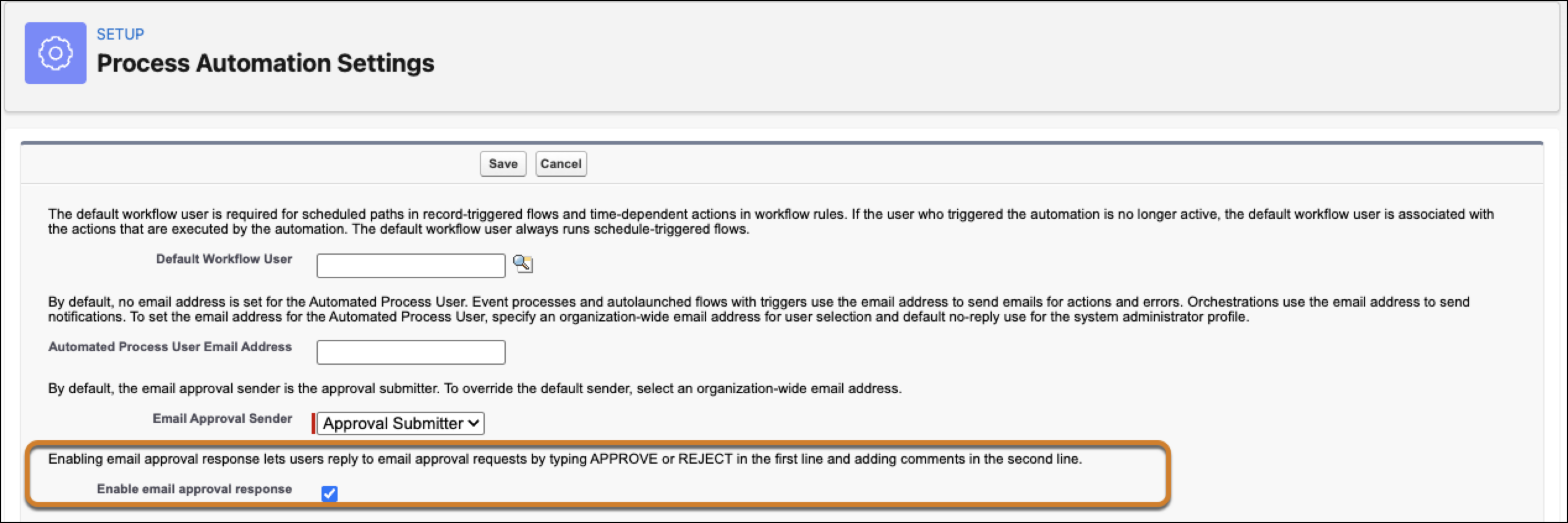
To allow approvers review approval items by replying to an email, you’ll need to make edits
in the Process Automation Settings page.
From Setup, find and select Process Automation Settings.
Select Enable email approval response.
Save your changes.
Did this article solve your issue?
Let us know so we can improve!
Loading
Salesforce Help | Article
Cookie Consent Manager
Cookie Consent Manager
General Information
Required Cookies
Functional Cookies
Advertising Cookies
General Information
We use three kinds of cookies on our websites: required, functional, and advertising. You can choose whether functional and advertising cookies apply. Click on the different cookie categories to find out more about each category and to change the default settings.
Privacy Statement
Required Cookies
Always Active
Required cookies are necessary for basic website functionality. Some examples include: session cookies needed to transmit the website, authentication cookies, and security cookies.
Functional Cookies
Functional cookies enhance functions, performance, and services on the website. Some examples include: cookies used to analyze site traffic, cookies used for market research, and cookies used to display advertising that is not directed to a particular individual.
Advertising Cookies
Advertising cookies track activity across websites in order to understand a viewer’s interests, and direct them specific marketing. Some examples include: cookies used for remarketing, or interest-based advertising.