
Loading
Feature Disruption - Service Cloud VoiceRead More
Feature degradation | Gmail Email delivery failureRead More
Automotive Cloud
Table of Contents
Select Filters

          No results
          No results
          Here are some search tips

          Check the spelling of your keywords.
          Use more general search terms.
          Select fewer filters to broaden your search.

          Search all of Salesforce Help
          Customize the Account Page for Automotive Cloud

          Customize the Account Page for Automotive Cloud

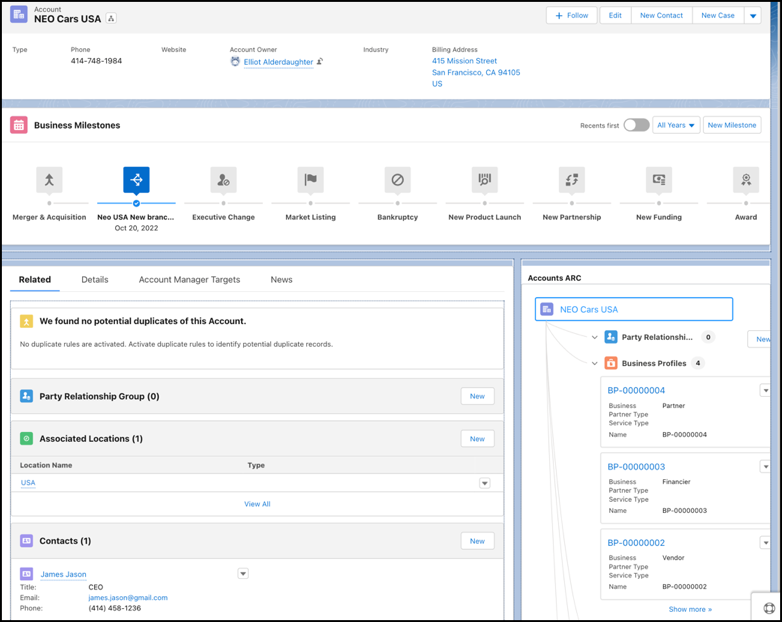
          Customize the Account record page layout to get a snapshot of all key information that’s relevant to your automotive business. Add related lists to view party relationship groups, vehicles, visits, and more. View the life events of a person account or the business milestones of a business account with the Events and Milestones component. Visualize relationships among people and assets by presenting them on the ARC Relationship Graph component.
          Required Editions

          Available in: Enterprise, Unlimited, and Developer Editions.
          User Permissions Needed
          To customize page layouts: Customize Application
          1. From Setup, go to Object Manager.
          2. Search for and select Account.
          3. Click Page Layouts and select a page layout.
          4. Drag these related lists from the palette onto the Account Related Lists section on the page.
            • Party Relationship Groups
            • Associated Locations
            • Contacts
            • Engagement Interactions
            • Sales Agreements
            • Assets
            • Asset Account Participants
            • Vehicles
            • Visits
            • Service Appointments
          5. Save your changes.
          6. Open an Account record and click Edit Page.
          7. Drag the Related Lists component onto the right sidebar area of the page. Or, add a Related tab in the main region and add the Related Lists component to that tab.
          8. Drag the Events and Milestones component onto the main region.
          9. Drag the ARC Relationship Graph component onto the right sidebar.
          10. In the properties panel, enter a label.
          11. Select an active graph in the Graph Name field.
          12. Save your changes.
          13. To apply the changes, click Activation.
            Account page layout.
           
          Loading
          Salesforce Help | Article
