
Loading
Feature Disruption - Service Cloud VoiceRead More
Feature degradation | Gmail Email delivery failureRead More
Automotive Cloud
Table of Contents
Select Filters

          No results
          No results
          Here are some search tips

          Check the spelling of your keywords.
          Use more general search terms.
          Select fewer filters to broaden your search.

          Search all of Salesforce Help
          Add Timelines to a Vehicle Record in Automotive Cloud

          Add Timelines to a Vehicle Record in Automotive Cloud

          Add the Timeline component to a Vehicle record page to create a chronological view of events and activities derived from warranties, stakeholder information, asset-related information, and more. If you have multiple Vehicle page layouts for different users, such as dealers, service agents, and sales executives, make sure that you add relevant timelines to the page layouts. For example, if you create a timeline that shows information about warranties, recalls, and services, you can add the timeline to the Vehicle page layout for the service technician and service dealer profiles.
          Required Editions

          Available in: Enterprise, Unlimited, and Developer Editions.
          User Permissions Needed
          To configure and customize Timeline: Customize Application
          1. On a Vehicle record page, from Setup, select Edit Page.
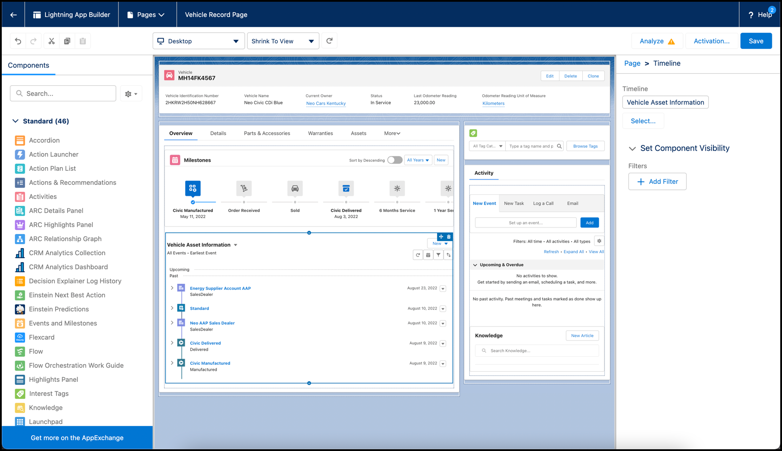
          2. Drag the Timeline component onto the editable content area.
          3. To select the timeline configurations to make available, in the component properties panel, click Select.
            Only active timeline configurations are available for selection.
          4. In the Timeline window, select the required configurations, and then click OK.
            You can select up to five timeline configurations.
          5. Save and activate your changes.

          Timeline component added to Vehicle page.

          Based on the type of access you grant, users can create and edit timeline events directly from the component without leaving the Vehicle record page.

           
          Loading
          Salesforce Help | Article
