Explore the Actionable Relationship Center on Vehicle
Explore relationships on an Actionable Relationship Center (ARC) relationship graph to
get a single, unified view of records associated with a vehicle.
Required Editions
Available in: Enterprise, Unlimited, and Developer
Editions.
User Permissions Needed
To use Actionable Relationship Center graphs:
Automotive Foundation User permission set.
Make sure your admin has added the ARC Relationship Graph component to the Vehicle page layout
that’s assigned to you.
Open a Vehicle record.
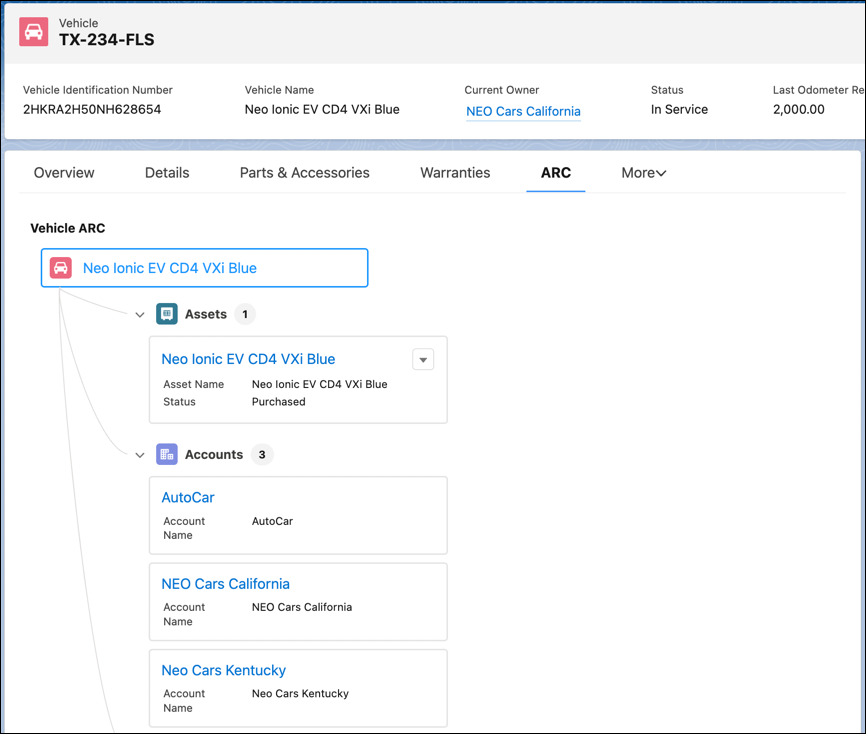
Click the ARC graph tab.
View the following information:
Root record name: Name of the vehicle.
Child record name: Name of the related record such as the asset name, account name, or
product name.
Node actions: Actions such as Edit, Clone, or Delete. This depends on how your admin
has configured the graph.
Node information: Information such as asset status, model name, or make name. This
depends on how your admin has configured the graph.
Number of child records: Number of records for a related object.
To show record details, click a record name on a node.
If there are more than five child records, click Show More to see
more records.
When Show Child Records is enabled, child records show in the same node as the parent
node.
We use three kinds of cookies on our websites: required, functional, and advertising. You can choose whether functional and advertising cookies apply. Click on the different cookie categories to find out more about each category and to change the default settings.
Privacy Statement
Required Cookies
Always Active
Required cookies are necessary for basic website functionality. Some examples include: session cookies needed to transmit the website, authentication cookies, and security cookies.
Functional Cookies
Functional cookies enhance functions, performance, and services on the website. Some examples include: cookies used to analyze site traffic, cookies used for market research, and cookies used to display advertising that is not directed to a particular individual.
Advertising Cookies
Advertising cookies track activity across websites in order to understand a viewer’s interests, and direct them specific marketing. Some examples include: cookies used for remarketing, or interest-based advertising.