
Loading
Feature Disruption - Service Cloud VoiceRead More
Feature degradation | Gmail Email delivery failureRead More
Automotive Cloud
Table of Contents
Select Filters

          No results
          No results
          Here are some search tips

          Check the spelling of your keywords.
          Use more general search terms.
          Select fewer filters to broaden your search.

          Search all of Salesforce Help
          Configure Icons for Events and Milestones in Automotive Cloud

          Configure Icons for Events and Milestones in Automotive Cloud

          Use icons to identify the event types or milestone types that you create. You can replace the default icon for life event types, business milestone types, financial account milestone or asset milestone types with your own icons. For example, if you create an Asset Milestone type for 10,000 Miles Completed, you can use an odometer icon to signify the milestone.
          Required Editions

          Available in: Enterprise, Unlimited, and Developer Editions.
          User Permissions Needed
          To customize Person Life Events, Business Milestones, and Asset Milestones: Customize Application
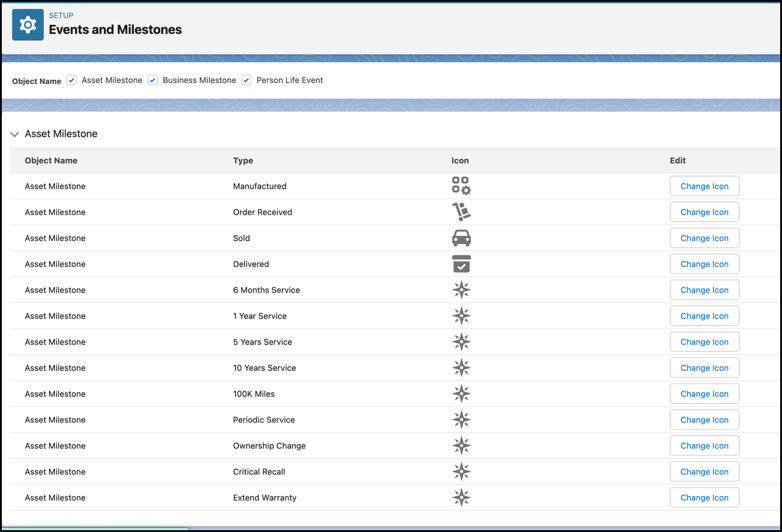
          1. From Setup, in the Quick Find box, enter Events and Milestones, and then select Events and Milestones.
          2. For Object Name, select one or more from Life Events, Business Milestones, Financial Account Milestones, and Asset Milestones.
          3. For the milestone or event type for which you want to change the icon, click Change Icon.
          4. Click Upload Files, and select the SVG file for the icon.
          5. Save your changes.
            Events and Milestones Icons page.
           
          Loading
          Salesforce Help | Article
