
Loading
Automotive Cloud
Table of Contents
Select Filters

          No results
          No results
          Here are some search tips

          Check the spelling of your keywords.
          Use more general search terms.
          Select fewer filters to broaden your search.

          Search all of Salesforce Help
          Create Tasks for Dealer Visits

          Create Tasks for Dealer Visits

          Create tasks for district managers and evaluation officers to perform during dealer visits. For example, the officer can check on the ongoing promotions at the dealer showrooms, discuss monthly targets or incentives with the dealer representatives, and upsell spare parts or accessories. The information and metrics collected by evaluation officers during these tasks provide helpful insights into dealer performance. Sales managers can define their own tasks and associate their own assessment indicators with the tasks to capture key business and performance metrics.
          Required Editions

          Available in: Enterprise, Unlimited, and Developer Editions.
          User Permissions Needed
          To create generic visit tasks:
          • Partner Visit Management permission set
          • Create access on Generic Visit Task

          When a sales manager creates a generic visit task, the manager always selects the task as a definition. The runtime equivalent of the task is created automatically when the evaluation officer starts the task on their mobile app.

          1. From the App Launcher, find and select Generic Visit Tasks, and then click New.
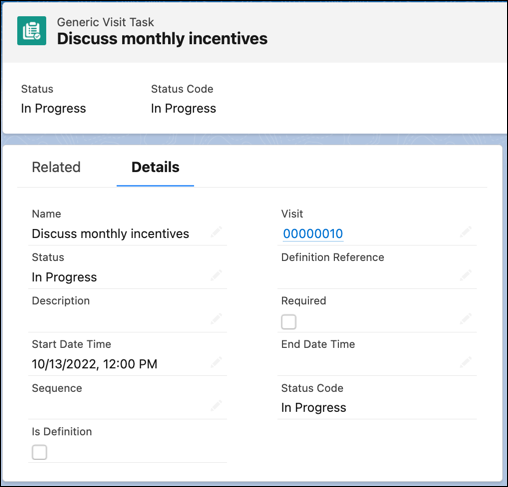
          2. Enter a name and a description for the task.
          3. To mark the task as a definition, for Status, select Is Defined.
          4. To mark the task as mandatory, select Required.
          5. Select the start date, the end date, and the time.
          6. Enter a numeric value for Sequence.
          7. Save your changes.
            A visit task record.
          Note
          Note If you use the Generic Visit Tasks related list on a Visit record to create a task, the Visit field is auto-populated.
           
          Loading
          Salesforce Help | Article
