
Loading
Feature degradation | Gmail Email delivery failureRead More
Automotive Cloud
Table of Contents
Select Filters

          No results
          No results
          Here are some search tips

          Check the spelling of your keywords.
          Use more general search terms.
          Select fewer filters to broaden your search.

          Search all of Salesforce Help
          Create Asset Account Participants in Automotive Cloud

          Create Asset Account Participants in Automotive Cloud

          Use Asset Account Participant records to relate every asset in your org—a vehicle, a part, or an accessory—to relevant Account records. You can relate multiple stakeholders to an asset during the asset's lifecycle. For example, a car can be related to the dealers who sell the car, the service dealers who repair and maintain the car, and the customer who purchases the car. If the car is used or refurbished, you can also track the financiers and the consultants who help with trade-in transactions.
          Required Editions

          Available in: Enterprise, Unlimited, and Developer Editions.
          User Permissions Needed
          To create asset account participants: Automotive Foundation permission set

          The admin can add picklist values for the Role field on the Asset Account Participant object in Object Manager. Automotive Cloud comes with predefined values.

          1. From the App Launcher, find and select Asset Account Participants.
            You can also find the list of all asset account relationships related to an Account on the Related tab of an Account record.
          2. Click New.
          3. Search for and select an account.
          4. Enter a name for the participant.
          5. For Stakeholder Role, select the type of account in relation to the asset, such as Sales Dealer, Customer-Preferred Dealer, Customer, or Financier.
          6. Search for and select an asset.
          7. If the asset is a vehicle, search for and select a Vehicle record.
          8. Select the status as Active.
          9. Select a start date and effective end date for the association between the asset and the account.
          10. For Usage Type, select Automotive.
          11. Save your changes.

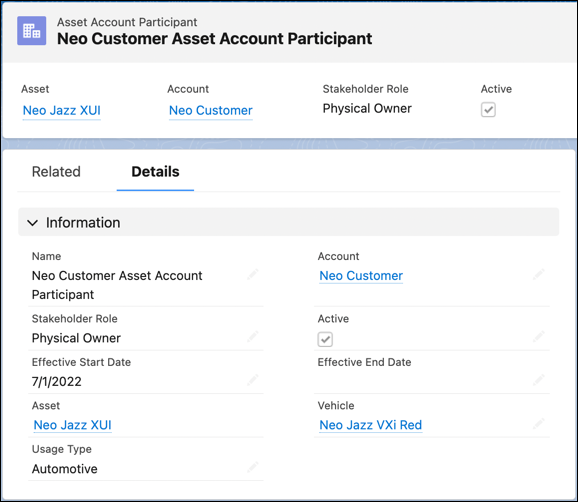
          An asset account participant record.

          You can create relationship cards to capture key information about asset account participants and add the cards on the Vehicle record page layout to get information in context. Or, use the Actionable Relationship Center graph to visualize related stakeholders.

           
          Loading
          Salesforce Help | Article
