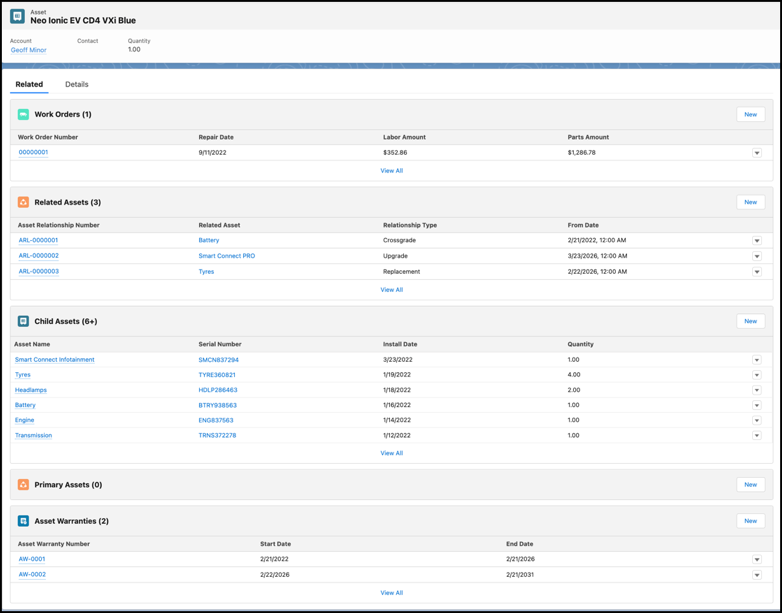
Track the lifecycle of each asset right from production to retirement with Asset records
in Automotive Cloud. You can create assets to represent the vehicles as well as the parts and
accessories that you sell to customers. Capture key details such as the related account, product,
and contact, purchase and installation dates, and quantity and price of the asset.
Required Editions
Available in: Enterprise, Unlimited, and Developer
Editions.
User Permissions Needed
To create assets:
Automotive Foundation User permission set.
Make sure your admin has added the relevant fields and related lists to the Asset page layout
that’s assigned to you.
From the App Launcher, find and select Assets.
Click New.
Select a product. The Product Code gets automatically populated.
Enter a name for the asset.
Select an account, contact, or both to indicate who has purchased the asset.
Fill out the remaining fields as needed. See Asset Fields.
To create hierarchical relationships between assets, use the Parent Asset field and the
Child Assets related list on the Asset page.
If the asset is a competitor’s product, select Competitor Asset. If
it’s produced or used internally, select Internal Asset.
If the asset is a vehicle that’s already in the system, search for and select a Vehicle
record.
If the Vehicle record is not yet created, you can create it after creating the Asset
record.
If the asset is a serialized product like a part or accessory, enter the serial
number.
We use three kinds of cookies on our websites: required, functional, and advertising. You can choose whether functional and advertising cookies apply. Click on the different cookie categories to find out more about each category and to change the default settings.
Privacy Statement
Required Cookies
Always Active
Required cookies are necessary for basic website functionality. Some examples include: session cookies needed to transmit the website, authentication cookies, and security cookies.
Functional Cookies
Functional cookies enhance functions, performance, and services on the website. Some examples include: cookies used to analyze site traffic, cookies used for market research, and cookies used to display advertising that is not directed to a particular individual.
Advertising Cookies
Advertising cookies track activity across websites in order to understand a viewer’s interests, and direct them specific marketing. Some examples include: cookies used for remarketing, or interest-based advertising.