
Loading
Feature degradation | Gmail Email delivery failureRead More
Automotive Cloud
Table of Contents
Select Filters

          No results
          No results
          Here are some search tips

          Check the spelling of your keywords.
          Use more general search terms.
          Select fewer filters to broaden your search.

          Search all of Salesforce Help
          Add Context for Tasks Performed During Dealer Visits

          Add Context for Tasks Performed During Dealer Visits

          Make dealer visits more meaningful by relating other Salesforce records with the tasks that evaluation officers perform during a visit. Sales managers can use Generic Visit Task Context records to relate a task with a specific context, such as the dealer’s Account record, a Sales Agreement record, or even an Asset Warranty record. For example, you can create a task for checking the promotion banners at a dealer showroom and relate the relevant Promotion record as the task context.
          Required Editions

          Available in: Enterprise, Unlimited, and Developer Editions
          User Permissions Needed
          To create generic visit task contexts:
          • Partner Visit Management permission set
          • Create access on Generic Visit Task Context

          A task can be related to multiple context records. For example, an evaluation officer is assigned a task to follow up on a sales agreement with a dealer. You can relate this task with a sales agreement record, the dealer’s account record, and the product records that are part of the agreement.

          1. From the App Launcher, find and select Generic Visit Task Context, and then click New.
          2. Enter a name and a description for the task.
          3. Click the down arrow for Context, select an object, and then select the required record.
          4. To mark the task as a definition, for Status, select Is Defined.
          5. To mark the task as mandatory, select Required.
          6. Select the start date, the end date, and the time.
          7. Save your changes.
            You can view the list of Generic Visit Task Context records related to a task on the Generic Visit Task Context Relations related list of the task.
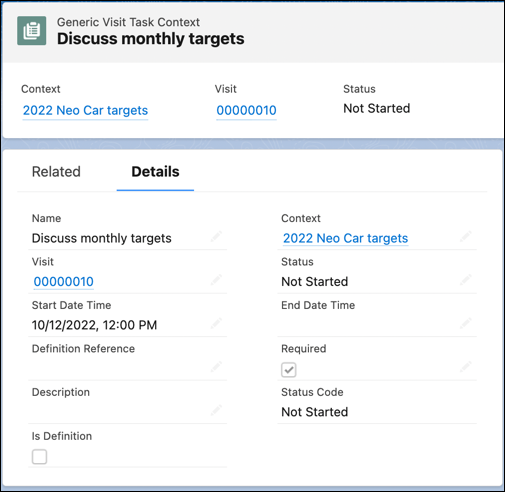
            A visit task context record.
           
          Loading
          Salesforce Help | Article
