
Loading
Feature Disruption - Service Cloud VoiceRead More
Feature degradation | Gmail Email delivery failureRead More
Automotive Cloud
Table of Contents
Select Filters

          No results
          No results
          Here are some search tips

          Check the spelling of your keywords.
          Use more general search terms.
          Select fewer filters to broaden your search.

          Search all of Salesforce Help
          Create Lead Preferred Sellers

          Create Lead Preferred Sellers

          Sometimes leads prefer to purchase from the most closely located dealer or a dealer that they previously negotiated with. And often, automotive companies use lead providers or digital marketing agencies to source high-quality leads. You can capture such key information by creating Lead Preferred Seller records and relating them with Lead records. A Lead Preferred Seller record forms two lead relations: relation of a dealer to a lead and relation of a lead provider to a lead.
          Required Editions

          Available in: Enterprise, Unlimited, and Developer Editions.
          User Permissions Needed
          To create lead preferred sellers: Partner Lead Management permission set

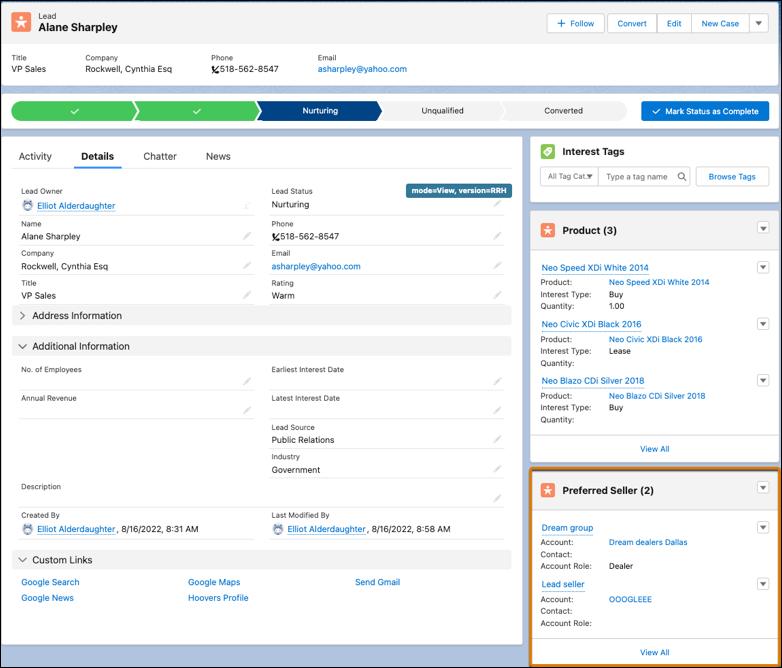
          Make sure that the Preferred Sellers related list is added to the Lead page layout.

          1. From the App Launcher, find and select Leads.
          2. Select the required lead record.
          3. In the Preferred Sellers related list, click New.
            Depending on how your admin configures the Lead page layout, you can access the Preferred Sellers related list as a card on the page layout or from the Related tab.
          4. Enter a name for the preferred seller.
          5. Search for and select the account of the preferred seller.
          6. Search for and select the contact of the preferred seller, if applicable.
          7. In the Account Role field, select Dealer or Lead Provider.
          8. Save your changes.

          Preferred Sellers related list on Lead.

          When you convert the lead to an opportunity, the lead preferred sellers automatically get converted to opportunity preferred sellers if the required configurations are defined.

           
          Loading
          Salesforce Help | Article
