Create Products for Parts and Accessories in Automotive Cloud
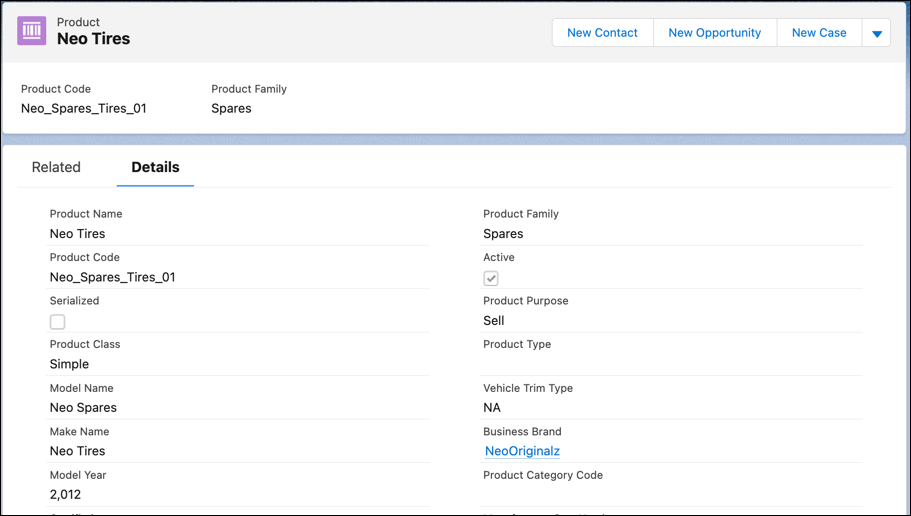
Use Product records to define the parts and accessories for a vehicle. With Automotive
Cloud, you can track the key details of a part, such as the part's manufacturer part number,
availability and discontinued dates, and other aspects.
Required Editions
Available in: Enterprise, Unlimited, and Developer
Editions.
User Permissions Needed
To create Products:
Automotive Foundation User permission set
Make sure your admin has added the relevant fields to the Product page layout that’s assigned
to you.
From the App Launcher, find and select Products.
Click New.
Enter a name for the product.
For Product Line Code, enter the unique code that identifies the line of products that this
part is a part of.
For Product Category Code, enter the unique code that identifies the category of products
that this part is a part of.
For Manufacturer Short Name, enter the name of the manufacturer who built the part.
For Manufacturer Part Number, enter the unique number assigned by the manufacturer to
identify the part.
For Universal Product Code, enter the code available as part of retail product
packaging.
The code consists of two parts, a barcode and a unique 12-digit number.
For Harmonized System Code, enter the harmonized system code that’s assigned to a part used
in the vehicle.
For Harmonized Tariff Schedule Code, enter the harmonized tariff schedule code that’s
assigned to a part used in the vehicle.
Harmonized System (HS) is an internationally standardized system of names and numbers to
classify traded products.
For Availability Date, select the date from when the part is used in the vehicle or made
available for sale.
For Discontinued Date, select the date from when the part can’t be sold or used in any
vehicle.
Select the Environmental Protection Regulation Compliant checkbox if the product is
compliant with the environmental protection regulations.
Select the Certified checkbox if the part that’s installed in the vehicle is
certified.
Enter the other details as required, and save your changes.
We use three kinds of cookies on our websites: required, functional, and advertising. You can choose whether functional and advertising cookies apply. Click on the different cookie categories to find out more about each category and to change the default settings.
Privacy Statement
Required Cookies
Always Active
Required cookies are necessary for basic website functionality. Some examples include: session cookies needed to transmit the website, authentication cookies, and security cookies.
Functional Cookies
Functional cookies enhance functions, performance, and services on the website. Some examples include: cookies used to analyze site traffic, cookies used for market research, and cookies used to display advertising that is not directed to a particular individual.
Advertising Cookies
Advertising cookies track activity across websites in order to understand a viewer’s interests, and direct them specific marketing. Some examples include: cookies used for remarketing, or interest-based advertising.