
You are here:
Report Sales of Vehicles
Dealers can strengthen collaboration with original equipment manufacturers (OEMs) by creating granular retail delivery reports (RDRs) for vehicles. Create a Rebate Claim record to report a vehicle sale with key information, such as the odometer reading at the time of delivery, trade of parts between different dealers, and other details. Meet advanced business needs, such as rebate calculations and dealer performance analysis by converting rebate claims to Transaction Journal records.
Required Editions
| Available in: Enterprise, Unlimited, and Developer Editions. |
Here’s how you can use the fields on a Rebate Claim record to report sale of vehicles.
| FIELD | DESCRIPTION |
|---|---|
| Claim Number | The reference number of the claim. |
| Claim Date | The date of the submission of the claim. |
| Claimed By Account Number | The reference number of the dealer account that submits the claim. |
| Claimed by Account | The account name of the dealer who submits the claim. |
| Product Code | The product code of the associated vehicle. |
| Product | The product record of the associated vehicle. |
| Quantity | The quantity of the associated vehicle. |
| Claim Amount | The total amount for which the vehicle is sold. If your company uses Salesforce Rebate Management, the amount is used in rebate payout calculations. |
| Program Reference Number | The reference number of the rebate program that's related to the claim. Specify this field if your company uses Salesforce Rebate Management. |
| Reference Price Per Unit | The agreed-upon price for a unit of the product. |
| Description | The description of the claim. |
| Vehicle | The vehicle associated with the claim. |
| Vehicle Delivery Status | The delivery status of the associated vehicle. The status can be as follows:
|
| Vehicle Delivery Odometer Reading | The odometer reading of the associated vehicle at the time of delivery. |
| Asset | The asset record of the associated vehicle. If you’re submitting claims for a part or accessory, select the asset record related to the part or accessory. |
| Asset Sale Type | The type of sale of the associated asset: Lease, Loan, or Cash. |
| Asset Identification Number | The unique identifier of the associated asset, such as a vehicle identification number (VIN) or the serial number of an accessory. If you’re submitting claims for a part or accessory, select the asset record related to the part or accessory. |
| Sale Approval Date | The date on which the OEM approves the retail delivery report of the dealer and acknowledges the sale of the vehicle. |
| Participating Account Number | The account number of the end customer related to the claim. When the claim is submitted by the dealer, specify the account number of the customer. |
| Participating Account | The account record of the customer or a partner that’s related to the claim. |
| Traded-From Account | The account of the dealer who purchases a product from another dealer or distributor to complete inventory requirements. |
| Traded-To Account | The account of the dealer who sells a product to another dealer or distributor who further fulfills the final demand. |
| Sale Price Per Unit | The price at which a unit of the product is sold. |
| Processing Status | The processing status of the claim record. The status can be as follows:
|
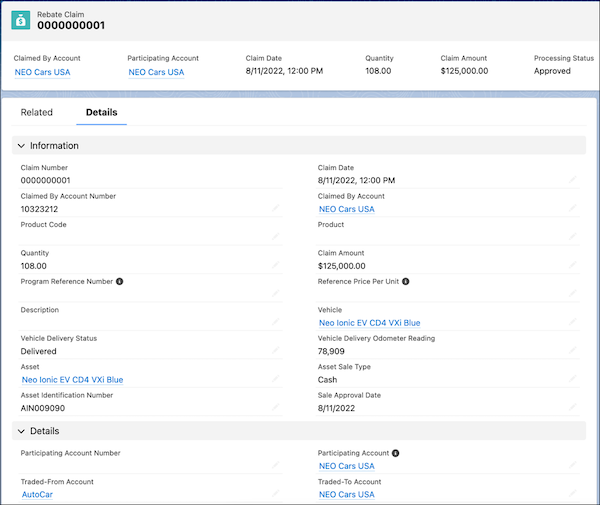
OEMs can configure company-specific business rules to validate claims. Dealers can fix any errors and resubmit the claims. After an OEM approves a claim and acknowledges the sale, the claim can be converted into Transaction Journal records. The transactions can be processed further for downstream business purposes, such as reports and analytics, rebate calculations, and inventory management.

Dream Dealers, Dallas, an electric car dealership, wants to report the sale of a used car to Neo Motors, an OEM. Here are some details about the resale transaction:
- Dream Dealers procured red seat covers that the customer wanted from Speedy Motors, another dealership.
- Neo Motors., uses Salesforce Rebate Management to calculate and process rebate payout. Dream Dealers is enrolled in the North American Electric Car Dealers rebate program, whose Program Reference Number is 0120401094AZD.
Here’s how Dream Dealers report the sale as a Rebate Claim record:
- Claimed by Account: Dream Dealers
- Product: Turbo Electric Car 25XE
- Quantity: 1
- Program Reference Number: 0120401094AZD
- Vehicle: Turbo Electric Car 25XE
- Asset: Turbo Electric Car 25XE A53023
- Vehicle Delivery Status: In Transit
- Vehicle Delivery Odometer Reading: 1400
- Asset Sale Type: Cash
- Asset Identification Number: 4Y1SL65848Z411439
- Traded-From Account: Speedy Motors
- Traded-To Account: Dream Dealers
- Processing Status: New
Dream Dealers submits the claim to Neo Motors. Neo Motors specifies the Sale Approval Date and changes the Processing Status to Approved after validating the claim.
