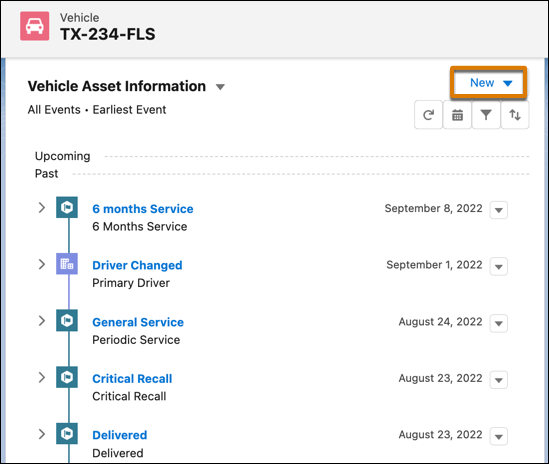
View records and key activities associated with a vehicle on a Timeline. You can add and
edit records without losing the context of the vehicle and you can sort and filter past and
upcoming events by time and event type. You can also switch between multiple timelines. You can
view up to 2000 records on a single timeline.
Required Editions
Available in: Enterprise, Unlimited, and Developer
Editions.
User Permissions Needed
To use Timeline:
Automotive Foundation User permission set.
Make sure your admin has added the Timeline component to the Vehicle page layout that’s
assigned to you.
Open a Vehicle record.
Click the Timeline component.
To create a record, click New and select the event or record
type.
View the following information:
Timeline name along with a picker that allows you to switch between timelines.
Name of a record along with other information such as the created date, status, and
other fields that the admin configured.
Segments that divide the records into past, current, and upcoming records.Party
Relationship Groups
To get a more detailed view of an event or record, expand the event or record.
To add or remove event types from your view, use the Event Type filter.
To view events from a broader or narrower range of dates, use the Date Range filter.
Click to edit, delete, or clone
records.
The actions depend on how the admin has configured the timeline.
We use three kinds of cookies on our websites: required, functional, and advertising. You can choose whether functional and advertising cookies apply. Click on the different cookie categories to find out more about each category and to change the default settings.
Privacy Statement
Required Cookies
Always Active
Required cookies are necessary for basic website functionality. Some examples include: session cookies needed to transmit the website, authentication cookies, and security cookies.
Functional Cookies
Functional cookies enhance functions, performance, and services on the website. Some examples include: cookies used to analyze site traffic, cookies used for market research, and cookies used to display advertising that is not directed to a particular individual.
Advertising Cookies
Advertising cookies track activity across websites in order to understand a viewer’s interests, and direct them specific marketing. Some examples include: cookies used for remarketing, or interest-based advertising.