
Loading
Automotive Cloud
Table of Contents
Select Filters

          No results
          No results
          Here are some search tips

          Check the spelling of your keywords.
          Use more general search terms.
          Select fewer filters to broaden your search.

          Search all of Salesforce Help
          Report Sales of Parts and Accessories

          Report Sales of Parts and Accessories

          Dealers can track the sale of parts and accessories and report these sales to original equipment manufacturers (OEMs). Create a Transaction Journal record to capture transaction information, such as amount and quantity of sale, related assets or vehicles, and trade of parts between dealerships. Consolidate all transactions by converting Rebate Claim records, which store vehicle sale information, to Transaction Journal records.
          Required Editions

          Available in: Enterprise, Unlimited, and Developer Editions.

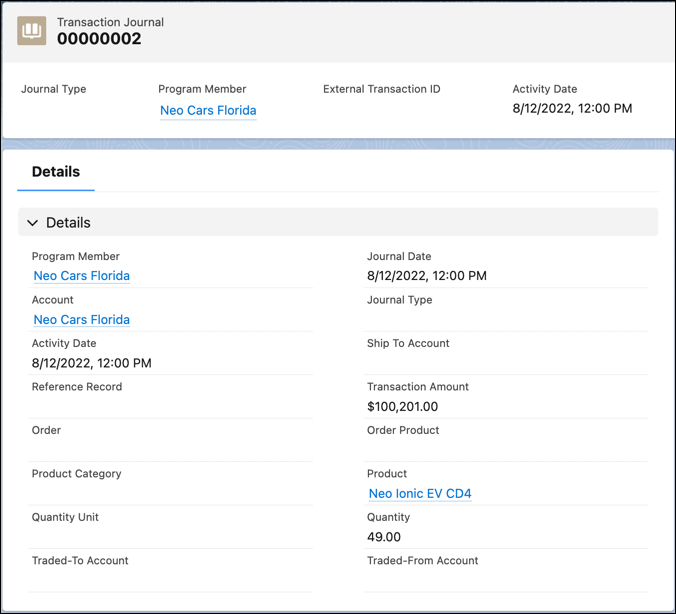
          Here’s how you can use the fields on a Transaction Journal record to report sale of parts and accessories.

          FIELD DESCRIPTION
          Journal Date The date of the submission of the Transaction Journal record.
          Activity Date The date of the transaction.
          Account The account of the dealer who carried out the transaction.
          Program Member The rebate program member related to the transaction. Specify this field if your company uses Salesforce Rebate Management.
          Reference Record The record of an asset or vehicle that's associated with this transaction.
          Transaction Amount The transaction amount of the product sold.
          Order The record of the order associated with the transaction.
          Product The record of the product related to the transaction.
          Product Category The record of the product category related to the transaction.
          Quantity Unit The unit of the quantity for the transaction.
          Quantity The quantity of the product sold.
          Traded-To Account The account of the dealer who purchases a product from another dealer or distributor to complete their inventory requirement.
          Traded-From Account The account of the dealer who sells a product to another dealer or distributor who further fulfills the final demand.
          A Transaction Journal record reporting sale of parts.
          Example
          Example

          Dream Dealers, Dallas wants to report the sale of two accessories to Neo Motors, an OEM. Neo Motors. uses Salesforce Rebate Management to calculate and process rebate payouts. Dream Dealers is enrolled into the North American Electric Car Dealers rebate program. Here are some details of the transactions to report:

          • Transaction 1: A steering wheel cover sold by Dream Dealers.
          • Transaction 2: Six seat covers, two of which Dream Dealers procured from Speedy Motors.

          Here’s how Dream Dealers report the sale of the steering wheel cover:

          • Account: Dream Dealers
          • Program Member: Dream Dealers
          • Reference Record: Matte Black Steering Wheel Cover XL 2901 (Asset record)
          • Transaction Amount: $150
          • Order: 40020562
          • Product: Matte Black Steering Wheel Cover XL
          • Quantity Unit: Each
          • Quantity: 1

          Here’s how Dream Dealers report the sale of the seat covers:

          • Account: Dream Dealers
          • Program Member: Dream Dealers
          • Reference Record: Red Seat Cover 2389S (Asset record)
          • Transaction Amount: $290
          • Order: 10029060
          • Product: Red Seat Covers
          • Quantity Unit: Each
          • Quantity: 6
          • Traded-From Account: Speedy Motors
          • Traded-To Account: Dream Dealers
           
          Loading
          Salesforce Help | Article
