
You are here:
Default Page Layout for Vehicle
Automotive Cloud provides you a 360-degree view of all information about a vehicle on the default Vehicle record page layout. Maximize the vehicle and customer lifetime value with a connected and comprehensive view of key information on the Vehicle page.
Required Editions
| Available in: Enterprise, Unlimited, and Developer Editions. |
The default Vehicle page layout has these predefined tabs.
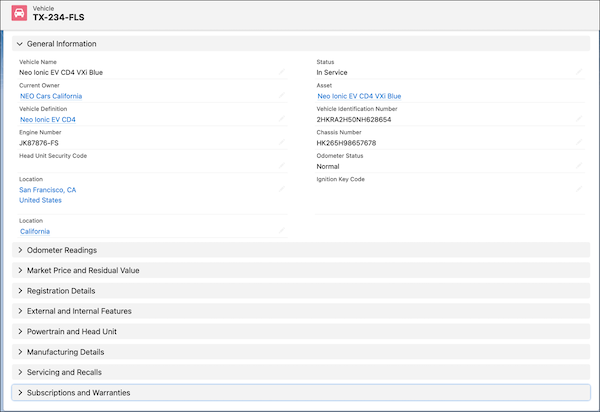
Details
Capture key details such as the vehicle identification number (VIN), chassis number, engine number, odometer status, and current owner. You can also capture information about odometer readings, market price and residual value, registration details, exterior and interior features, and vehicle manufacturing details. You can track information about servicing, recalls, subscriptions, and warranties related to the vehicle.
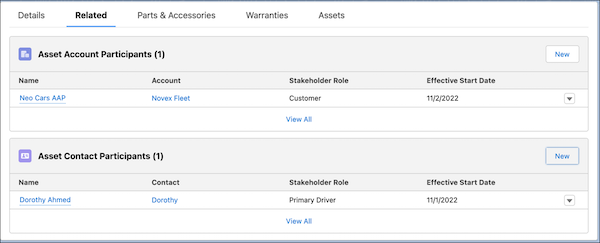
Related
Get quick access to the list of accounts and contacts that are related to the vehicle asset. You can find the Asset Account Participant and Asset Contact Participant related lists on this tab.

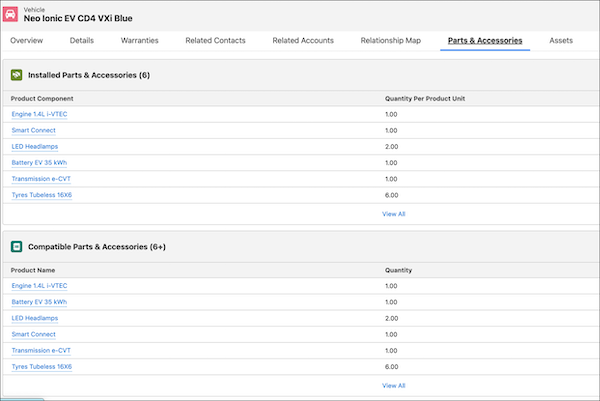
Parts & Accessories
A vehicle can have multiple spare parts and accessories related to it. While some parts and accessories are installed in a vehicle and make up the base configuration, others are compatible parts and accessories that can be installed, as needed. Service agents can get a comprehensive view of all parts and accessories built into the vehicle, and the ones that they can upsell or recommend to the customer.
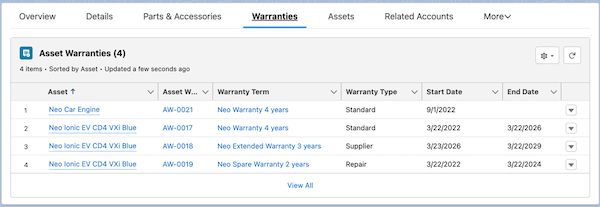
Warranties
Each vehicle in your Salesforce org is also an Asset record. On this tab, you can view the warranties associated with the asset, such as standard warranties, warranty extensions, and even warranties for the underlying parts such as engines and tires.
Assets
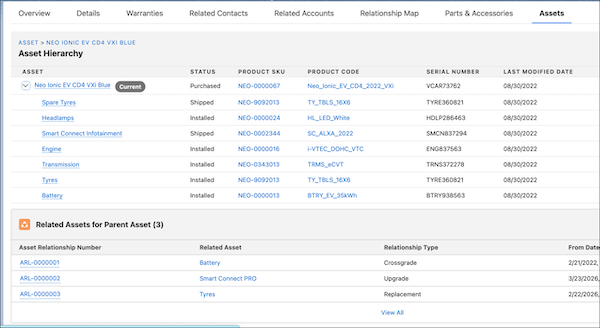
A vehicle is a parent asset with multiple child assets such as the engine, wheels, tires, and other parts. A child asset can have other child assets, for example, the engine can have child assets for piston and battery. On this tab, you can view the hierarchy of the assets of the vehicle, which is the parent asset, by using the Asset Hierarchy component. You can also view assets that are marked as replacements, upgrades, or crossgrades for the vehicle asset and the related parts by using the Related Assets for Parent Assets component.
Claims
The Asset Claim Items related list shows a list of all claim items related to the parent asset of the vehicle. The claim items help you assess the type of work required to be performed on faulty items. So, the Asset Claim Items related list for the Neo_Ionic_ED4_VXi can show claim items for all the parts in the vehicle along with details of claim participant, repair date, fault date,asset usage, and more.
Appointments
The appointments tab shows two related lists.
- If the vehicle is used as an asset for test drives, the Test Drive Appointments related list can be added to the Vehicle page layout and it shows up under the Appointments tab.
- If the vehicle is sold to a customer and requires regular checkups and periodic maintenance, the Service Appointments related list can be added to the Asset page layout. If the related list is not added to the Asset page, you won’t see the Service Appointments for Parent Asset related list on the Vehicle page.
You can customize the Vehicle record page layout to add components such as Events and Milestones, Record Alerts, Timeline, Relationship Cards, and Actionable Relationship Center. You can also add other related lists to the Vehicle page such as Action Plans to create follow-up tasks for a Vehicle, or Approval History to audit approvals.
