Loading
Ongoing maintenance for Salesforce HelpRead More
Feature degradation | Gmail Email delivery failureRead More
Table of Contents
Select Filters

          No results
          No results
          Here are some search tips

          Check the spelling of your keywords.
          Use more general search terms.
          Select fewer filters to broaden your search.

          Search all of Salesforce Help
          Examples: Flexible Invoicing for Complex Business Models

          Examples: Flexible Invoicing for Complex Business Models

          Billing arrangements can help you manage complex financial relationships by automating the allocation of invoice charges across billing accounts. You can configure billing arrangements for invoicing a billing account that’s different from a service or owning account. You can also split bills for products or services shared by multiple accounts to streamline invoicing with prorated charge allocation. Here are several business scenarios where billing arrangements help businesses by invoicing and billing the right parties.
          Required Editions

          Available in: Lightning Experience
          Available in: Enterprise, Performance, Unlimited, and Developer Editions with the Revenue Cloud Billing license. Contact your Salesforce account executive for more information.

          Different Owning and Billing Accounts

          Consider a parent-subsidiary business model where the subsidiary company, say Acme Manufacturing, uses a Cloud Storage subscription licensed by the parent company, Acme Corp. Though Acme Manufacturing uses the subscription service, Acme Corp manages the licensing, so all bills go to the corporate headquarters, say Acme Corp, for centralized payment processing.

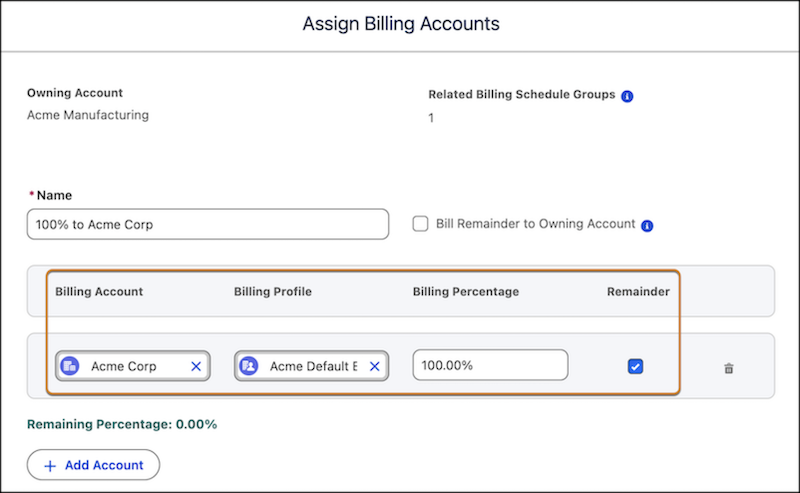
          For this business scenario, let’s use a billing arrangement to clearly demarcate the owning and billing accounts. Create a new billing arrangement to specify the owning and billing accounts, and allocate 100% of invoice charges to the billing account.

          • Owning Account: Acme Manufacturing that uses the service, and performs any amendments, renewals, and cancellations.
          • Billing Account: Acme Corp that receives the invoices and handles payments.
          • Billing Profile: Acme Corp’s billing profile to indicate the billing preferences such as billing contact, billing address, payment terms, and payment method.
          • Billing Percentage: 100%
          Assign Acme Corp as the billing account

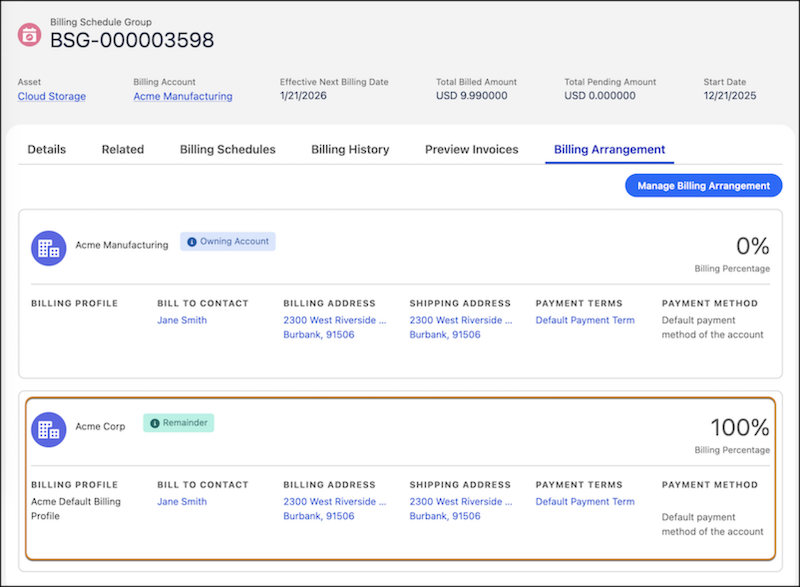
          The billing schedule group shows the new billing arrangement with details about the owning and billing account, the assigned billing percentage, together with the billing preferences.

          Billing Arrangement with 100% assigned to the billing account, Acme Corp

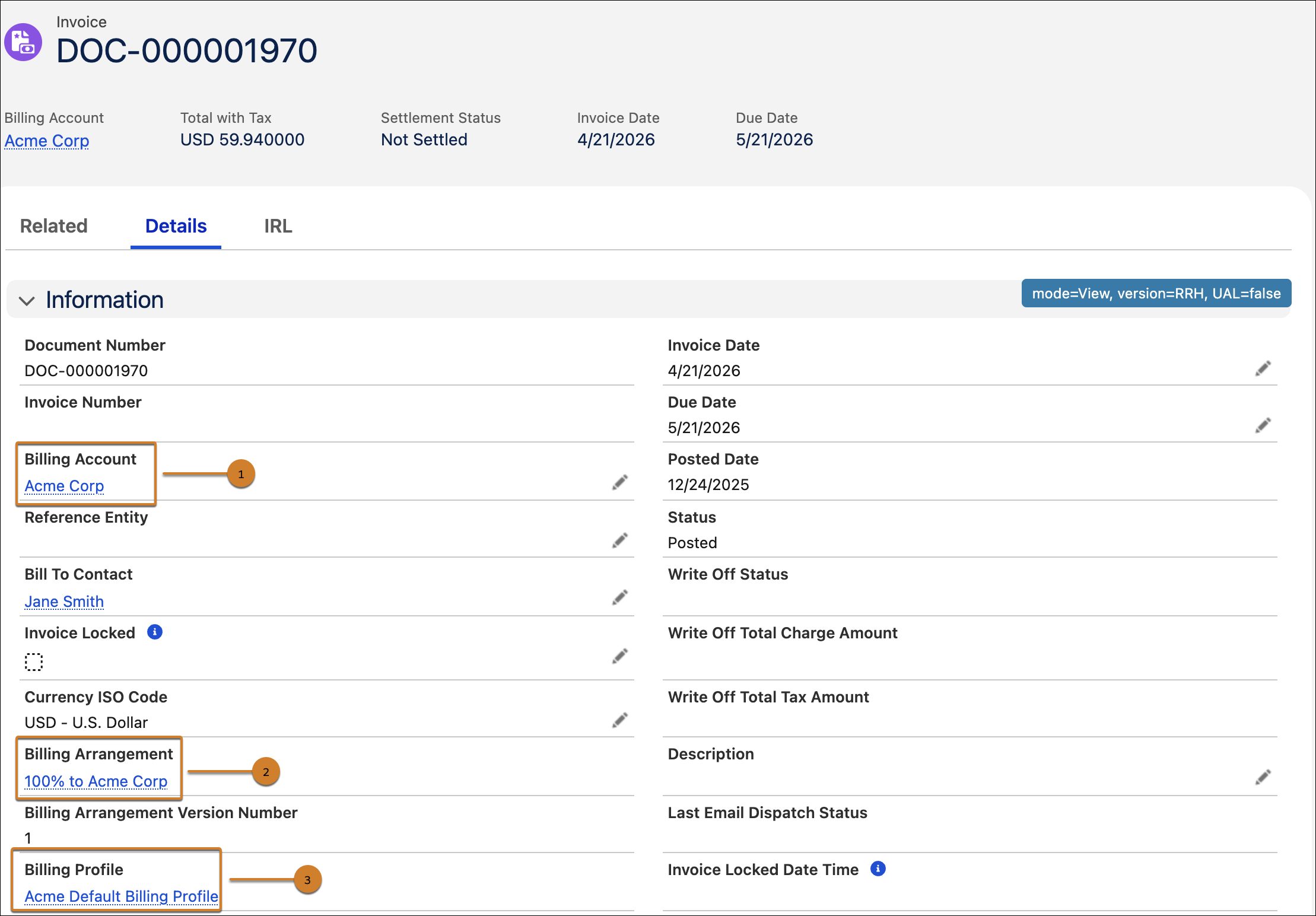
          In the upcoming billing cycle, the invoice is generated based on the billing arrangement details. The generated invoice shows Acme Corp as the billing account (1) with the associated billing arrangement (2) and billing profile (3) stamped on it.

          Generated invoice with billing arrangement details

          Shared or Split Billing Across Accounts

          Consider a shared service model where multiple organizations share infrastructure, software, or services with proportional cost allocation. Three companies—SmartBytes, AT&T, Acme Corp—share a few services that are owned by SmartBytes. SmartBytes, AT&T, and Acme Corp share costs for the shared services based on this split configuration.

          • SmartBytes: 40%
          • AT&T: 30%
          • Acme Corp: 30%

          For this business scenario, let’s create a split billing arrangement where the entire service or order is owned by one account, SmartBytes, but billed to all the three organizations, SmartBytes, AT&T, and Acme Corp.

          • Owning Account:SmartBytes that owns the shared infrastructure
          • Billing Accounts: SmartBytes, AT&T, Acme Corp
          • Billing Arrangement Lines: SmartBytes, AT&T, Acme Corp
            • SmartBytes: 40%, including any remainders
            • AT&T: 30%
            • Acme Corp: 30%

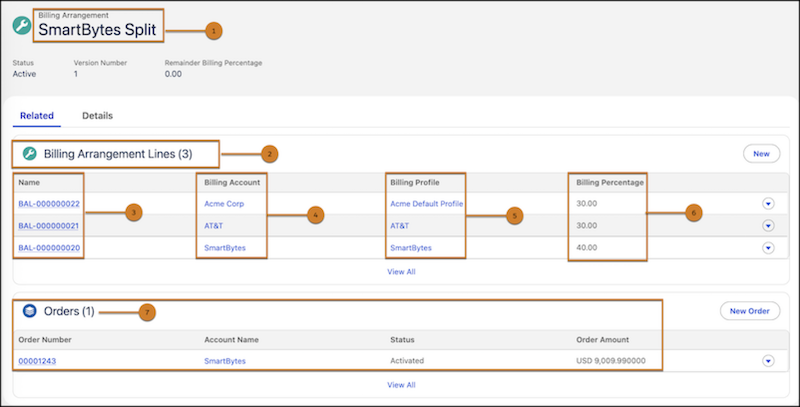
          The billing arrangement “SmartBytes” Split (1) is created for the order (7) that’s owned by SmartBytes. The billing arrangement has three billing arrangement lines (2). Each billing arrangement line (3) includes the billing account (4), it’s corresponding billing profile (5), and the allocated billing percentage (6).

          Split billing arrangement showing billing arrangement lines and order

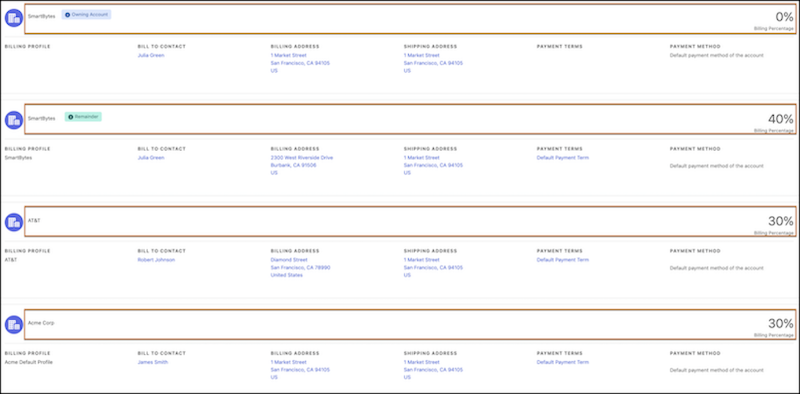
          Here’s a view of the billing arrangements for each account as seen on the Billing Arrangements tab. The SmartBytes owning account is allocated zero billing percentage but the SmartBytes billing account pays 40%, AT&T billing account pays 30%, and Acme Corp pays 30% of the total order amount.

          Split billing arrangement for SmartBytes, AT&T, and Acme Corp.

          When the order is activated, the same billing arrangement is applied and stamped on the billing schedule groups. When the invoice is then generated, three separate invoice documents are produced, one for each account. You can view the invoices in the All Invoices tab of the order. The invoice amounts are based on the percentages defined in the billing arrangement.

          Invoices generated for each billing arrangement line
           
          Loading
          Salesforce Help | Article