
You are here:
Create General Ledger Account Assignment Rules
Define general ledger account assignment rules that assign the correct general ledger accounts to credit and debit transaction journal entries.
Required Editions
| Available in: Lightning Experience |
| Available in: Enterprise, Unlimited, and Developer Editions with the Revenue Cloud Billing license. Contact your Salesforce account executive for more information. |
| User Permissions Needed | |
|---|---|
| To create general ledger account assignment rules and related records: | Accounts Receivables Admin permission set |
Create a general ledger account assignment rule for every combination of legal entity and transaction type.
- From the App Launcher, find and select General Ledger Account Assignment Rules.
- Click New.
-
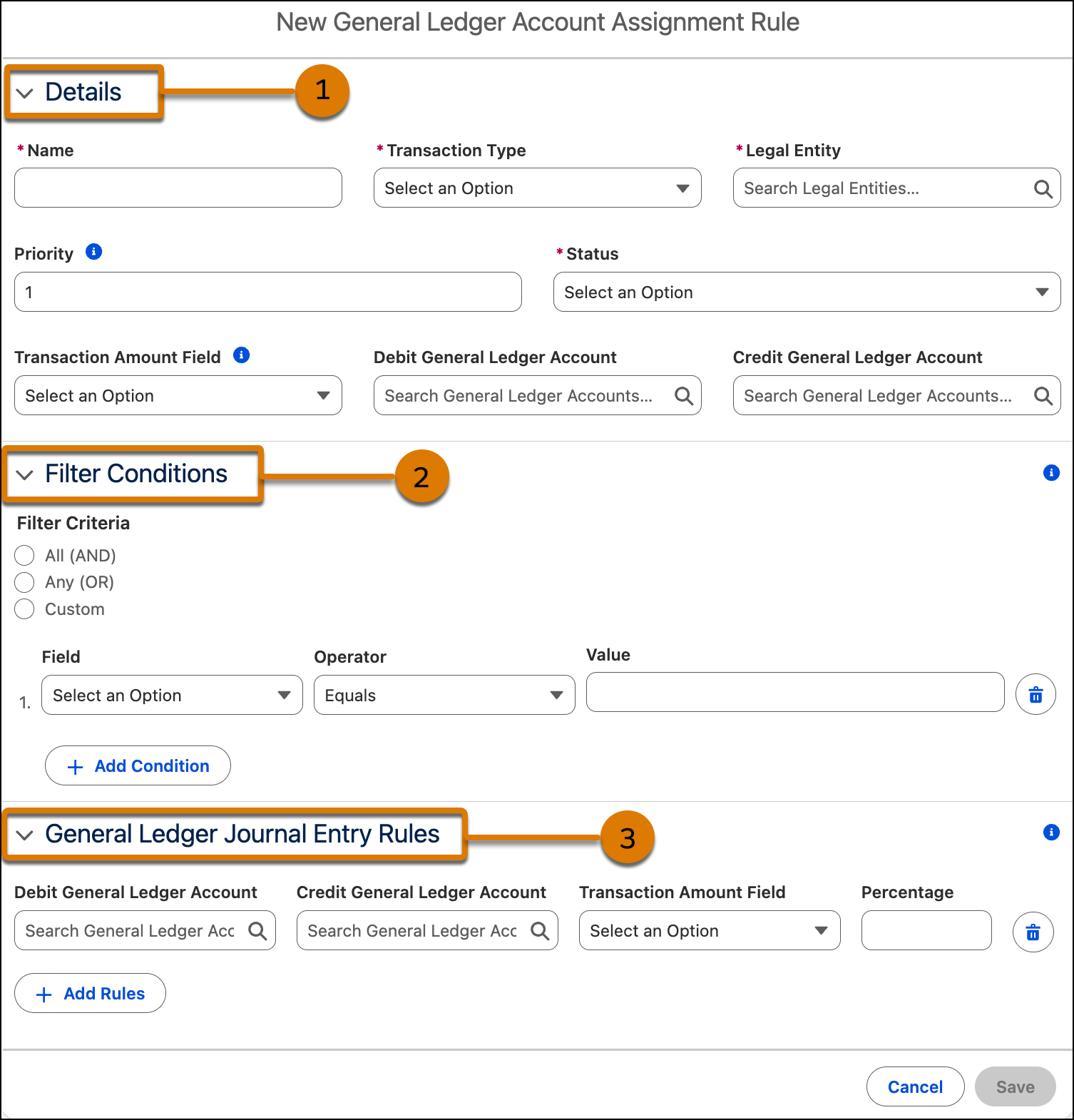
In the Details section (1), enter these details.
- Enter a name.
- Select the billing transaction that you’re defining the rule for as the transaction type.
- Select a legal entity.
-
If you define multiple general ledger account assignment rules for the same
combination of legal entity and transaction type, enter the priority of the
rule.
For example, if you have two rules for the same legal entity and Invoice records, enter 1 as the priority for the rule that must be considered first, and 2 as the priority for the rule that must be considered later.
If multiple general ledger account assignment rules have the same priority, all of them are considered to create transaction journals.
-
Select the status.
Only active general ledger account assignment rules are considered when transaction journals are generated.
-
Select a transaction amount field, a debit general ledger account, and a credit
general ledger account.
If you specify these field values here, you can't define them in the General Ledger Journal Entry Rule section.
 Note
NoteFor General Ledger Account Assignment Rule records created before Summer ’25, the Transaction Amount Field was automatically assigned. From Summer ’25, you can select a Transaction Amount Field value for the existing General Ledger Account Assignment Rule records.
If you edit General Ledger Account Assignment Rule records created before Winter ’26, the Details section shows the specified details.
-
In the Filter Condition section (2), enter these details.
-
Select the filter criteria.
- To filter the records that meet all the filter conditions, select All (AND).
- To filter the records that meet any of the filter conditions, select Any (OR).
- To define custom filter criteria, select Custom and enter your custom filter logic. For example, enter (1 AND 2) OR 3).
-
Define the filter conditions based on the fields from the transaction type of the
general ledger account assignment rule.
You can define up to 10 conditions and select both custom and standard fields of the data types: currency, date, percent, picklist, number, lookup, and text.
-
Select the filter criteria.
-
In the General Ledger Journal Entry Rules section (3), enter these details.
- Select a debit general ledger account and a credit general ledger account that have the same legal entity as the General Ledger Account Assignment Rule record.
-
Select a transaction amount field.
You can create multiple rules for the same transaction amount field, by applying the transaction amount field to different debit and credit general ledger accounts.
-
Enter a percentage.
When you create multiple rules for the same transaction amount field, the sum of all the percentages must be less than or equal to 100%. The percentage value can have up to five decimals.
-
Save your work.
- Default Transaction Amount Fields
If you don't select a transaction amount field when defining the criteria, the default transaction amount field is populated as the credit or debit amount in transaction journals. - Record Creation for the General Ledger Account Assignment Rule
When billing transactions are Posted, Canceled, Voided, or Processed and they match the defined filter criteria and journal entry rules, then dual transaction journals are created for the defined general ledger accounts for each general ledger journal entry rule.
