
You are here:
Generated Invoice Details
View the relationship between invoice lines in invoice line bundles generated for billing schedule group bundles. For amended billing schedules, eliminate manual calculations by automatically generating consolidated invoices. The amounts on invoice lines that are generated for amended, canceled, and renewed assets are matched to the corresponding billing schedule amounts, ensuring accuracy. The invoice lines generated for usage resources contain the consumed quantity and the applied overage charges. The invoice lines generated for orders with quantities in decimals inherit the same quantity and unit of measure.
Required Editions
| Available in: Lightning Experience |
| Available in: Enterprise, Unlimited, and Developer Editions with Revenue Management |
This feature is available with the Revenue Management Advanced license or the Revenue Management Billing license. The Usage Management feature is available only with the the Revenue Management Billing license. Contact your Salesforce account executive for more information. |
Invoices for Amended, Renewed, or Canceled Assets
If there are billing schedules for amended, renewed, canceled assets, invoice lines are created for the same positive or negative amounts as those of the billing schedules.
Single Invoice Line for Amended Billing Schedules
When an asset is amended and the related amendment order is activated, amended billing schedule groups are generated. When you generate an invoice for an amended billing schedule, the details of the original and the amended order product are automatically consolidated into a single invoice line. The criteria to generate a consolidated invoice line is that the original and amended order product must have the same Billing Period Start Date and Billing Period End Date. The Has Multiple Items field of the amended Invoice Line record indicates if there are multiple billing period items for the invoice. If there are multiple billing period items, they appear on the Billing Period Items related list.

Invoices for Usage-Based Products
For usage-based charge types, invoice lines for usage resources include details about the total consumed quantity, any overage quantity, and applicable overage charges. Usage-based products are invoiced when the liable summary, usage entitlement bucket, and usage entitlement account share the same grant binding target.
Quantity and Unit of Measure for Invoice Lines
Invoice lines inherit their quantity and unit of measure from the related billing schedules’ quantity and unit of measure. An invoice line’s quantity is rounded off based on the scale and rounding method of the quantity’s unit of measure.
Invoice Line Bundles for Billing Schedule Group Bundles
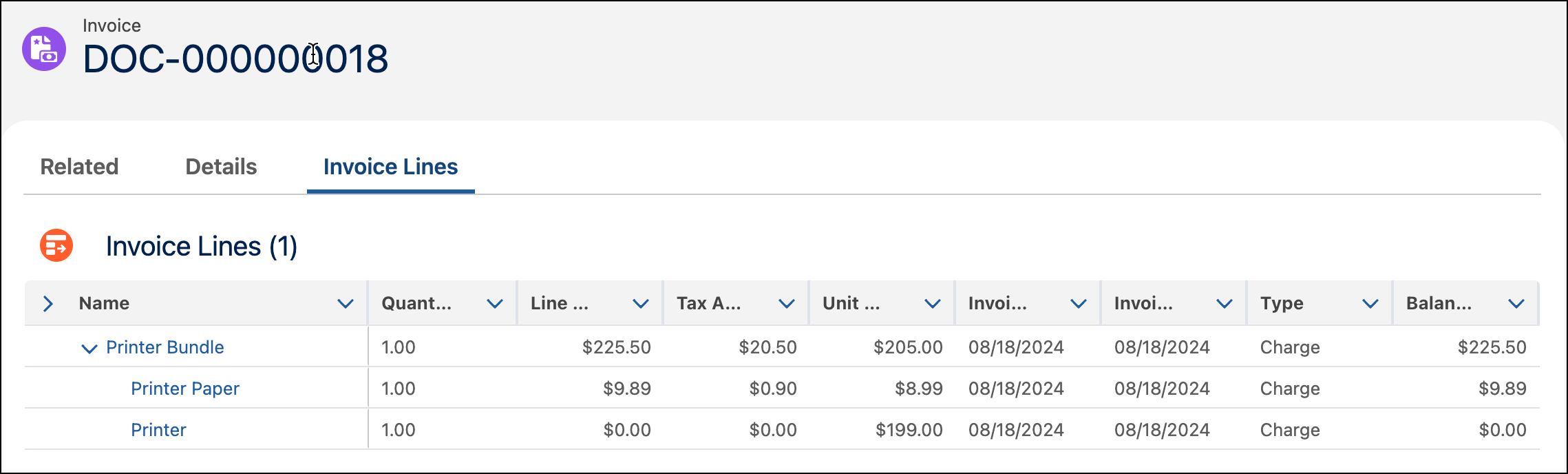
When an invoice run processes a billing schedule group bundle, the corresponding invoice line bundles are generated. These invoice line bundles are displayed hierarchically in the Invoice Lines related lists of the Invoice record, distinguishing related and independent products.
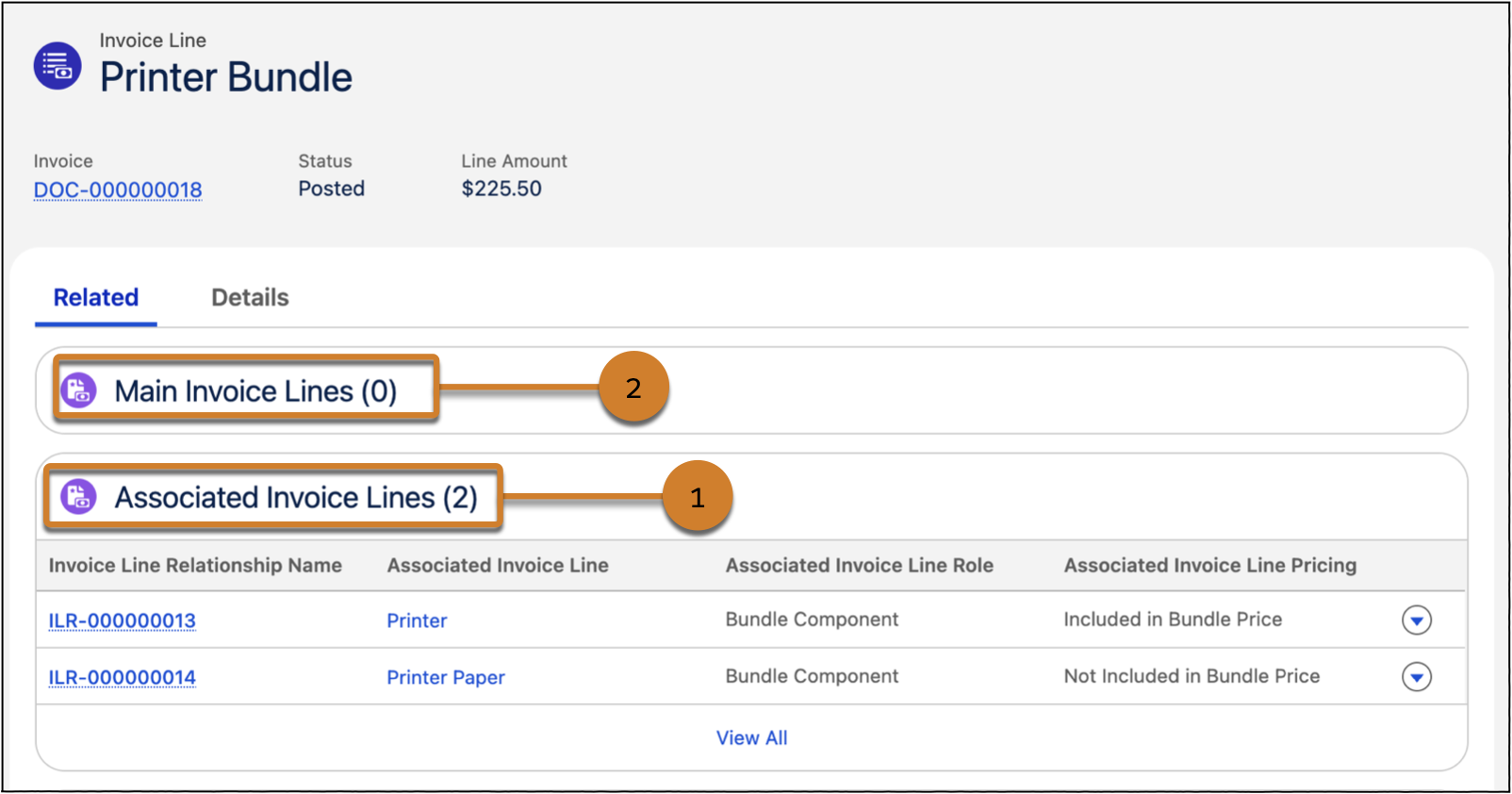
- All the invoice lines related to an invoice line bundle appear in the Associated Invoice Lines (1) related list of the Invoice Line Bundle record.
- The invoice line bundle related to an invoice line appears in the Main Invoice Lines (2) related list of the Invoice Line record.
If the line amount of invoice lines in a bundle is zero, the parent invoice line shows the total line amount for the entire bundle.
Invoice Line Bundles with Different Billing Frequencies
When a child product in a bundle has a different billing frequency than the parent product, the invoice reflects each billing period separately. This means a single child invoice line can span multiple parent invoice lines — one for each billing period within the child's billing term.
To consistently identify the parent, the child invoice line is associated with the parent invoice line from the earliest billing period in its span.
Consider a bundle where the parent product is billed monthly and the child product is billed quarterly:
- Quantum Bit Subscription Pro — $120/month (parent)
- Data Storage — $50/quarter (child)
When an invoice is generated for Q4 2026, the following invoice lines are created:
| Product | Billing Period | Quantity | Amount |
|---|---|---|---|
| Quantum Bit Subscription Pro | Oct 1, 2026 – Oct 31, 2026 | 1 | $120 |
| Data Storage | Oct 1, 2026 – Dec 31, 2026 | 1 | $50 |
| Quantum Bit Subscription Pro | Nov 1, 2026 – Nov 30, 2026 | 1 | $120 |
| Quantum Bit Subscription Pro | Dec 1, 2026 – Dec 31, 2026 | 1 | $120 |
Since the parent product is billed monthly, it generates three separate invoice lines: one each for October, November, and December. The child product, billed quarterly, generates a single invoice line covering the entire quarter, October through December.
Because the Data Storage invoice line spans all three months, it overlaps with all three parent invoice lines. In this case, the October invoice line, the earliest billing period, is displayed as the associated parent invoice line.
